
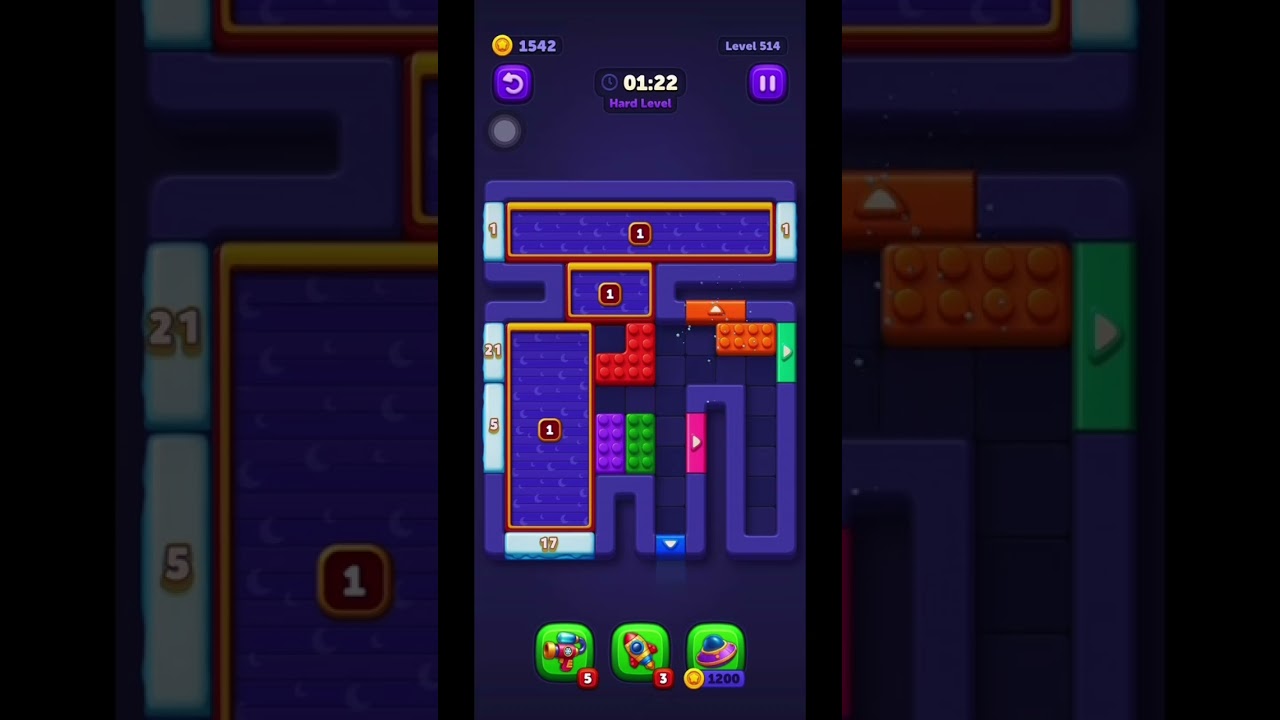
To beat Level 514 in Block Out, clear exposed perimeter pairs first to open exit paths, unlock the central barrier doors, and maintain at least two open tray slots at all times. Tapping trapped inner blocks before resolving outer layers fills the staging buffer quickly and causes an unrecoverable deadlock.
Board Zones and Bottlenecks
Level 514 divides its grid into three structural layers. Inner tiles cannot slide along their directional arrows until adjacent outer pieces and barrier gates clear out of their way.
| Board Area | Tile Accessibility | Primary Objective | Risk Level |
|---|---|---|---|
| Outer Perimeter | Fully exposed with clear exit routes | Clear direct matches to open interior lanes | Low to Moderate |
| Barrier Gates | Locked until designated colors clear | Match required color pairs to drop gates | High |
| Central Core | Blocked by gates and overlapping paths | Route final matching sets off the board | Critical |
Step-by-Step Clearing Sequence
Because exit trajectories cross over adjacent lanes, clearing blocks out of order will obstruct neighboring paths. Clear the board using this sequence:
- Clear exposed pairs immediately: Tap matching exterior tiles that resolve consecutively to keep the bottom dock empty.
- Strip flanking blockers: Remove side blocks that hold directional pieces in place, opening new sliding corridors.
- Target gate colors: Match the specific colors tied to the central barrier mechanisms to lower the physical blockades.
- Hold isolated tiles: Leave unmatched perimeter blocks on the board if their counterparts remain buried under multiple inner layers.
Buffer Management and Recovery
The bottom tray acts as a staging buffer, but filling every slot triggers an immediate stage loss. Prevent tray lock with these rules:
- Apply the two-move rule: Only move an isolated block into the tray if you can reach and clear its match within two subsequent taps.
- Maintain a two-slot cushion: Keep at least two dock spaces open throughout the mid-game to absorb necessary transitional moves.
- Enter recovery mode at one slot: If only one tray slot remains, stop opening new lanes or targeting gates. Search the board exclusively for a piece that matches a color already sitting in the dock to restore your buffer space.
Free Block Out Codes
Current active codes and how to redeem them.

James Brown
James focuses on Android gaming on PC, emulator setup, controls, performance tuning, and practical troubleshooting for longer play sessions.
COMMUNITY
Player Comments
63 players commented on this guide.
Nice guide. I am checking the other Block Out articles next.
The tips are practical and easy to follow.
I wish I had read this before upgrading the wrong thing.
The explanation is clear, especially for beginners.