
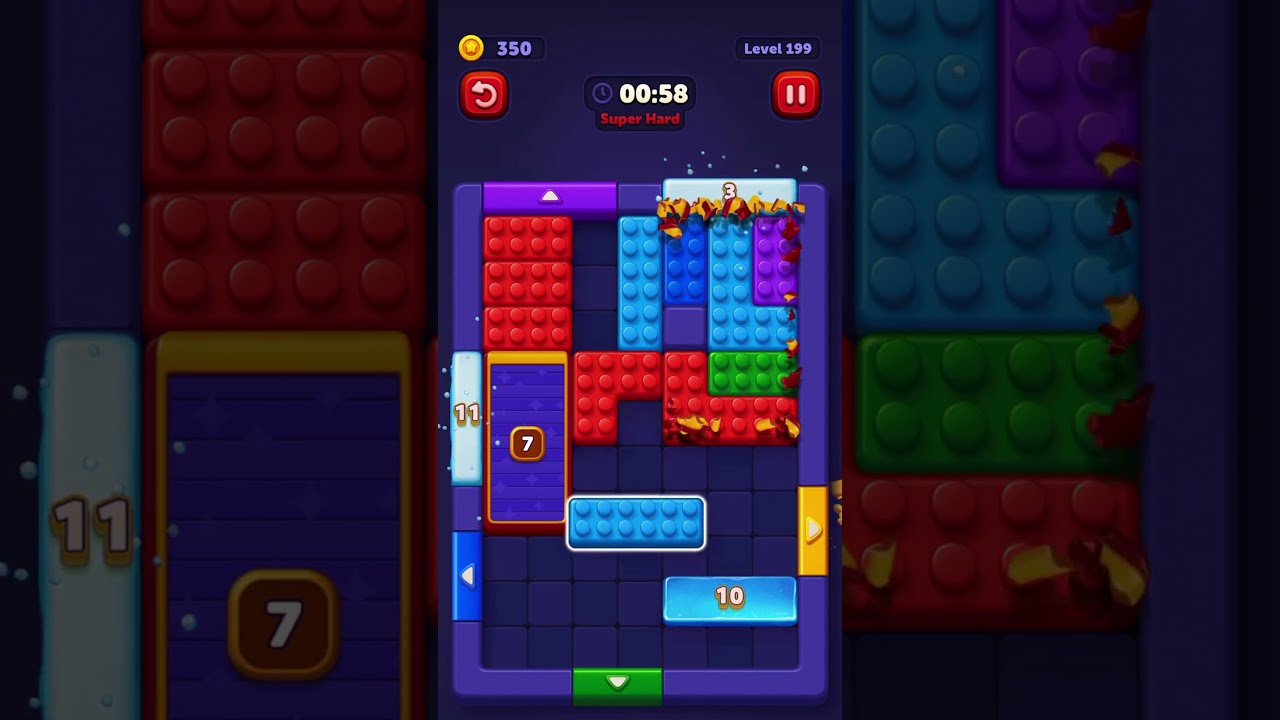
To clear Level 199 in Block Out, maintain at least two empty slots in your seven-slot buffer tray, clear visible outer triplets first, and never move an isolated block unless it directly unmasks its matching pieces. Level 199 introduces a dense, multi-layered layout where central blocks are trapped behind interlocking perimeter choke points, making uncalculated moves an immediate cause of tray deadlocks.
Managing the Seven Buffer Slots
The holding tray in Block Out holds seven blocks, and clearing requires three matching tiles of the same color. If you fill your tray with three unmatched colors, you lose three slots permanently until their partners are uncovered, leaving only four spaces to manipulate the remaining board.
To prevent premature tray saturation, follow three rules before tapping any piece:
- Complete existing sets: Prioritize drawing the third piece of a color already occupying dock space to clear all three tiles immediately.
- Direct unmasking: Only draw a single block if its removal directly exposes the remaining pair of that same color on the board.
- Clear slide lanes: Only park an unmatched singleton in the dock if moving it immediately clears an exit corridor for a full three-piece match.
Maintaining a discipline where the tray repeatedly drops back down to zero or one active piece neutralizes the level's tight space constraints.
Step-by-Step Clearance Order
Dismantling Level 199 requires working systematically from the outside inward. Pulling pieces from the core before the perimeter is stripped creates blockages that prevent inner tiles from sliding out.
| Phase | Primary Objective | Buffer Rule |
|---|---|---|
| 1. Outer Flanks | Remove exposed perimeter triplets | Keep dock occupancy under two slots |
| 2. Choke Points | Clear corner pins and blocking tiles | Take singletons only when pairs are exposed |
| 3. Central Core | Slide interior layers down opened lanes | Chain matches to flush the dock to zero |
Phase 1: Strip Outer Flanks
Scan the board margins for complete triplets that face open board edges. Clear these sets fully to carve open sliding lanes. If a color's third tile is buried two or more layers deep in the core, leave that color untouched on the perimeter and find another accessible set instead.
Phase 2: Unlock Choke Points
Focus on the corner pins and bottleneck blocks anchoring the middle layers. Removing these pieces often requires parking a temporary singleton in your tray. Because your buffer was kept clean in Phase 1, you can absorb that single piece, uncover its matching partners behind the obstacle, and complete the match immediately.
Phase 3: Collapse the Central Core
Once the choke points are dismantled, the remaining interior pieces have straight sliding paths to the board perimeter. Match the remaining sets in quick succession along the open lanes, ensuring the buffer tray resets after every sequence.
Directional Clearance and Arrow Obstacles
Blocks in Block Out slide strictly along their designated arrow trajectories and cannot exit if another tile obstructs their path. In Level 199, several visible pieces sit only half a grid unit away from adjacent tiles that block their line of travel.
Before tapping an exposed block, trace its entire exit path to the board edge. If two opposing directional pieces butt up against each other, do not tap the primary blocked piece. Instead, find which of the two has a secondary open flank, clear that piece first, and let the bottleneck resolve naturally.
Avoiding Critical Failures
Two specific errors cause most failed attempts on Level 199:
- Color greed: Pulling two pieces of an attractive color without verifying where the third piece is located. If the final tile is trapped four layers deep, those two pieces will clog your buffer tray indefinitely.
- Panic tapping: Tapping random exposed blocks when the dock reaches five or six slots. This almost always adds a fourth or fifth distinct color, causing an instant tray lock. If the tray fills to five slots, pause all moves, scan the exposed board, and trace backward to locate the single tile that completes an active pair. Clearing that match frees up three tray spaces and recovers the run.
Free Block Out Codes
Current active codes and how to redeem them.

James Brown
James focuses on Android gaming on PC, emulator setup, controls, performance tuning, and practical troubleshooting for longer play sessions.
COMMUNITY
Player Comments
94 players commented on this guide.
Can you add more details about strategy in a future update?
This helped me understand strategy much better.
I tried this today and it worked better than my old setup.
Good guide for Block Out players. The strategy part was useful.