
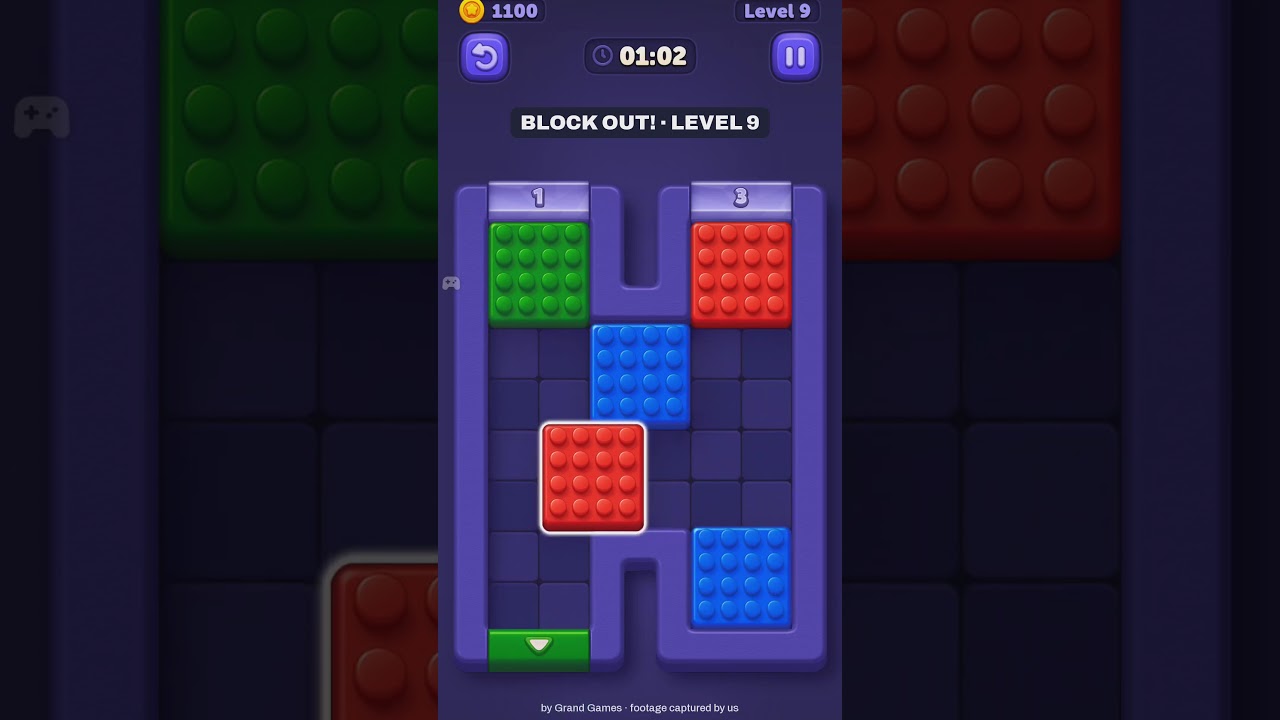
To clear Level 9 in Block Out, immediately exit your yellow 2×2 blocks through the open yellow gate to free up board space, then route the remaining blocks through the central bridge without parking pieces in the middle. Because ten 2×2 blocks congest the H-shaped layout, clearing yellow blocks first is the only way to create the four-tile clearance needed to shift other colors.
H-Shaped Layout and 2×2 Movement Constraints
Level 9 restricts all block movement to an H-shaped frame consisting of a left wing, a right wing, and a narrow horizontal bridge connecting them. Ten large 2×2 blocks fill almost the entire board at the start.
Managing this layout requires understanding two spatial constraints:
- Four-Tile Footprint: Every block occupies a 2×2 square. A block cannot slide into a partial opening or single-tile gap; it requires a completely empty 2×2 footprint to land.
- Bridge Bottleneck: The horizontal connector is the only passage between the two wings. If you park a block inside this connector without a clear landing spot on the other side, both wings become blocked, preventing any cross-board movement.
Priority 1: Clear the Open Yellow Gate
At the start of Level 9, only the yellow gate is active. Gates for other colors remain closed until the board progresses, meaning moving non-yellow blocks cannot remove pieces from the grid.
- Scan both vertical wings for any yellow 2×2 blocks with an open slide path to the yellow gate.
- Route unobstructed yellow blocks directly through the gate to remove them from the board.
- If a yellow block is blocked, make minimal adjustments to the obstructing pieces to open an exit lane.
- Avoid moving off-color blocks that do not directly assist in evacuating a yellow block.
Removing the first two yellow blocks frees up 8 to 12 tiles, creating the initial working room required to manipulate the rest of the board.
Routing Blocks Across the Central Bridge
Once the initial yellow blocks are cleared, subsequent color gates unlock. You must transfer matching blocks across the central bridge to reach their respective gates in the opposite wing.
To prevent unrecoverable jams in the connector, follow these rules:
- Confirm the Destination Landing: Never slide a block into the horizontal bridge unless the target wing already has an open 2×2 pocket waiting.
- Keep the Corridor Clear: Treat the middle bridge purely as a transit path. Leaving a block resting in the connector cuts off transverse movement and isolates both wings.
- Maintain Two-Way Clearance: Do not push a piece toward a wing if a block in that wing is queued to move across in the opposite direction.
Three-Phase Clearance Sequence
| Phase | Primary Objective | Key Tactical Action | Board Impact |
|---|---|---|---|
| Phase 1: Yellow Evacuation | Empty the open yellow gate | Slide free yellow blocks out; nudge blocking pieces minimally | Frees 8–12 tiles to restore initial wing circulation |
| Phase 2: Bridge Transit | Clear the central corridor | Move cross-wing blocks through the connector into cleared landing pockets | Restores two-way transit between both vertical wings |
| Phase 3: Color Matching | Route remaining colors | Group like-colored 2×2 blocks and exit them through matching unlocked gates | Clears the remaining lanes and finishes the level |
Avoiding Traps and Holding Slot Overflow
Two common mistakes cause immediate failure on Level 9:
- Corner Dead-Ends: The four tips at the upper and lower ends of the vertical wings are dead ends. Pushing a non-matching block into a terminal corner without an exit path will trap it if another block slides in front of it. Keep pieces circulating toward the center bridge rather than wedging them into corner pockets.
- Overfilling Buffer Slots: The holding dock offers temporary storage for inconvenient pieces, but its capacity is limited. Stashing large 2×2 blocks without an immediate exit plan rapidly caps your buffer space. Only move a block to a holding slot when doing so immediately opens an exit path for another piece to clear a gate.
Free Block Out Codes
Current active codes and how to redeem them.

James Brown
James focuses on Android gaming on PC, emulator setup, controls, performance tuning, and practical troubleshooting for longer play sessions.
COMMUNITY
Player Comments
74 players commented on this guide.
Good guide for Block Out players. The strategy part was useful.
I tried this today and it worked better than my old setup.
This helped me understand strategy much better.
I wish I had read this before upgrading the wrong thing.