
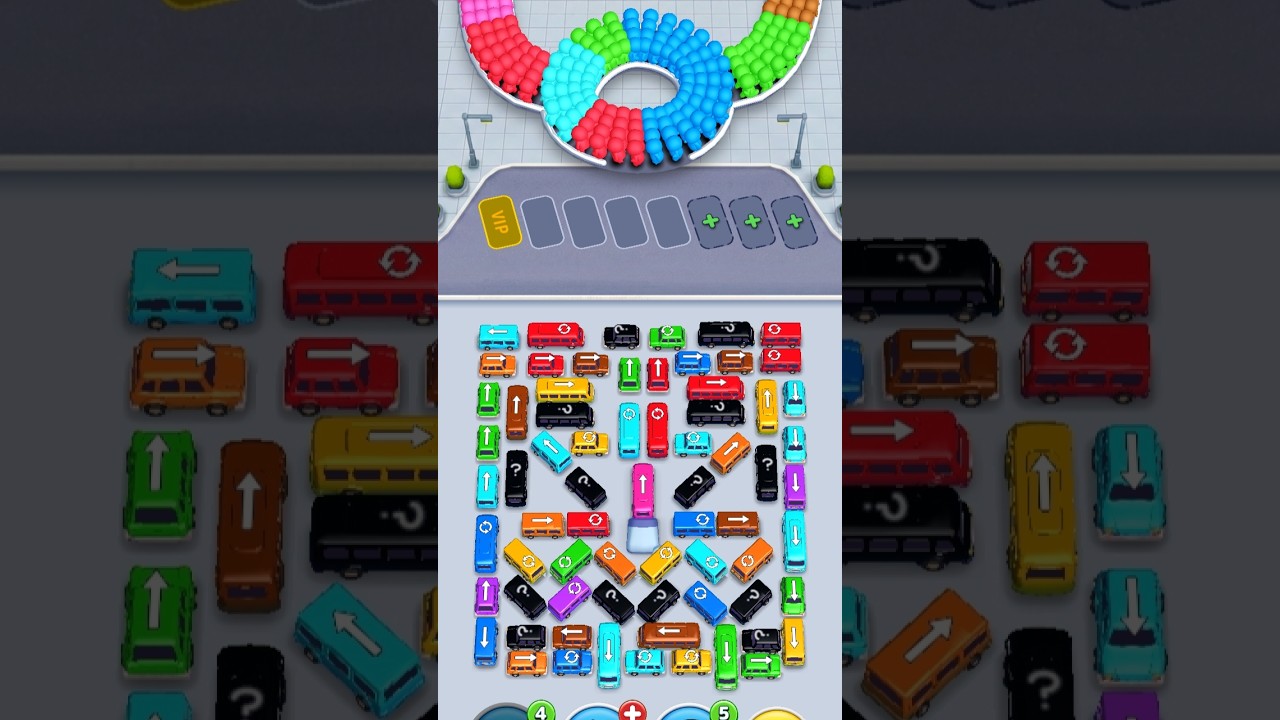
To beat Level 747 in Bus Traffic Fever!, dispatch buses that directly match the front group of waiting passengers rather than clearing open vehicles at random. The level restricts your docking bays while pinning key colored buses behind perpendicular traffic. Sending an unmatched bus into an active loading bay strands the vehicle, consumes a limited slot, and quickly causes a stage-ending gridlock.
Managing the FIFO Passenger Queue
Commuters board buses using a strict first-in, first-out (FIFO) queue. Waiting passengers will only walk up to a bus that matches their specific color, and passengers behind them cannot board until the front group clears out.
Before tapping any vehicle on the lot, evaluate the queue:
- Check the front line: Identify the color group at the absolute front of the line and note how many passengers are in that cluster (buses typically hold three or four passengers).
- Check the on-deck group: Identify which color stands directly behind the leading passengers to plan your follow-up bus.
- Avoid premature dispatches: Never move a free bus to the dock unless its color matches the active front group, even if its driving lane is completely empty.
Classifying Vehicles on the Grid
Level 747 features an interlocking grid where critical vehicles are locked behind perpendicular blockers. Group the vehicles on the board into three categories before moving them:
- Free Movers: Buses with a clear path to the dock. Only tap these if they match the current front of the passenger queue.
- Primary Blockers: Vehicles that have an exit path and currently pin two or more adjacent buses behind their sides or rear bumpers.
- Key Resolvers: Deeply pinned buses that match upcoming passenger groups in the queue.
Target blockers that release multiple trapped vehicles over those that free only a single bus. If clearing a blocker requires parking an unmatched bus in a loading bay, ensure you have at least two empty bays remaining to resolve the next moves.
Dock Slot Status and Strategy
Loading bays act as temporary staging buffers. Once a bus fills completely, it leaves the bay and frees that slot for your next move.
| Dock Slot State | Effect on Board | Required Action |
|---|---|---|
| Empty Bay | Provides maximum maneuvering space | Keep at least two bays open while clearing nested vehicles. |
| Fully Loaded Bus | Departs automatically | Wait for the departure animation to finish before tapping the next bus. |
| Partially Loaded Bus | Occupies a bay until matching passengers appear | Only allow if matching passengers are visible in the top queue. |
| Zero-Match Bus | Stalls indefinitely and clogs the bay | Do not move an unmatched bus unless it exposes an immediate win chain. |
Step-by-Step Clearing Sequence
- Inspect the Starting Queue: Check the first passenger group's color, then find the matching bus on the board with the fewest obstructions.
- Move the Initial Match: If the required bus has a clear exit, send it directly to the dock to load and clear the bay. If it is blocked, identify the single vehicle obstructing it.
- Run a Two-Step Swap: If forced to move a blocking vehicle that does not match the queue, send the blocker to one dock bay, then immediately send the newly freed matching bus into a second bay. The matching bus fills, leaves, and restores an open bay.
- Dismantle the Center Column: With the outer ring cleared, unlock the horizontal buses pinned between vertical movers in the central grid. Clear the vehicles facing open lanes first.
- Clear Remaining Buses: Once the center grid opens, all remaining buses have clear paths. Feed vehicles to the dock one at a time to match the remaining commuter waves.
Recovering From a Clogged Dock
If you drop down to a single open docking bay while the others hold partially filled buses, stop tapping immediately. Rapid tapping risks sending another unmatched bus into your final open slot, ending the run.
Trace the board specifically for the vehicle color needed to finish one of your stalled buses. Determine which blocker holds that vehicle in place. Use your last remaining dock slot to move the necessary vehicle into position so the stalled bus can finish boarding, depart, and reopen your docking buffer.

Free Bus Traffic Fever! Codes
Current active codes and how to redeem them.

Emily Johnson
Emily writes practical mobile strategy guides with a focus on resource planning, base progression, and the early decisions that shape a long-term account.
COMMUNITY
Player Comments
69 players commented on this guide.
Can you add more details about strategy in a future update?
The tips are practical and easy to follow.
I wish I had read this before upgrading the wrong thing.
The explanation is clear, especially for beginners.