
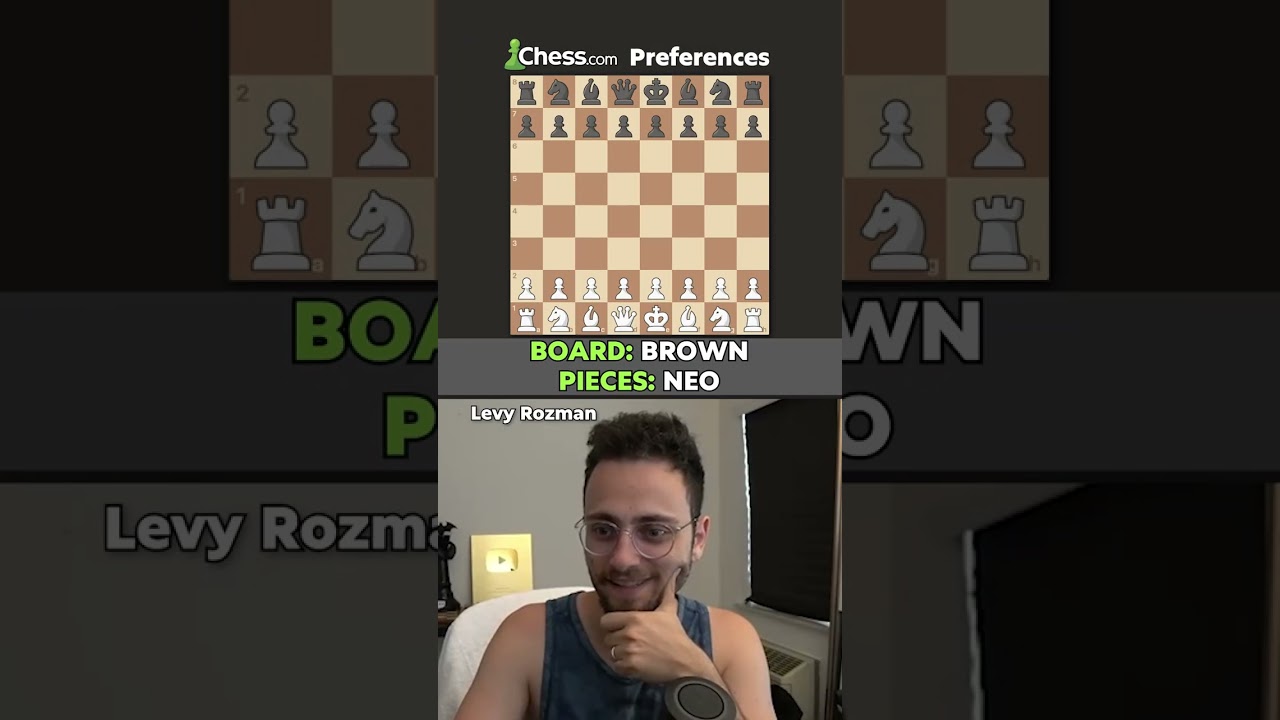
To configure your board like a Grandmaster in Chess.com - Play and Learn, select the Neo piece set, choose a Wood or Green board theme, and set piece animations to Fast or None. This configuration eliminates visual clutter, prevents interface lag during time scrambles, and maximizes peripheral board vision for tactical pattern recognition.
Popular Grandmaster Visual Setups
Top players prioritize muted board colors and high-contrast, flat piece silhouettes over ornate 3D graphics. Natural tones reduce eye strain during long sessions, while standardized 2D vector shapes keep pieces distinct on both light and dark squares.
| Setup Profile | Board Theme | Piece Style | Primary Advantage |
|---|---|---|---|
| Hikaru Nakamura | Wood | Neo | Soft optical contrast with distinct piece silhouettes |
| Magnus Carlsen | Green | Neo | Mirrors standard over-the-board tournament mats |
| Classical Tournament | Tournament / Dark Wood | Classic / Neo | Balanced light-dark square contrast for long calculations |
| Speed Specialist | Icy Sea / Blue | Bases / Neo | Cool color tones that reduce eye strain in fast games |
Hikaru Nakamura uses the Wood theme with default Neo pieces. The warm brown squares reduce glare from computer monitors, ensuring vector silhouettes remain sharply defined. Magnus Carlsen frequently uses the Green board with Neo pieces, replicating the standard vinyl roll-up boards used in over-the-board competition. Players such as Daniel Naroditsky occasionally employ cooler palettes like Icy Sea to maintain focus across extended speed-chess sessions.
Piece Set Clarity and Tactical Recognition
Simple piece geometry allows your brain to register tactical patterns such as forks, pins, and skewers instantly. Artistic sets—including 3D wood, glass, and gothic designs—feature heavy shadows, perspective angles, and ornate carvings. These extra details slow down visual processing and make it harder to spot pieces in your peripheral vision.
Sets like Neo and Classic use clear, standardized silhouettes:
- Bishops and Queens: Prominent crown designs and pointed mitres make diagonal threats instantly recognizable across the entire board.
- Knights: Compact, centered profiles prevent confusion about which specific squares the piece controls.
- Rooks: Flat, wide castles create an immediate, unambiguous shape along open files and ranks.
Move Animation Speed for Fast Time Controls
Default animations smoothly glide pieces across the board over 150 to 200 milliseconds. While visually fluid, this transition introduces an artificial delay that can cost critical seconds in Blitz and Bullet endgames.
- None: Moves appear instantaneously as soon as the server registers them. This setting provides maximum speed for premove sequences and scramble situations, though piece teleportation can take some adjustment.
- Fast: Pieces move with minimal transition time. This option balances motion tracking with high input speed, making it easier to follow piece trajectories without sacrificing valuable clock time.
Recommended Board Overlays
Tuning your overlay settings ensures critical match information remains visible without cluttering the board:
- Highlight Last Move: Keep this enabled. It allows you to immediately spot quiet retreats, long-range piece maneuvers, and lateral captures.
- Show Legal Moves: Disable this feature once you understand the basic rules. Target dots clutter your calculation field and interfere with visualizing empty square geometry.
- Coordinates: Set coordinates to Outside. This keeps rank numbers and file letters off the active playing squares, leaving the perimeter completely clear.
How to Apply Grandmaster Board Settings
You can apply these interface adjustments across both the desktop website and the mobile application in a few steps:
- Click or tap the Settings gear icon on the main menu.
- Select Board and Pieces.
- Change Piece Style to Neo or Classic.
- Set Board Theme to Wood or Green.
- Set Piece Animation to Fast or None.
- Toggle Highlight Last Move on, turn off Show Legal Moves, and set Coordinates to Outside.
Free Chess.com - Play and Learn Codes
Current active codes and how to redeem them.

Emily Johnson
Emily writes practical mobile strategy guides with a focus on resource planning, base progression, and the early decisions that shape a long-term account.
COMMUNITY
Player Comments
133 players commented on this guide.
The tips are practical and easy to follow.
I tried this today and it worked better than my old setup.
This helped me understand strategy much better.
I wish I had read this before upgrading the wrong thing.