
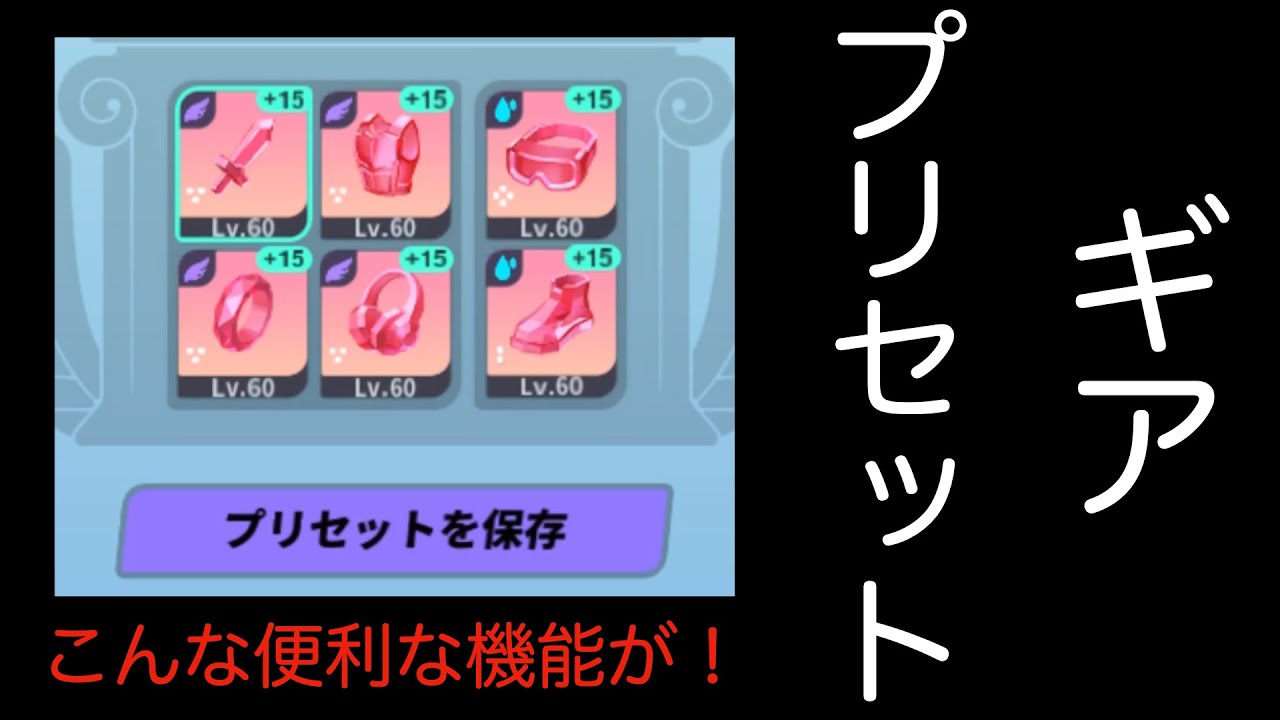
In Dislyte, the gear preset system snapshots complete six-piece relic loadouts so you can transfer your best equipment between Espers with a single confirmation. Applying a preset automatically pulls the saved relics from your inventory or strips them directly from whichever Esper currently holds them, while displaced gear returns to your inventory.
---
How to Save, Overwrite, and Apply Presets
The preset interface is located inside the individual Esper equipment screen. It captures the four-piece primary set, two-piece secondary set, enhancement levels, and substats of whatever is currently equipped.
Saving a New Preset
- Open the Espers menu and select the character holding the relic build you want to preserve.
- Navigate to the equipment tab and open the Preset menu.
- Select an empty preset slot and confirm to register the current six-piece loadout.
- Give the preset a descriptive label indicating its set type and key stat milestone (such as
WW_SPD+180orNether_Bruiser_CDMG).
Overwriting an Existing Preset
The preset system tracks specific relic items. If you enhance a saved relic from +12 to +15, the preset reflects that stat increase automatically. However, if you swap out one of the six relics for a completely different piece from your bag, the preset does not update on its own.
To update the preset with the new piece, return to the preset menu while wearing the adjusted build and select Overwrite.
Equipping a Preset
- Select the target Esper who needs the gear.
- Open their equipment menu and select Preset.
- Choose the saved loadout and tap Equip.
- The game will automatically reassign all six relics to the active Esper.
---
Gear Conflict Rules and Failure Points
Because the system allows multiple Espers to draw from the same pool of relics, applying presets requires caution around active battle modes.
- Defense Team Stripping: If a preset pulls relics from an Esper assigned to your Point War defense squad, that defense unit becomes unequipped immediately. The game does not prevent you from confirming the transfer.
- Background Multi-Battle Interruptions: Avoid taking gear from Espers assigned to active background runs (such as Kronos or Apep farming squads). Keep static, dedicated gear on your automated farming anchors.
- Speed-Tuning Variations: Presets copy flat relic stats, not final character speeds. Because base Speed values differ across Espers, transferring a high-speed preset to an Esper with lower base Speed will result in a lower total stat than the original holder had. Always check your squad's final turn order after transferring gear.
---
Role-Based Preset Archetypes
Organizing presets by functional combat roles rather than character names makes builds easy to swap as content demands change:
| Preset Archetype | Core Relic Sets | Primary Slot Focus | Primary Use Cases |
|---|---|---|---|
| Max Speed Opener | Wind Walker + Apollo's Bow / Light Above | SPD boots, HP% or ACC ring and headphones | Point War offense, Temporal Tower |
| Bruiser Cleave | War Machine / Nether + Brawler / Shield | C.DMG or C.RATE, ATK%, SPD / ATK% | Knockout, Shadowgale, Ritual Miracle |
| Tank Sustain | Ocean Waves / Frost + Master Grove | HP%, DEF%, SPD | Fafnir, Infinity Tower, Point War defense |
| Pure Control | Wind Walker / Tyranny of Zeus + Apollo's Bow | ACC, SPD, HP% | Calamity Island, Spatial Tower, Infinity Tower |
---
When to Share Gear Across Game Modes
Preset swapping is most efficient in progression content where teams run sequentially rather than at the same time:
- Desolate Lands Bosses: Shadowfire, Shadowgale, and Shadowstream run one trial at a time. A single, highly optimized damage-dealer set can be moved between your primary elemental DPS units before starting each respective boss trial.
- Tower Floors: Difficult stages in Temporal Tower or Infinity Tower often require specific counter-mechanics, such as stacking high Accuracy or running crowd control with Tyranny of Zeus. You can equip an unbuilt niche Esper with a top-tier control preset to clear the stage, then immediately return the set to your standard roster.

Free Dislyte Codes
Current active codes and how to redeem them.

Emily Johnson
Emily writes practical mobile strategy guides with a focus on resource planning, base progression, and the early decisions that shape a long-term account.
COMMUNITY
Player Comments
62 players commented on this guide.
The tips are practical and easy to follow.
Good guide for Dislyte players. The strategy part was useful.
Can you add more details about strategy in a future update?
Nice guide. I am checking the other Dislyte articles next.