
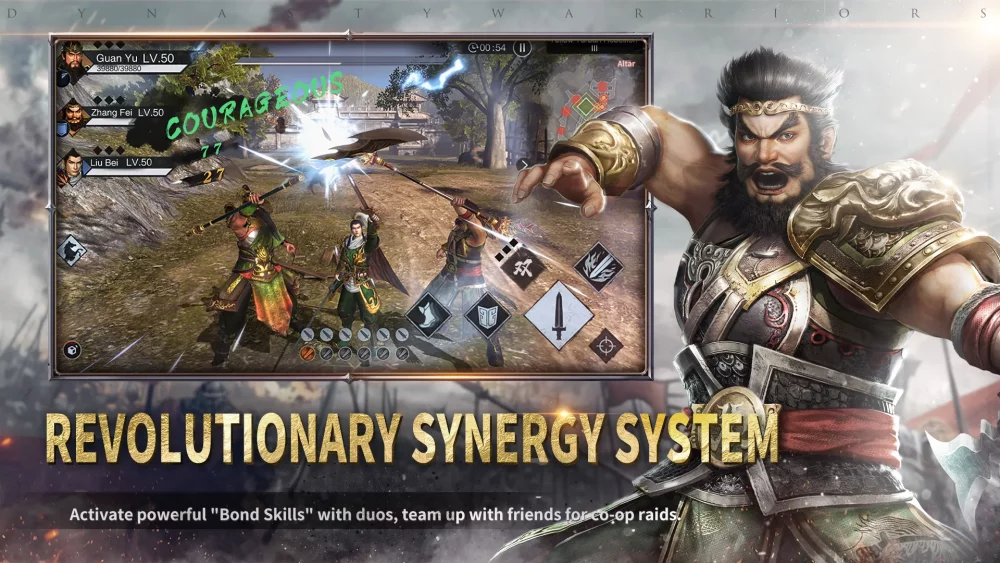
Navigating the interface of Dynasty Warriors:Overlords is essential for maintaining control during high-intensity skirmishes. Because the screen can quickly become crowded with enemy units and tactical indicators, understanding your combat HUD is the first step toward reducing reaction time and maximizing your damage output.
Essential Combat UI Elements
The combat interface is designed to provide critical information without obscuring the action. Familiarizing yourself with these zones ensures you can track your status while focusing on enemy movement.
| UI Element | Function | Tactical Importance |
|---|---|---|
| Health Bar | Tracks current HP status | Essential for knowing when to swap heroes. |
| Musou Gauge | Tracks energy for special attacks | Determines your window for ultimate damage. |
| Skill Icons | Displays cooldowns for active abilities | Allows for rotation timing and crowd control. |
| Mini-Map | Provides overview of troop movement | Vital for objective tracking and target location. |
| Hero Portrait | Displays current combatant | Quick reference for active character synergy. |
Navigating Combat Menus Under Pressure
In Dynasty Warriors:Overlords, the ability to transition between menus or trigger character switches mid-combo is a core skill. If you are struggling to maintain your rhythm, focus on these interface habits:
- Peripheral Awareness: Keep your eyes centered on the battlefield while using peripheral vision to monitor your Musou gauge. Avoid "tunnel vision" on your health bar.
- Icon Placement: If the game settings allow for HUD customization or adjustment, ensure your most important cooldowns are placed near the center or bottom-right to minimize eye travel time.
- Menu Streamlining: Spend time in the staging area before missions to ensure your equipment and skills are sorted. Attempting to manage inventory or complex skill setups while in a mission screen can lead to unnecessary delays.
Optimizing Interaction Speed
Efficiency in Dynasty Warriors:Overlords often comes down to how quickly you can process information from the screen. If you find the UI overwhelming during large-scale battles, consider these adjustments:
- Reduce Visual Clutter: If the game permits, lower transparency settings for non-essential UI elements to keep the battlefield clear.
- Audio Cues: Use sound effects to supplement your UI. Many critical moments—such as your Musou gauge reaching capacity—have distinct audio cues that allow you to track information without looking away from the action.
- Input Consistency: Practice your skill rotations in a training environment until the button layout becomes muscle memory. This removes the need to constantly look at the skill icons to see if they are ready, allowing you to focus entirely on enemy positioning.
By treating the combat interface as a tool rather than a distraction, you can improve your situational awareness and respond to battlefield threats with greater precision. Prioritize clean UI management to ensure that your tactical decisions are never hindered by the screen layout.

Free Dynasty Warriors:Overlords Codes
Current active codes and how to redeem them.

Michael Smith
Michael covers live-service games, events, reward systems, and efficient daily routines, turning frequent updates into clear actions for players.
COMMUNITY
Player Comments
75 players commented on this guide.
The tips are practical and easy to follow.
Nice guide. I am checking the other Dynasty Warriors:Overlords articles next.
Can you add more details about strategy in a future update?
This guide answered the exact question I had.