
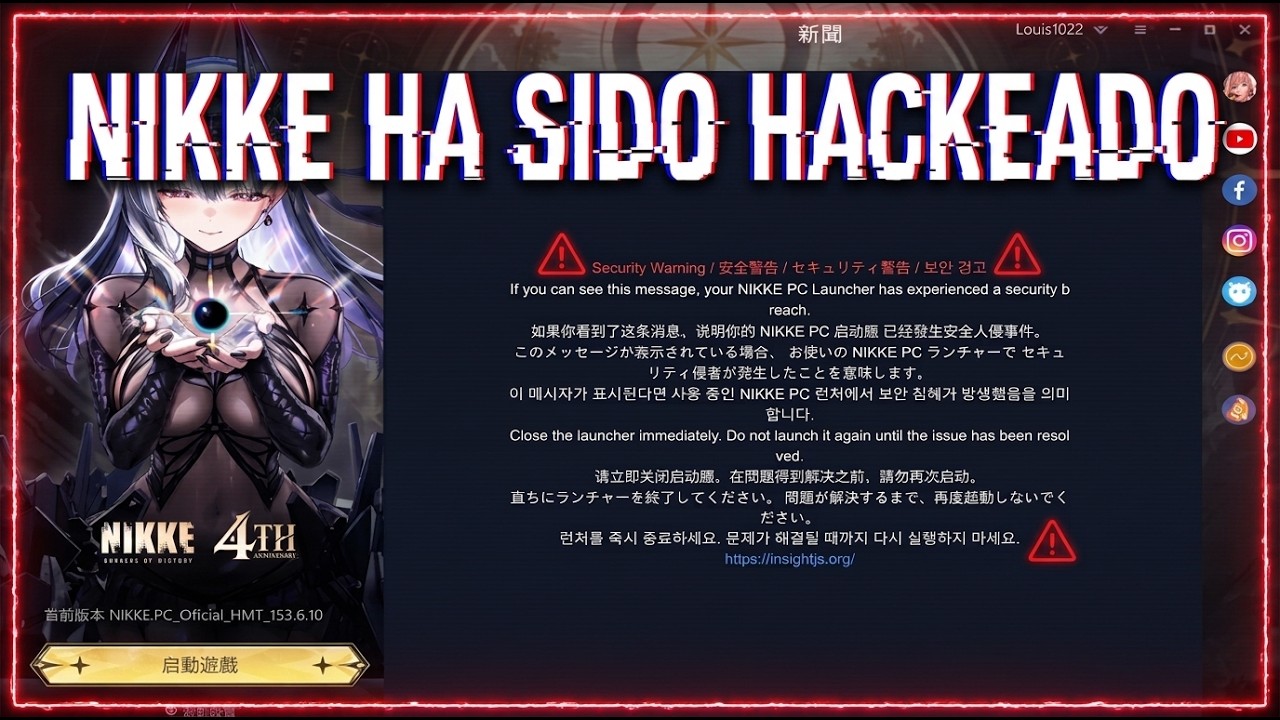
If reports indicate that the GODDESS OF VICTORY: NIKKE desktop launcher or domain infrastructure is compromised, stop opening the PC client immediately. Prevent potential delivery of unauthorized files by terminating active background processes, routing suspicious network traffic to a local loopback in your Windows hosts file, and switching your daily gameplay to official mobile versions until server security is confirmed.
Terminate the PC Launcher in Windows Task Manager
Closing the desktop launcher window does not fully shut down the software. The client often minimizes to the Windows system tray and continues running updater services in the background.
- Press Ctrl + Shift + Esc to open the Windows Task Manager.
- Open the Processes or Details tab.
- Locate active processes associated with the game launcher, background patchers, or updater services.
- Select each relevant process and click End task.
Halting these background tasks stops the client from automatically reaching out to remote distribution servers or downloading unverified files.
Block Domain Traffic Using the Windows Hosts File
The Windows hosts file is located at C:\Windows\System32\drivers\etc\hosts. It functions as a local lookup table that overrides public DNS lookups. Mapping reported or flagged game-update domains to an unreachable local loopback address prevents your computer from establishing outbound connections to those addresses.
Use the following procedure to edit the file safely:
- Open the Windows Start menu, type Notepad, right-click the shortcut, and select Run as administrator.
- In Notepad, click File > Open and browse to
C:\Windows\System32\drivers\etc. - Set the file type dropdown in the bottom-right corner from Text Documents (.txt) to All Files (.*).
- Select the file named
hostsand open it. - Move to the bottom of the text and create a new line.
- Enter a local loopback address (
127.0.0.1or0.0.0.0), press the spacebar or Tab key, and type the specific flagged server domain reported during the incident. - Save the file and close Notepad.
Redirecting these addresses stops all automated client downloads. This block also prevents official game updates from downloading until you manually remove the entries later.
Maintain Account Progress on Mobile Devices
Mobile clients for iOS and Android operate in isolated system environments independent of the Windows launcher. Switching to a mobile device allows you to continue account progression safely without exposing your PC to client-side vulnerabilities.
Download the official client through the Apple App Store or Google Play Store and sign in using your linked Level Infinite Pass, Apple ID, or Google account. You can complete your standard daily routine on mobile:
- Claim accumulated Outpost Defense supplies before they hit the capacity limit.
- Complete daily Simulation Room sectors for skill development manuals.
- Clear daily missions to secure recruit vouchers and active event currency.
- Spend daily attempts in the Arena and Tribe Tower.
If your mobile device experiences performance drops, lower the frame rate to 30 FPS and turn off high-resolution combat effects in the in-game settings menu.
Distinguishing a Breach from an Antivirus False Positive
Not every security alert indicates a hacked client. Antivirus scanners frequently flag legitimate anti-cheat drivers due to heuristic rules, whereas a genuine breach involves external network redirection or untrusted executable updates.
| Evaluation Metric | Antivirus False Positive | Client or Domain Compromise |
|---|---|---|
| Common Trigger | Heuristic scanners flag local anti-cheat files (.sys or .dll). | Community or creator advisories warn against opening the launcher. |
| Network Destination | Traffic flows to verified publisher content delivery networks. | The launcher attempts connections to flagged or suspicious remote hosts. |
| Immediate Risk | Low; the client fails to boot because a file was quarantined. | High; risk of running unauthorized payloads or scripts. |
| Recommended Action | Whitelist verified files within your local antivirus software. | Kill launcher processes, edit the hosts file, and switch to mobile. |
Never disable system antivirus software or add sweeping directory exclusions while an unconfirmed security alert is active.
Reopening the PC Client After Resolution
Do not undo local network blocks until Shift Up or Level Infinite publishes an official all-clear announcement through verified channels. Avoid downloading third-party replacement files or launcher fixes shared on community forums.
Once the publisher verifies that infrastructure is secure:
- Open Notepad as an administrator and access
C:\Windows\System32\drivers\etc\hosts. - Delete the loopback lines added during the incident, then save the file.
- Run a full malware scan using Windows Defender or your installed antivirus program.
- If you suspect your credentials were exposed during the compromise, visit the official Level Infinite Pass portal and update your account password.

Free GODDESS OF VICTORY: NIKKE Codes
Current active codes and how to redeem them.

Sarah Williams
Sarah specializes in RPG and collection games, explaining team building, character growth, and beginner-friendly ways to avoid expensive early mistakes.
COMMUNITY
Player Comments
119 players commented on this guide.
Can you add more details about strategy in a future update?
The tips are practical and easy to follow.
This saved me time in the early game.
I wish I had read this before upgrading the wrong thing.