
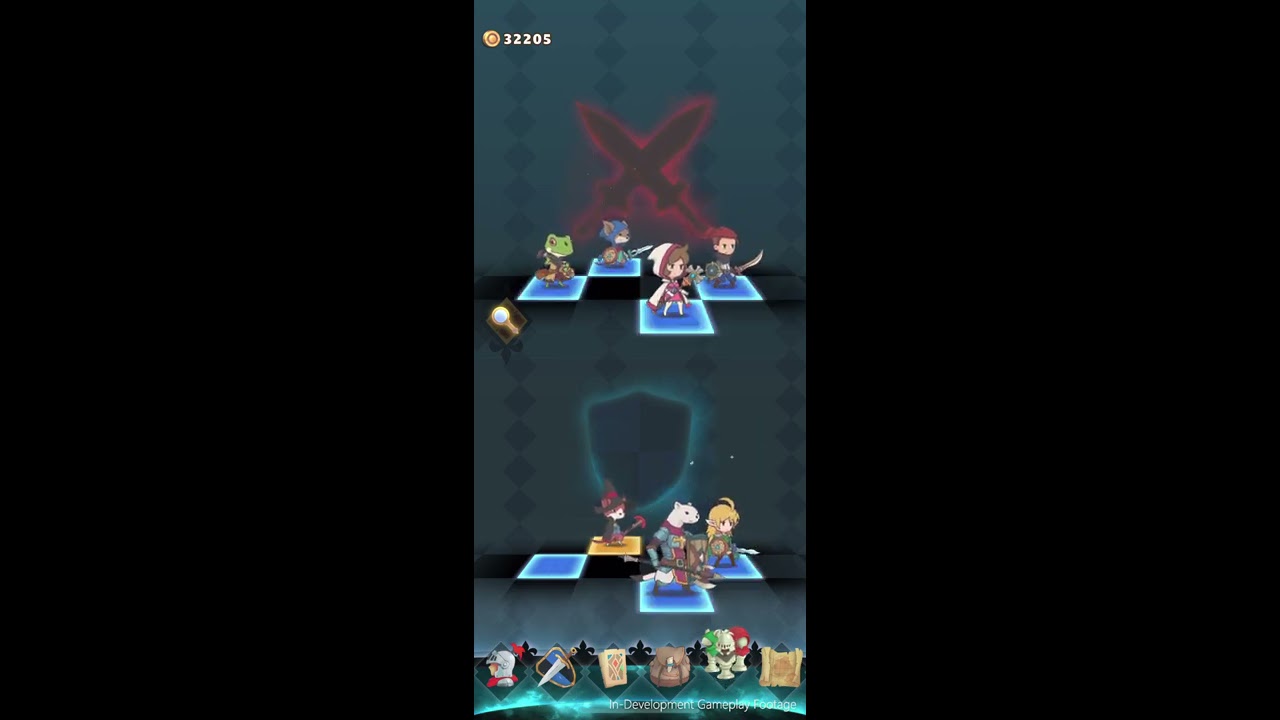
In Hero Emblems II, party formation divides your roster between four active front-row combatants and reserve back-row members on standby. Only frontline heroes appear in battle and generate emblem tiles on the match-3 puzzle board. To prepare for an encounter, open the party formation menu before entering a stage and swap standby heroes into the active front row to counter upcoming enemy threats.
How Front and Back Roster Slots Function
The party formation menu separates your unlocked roster into two operational tiers:
- Front Row (Battle Members): Exactly four heroes occupy the active frontline. These characters physically fight on screen, generate their corresponding emblem tiles on the match-3 grid, and trigger their skills through tile chains.
- Back Row (Standby Members): Reserve characters wait on standby. Their emblem tiles do not appear on the puzzle board, which prevents the grid from becoming cluttered while allowing you to retain an adaptable roster.
Unlike the original Hero Emblems, which locked players into a fixed four-character team (Zack, Howard, Alston, and Mia), Hero Emblems II lets you recruit additional heroes and deploy them dynamically based on stage hazards.
How to Swap Party Members
You must make party adjustments before launching a quest or entering a dungeon run.
- Open the party formation interface. The four active frontline combatants appear across the top row, with reserve heroes seated below.
- Tap or select the frontline slot holding the hero you want to bench.
- Select the standby hero from the lower row whom you want to promote to the battle lineup.
- Confirm the selection to swap their positions instantly.
- Review the newly promoted hero's equipped weapons, gear, and badges before exiting to the world map.
Frontline Roles and Board Tile Trade-Offs
Each active combatant dictates the type and function of the tiles dropping onto your puzzle board. Changing a front-row hero changes your board layout and available skill triggers.
| Frontline Role | Board Function | Tactical Trade-Off |
|---|---|---|
| Physical Striker | Produces standard weapon tiles for baseline physical damage. | Ineffective against heavily armored or physical-resistant enemies. |
| Magical Specialist | Generates spell tiles to bypass physical armor and target elemental weaknesses. | Ineffective against magic-resistant targets; reliant on specific tile matches. |
| Defensive Anchor | Generates shield and DP tiles to absorb heavy attacks. | Lowers total offensive tile output in exchange for party survivability. |
| Support / Healer | Generates recovery tiles to restore HP and cleanse status ailments. | Sacrifices damage output to maintain team health over long fights. |
When to Rotate Standby Heroes to the Front
Examine quest previews and upcoming zone encounters to determine whether your default frontline needs adjustment:
- Elemental and Armor Resistances: When encountering monsters heavily resistant to physical strikes or specific elements, bench your standard attackers and bring forward an appropriate magic caster or alternate damage dealer.
- Ailment-Heavy Bosses: If an enemy regularly inflicts poison, burn, or paralysis, rotate in a support specialist capable of removing status effects through skill tiles.
- Damage Checks and Timers: When facing enemies with rapid wipe-skill charge bars, bench pure defensive units in favor of a secondary offensive hero to clear the charge threshold quickly.

Free Hero Emblems II Codes
Current active codes and how to redeem them.

James Brown
James focuses on Android gaming on PC, emulator setup, controls, performance tuning, and practical troubleshooting for longer play sessions.
COMMUNITY
Player Comments
138 players commented on this guide.
This guide answered the exact question I had.
This saved me time in the early game.
This helped me understand heroes much better.
Good guide for Hero Emblems II players. The heroes part was useful.