
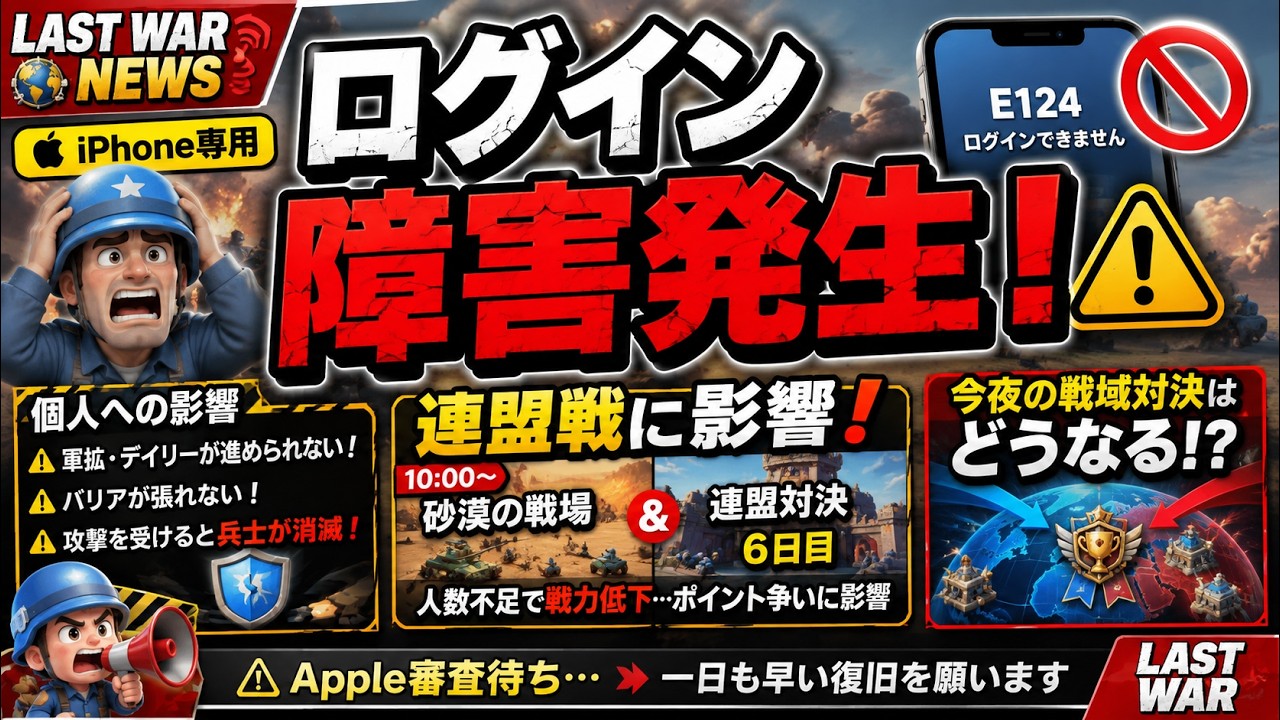
When the E124 login error blocks you from entering Last War on an iPhone, do not delete or reinstall the app if you use an unlinked guest account, as clearing local data permanently erases your base progress. Instead, refresh your network route, log in through a secondary device if your account is linked, and alert your alliance leadership to protect your base during active war events.
Troubleshooting the E124 Error on iOS
The E124 error code appears during the initial loading sequence when an iOS client fails to authenticate with active game servers. Because the live servers remain online, commanders playing on Android devices or PC emulators can usually log in normally, leaving unshielded iOS accounts visible and vulnerable to attack.
Try these sequential troubleshooting steps to restore access:
- Cycle your network connection: Stale DNS caches or local routing drops frequently cause handshake failures. Turn on Airplane Mode for ten seconds, switch between Wi-Fi and cellular data, or connect to an alternative Wi-Fi network to force a new routing path.
- Access via secondary hardware: If your profile is bound to an external login (such as Google, Facebook, or a registered email address), open Last War on an Android phone, tablet, or desktop PC emulator. Sign in using your bound credentials to activate a Peace Shield and manage your base.
- Wait for a client patch if unbound: If your account is not linked to a third-party service, do not wipe the app data. Keep the application installed and wait for an official App Store update to restore authentication safely.
| Login Scenario | Platform Availability | Recommended Immediate Action |
|---|---|---|
| Universal Maintenance | Offline across iOS, Android, and PC | Wait for scheduled maintenance to end; all bases are safe. |
| E124 Authentication Error | Blocked on iOS; operational on Android/PC | Cycle network; log in on a secondary device to bubble. |
| Local Network Conflict | Restricted to current connection | Switch between cellular data and secondary Wi-Fi networks. |
Protecting Bases and Event Scores During Lockouts
Because the game world treats locked-out players as standard offline commanders, an unexpected outage during competitive events like Warzone Duel or Alliance Wars leaves exposed bases open to hostile raids. In conflict windows like Enemy Buster Day, opposing alliances target stationary settlements to plunder resources and score war points.
If you are locked out or managing affected alliance members, take these protective measures immediately:
- Coordinate via external channels: Alliance leadership (R4 and R5 officers) should use third-party platforms like Discord or LINE to identify locked-out iOS commanders.
- Reinforce vulnerable walls: Station online members with high-tier defensive heroes and gear as garrisons on exposed squad mates to deflect incoming scout rallies.
- Relocate perimeter bases: Move active commanders around perimeter settlements at the hive edges to create a protective buffer against enemy invaders.
- Adjust competitive lineups: Substitute unavailable iOS players with active Android or PC participants in scheduled matches, such as Desert Storm, to preserve building capture points and map control.
Submitting Support Tickets and Claiming Compensation
Once access is restored, submit an error report to document lost progress and verify eligibility for event compensation. Take a screenshot of the E124 error prompt displaying the timestamp. If you cannot log in to find your numeric Player ID, ask an alliance member to view your profile on the map, or retrieve the ID from previous purchase confirmation receipts.
Submit your ticket through in-game customer support or the official Discord help desk. After resolving platform-wide outages, developers typically distribute compensation packages through in-game mail. Claim these mail rewards promptly and direct the resources—such as Universal Speedups and resource chests—into tech research, building upgrades, or troop healing to make up for missed Alliance Duel points.
Free Last War Codes
Current active codes and how to redeem them.

James Brown
James focuses on Android gaming on PC, emulator setup, controls, performance tuning, and practical troubleshooting for longer play sessions.
COMMUNITY
Player Comments
147 players commented on this guide.
The explanation is clear, especially for beginners.
The tips are practical and easy to follow.
Good guide for Last War players. The base building part was useful.
This helped me understand base building much better.