
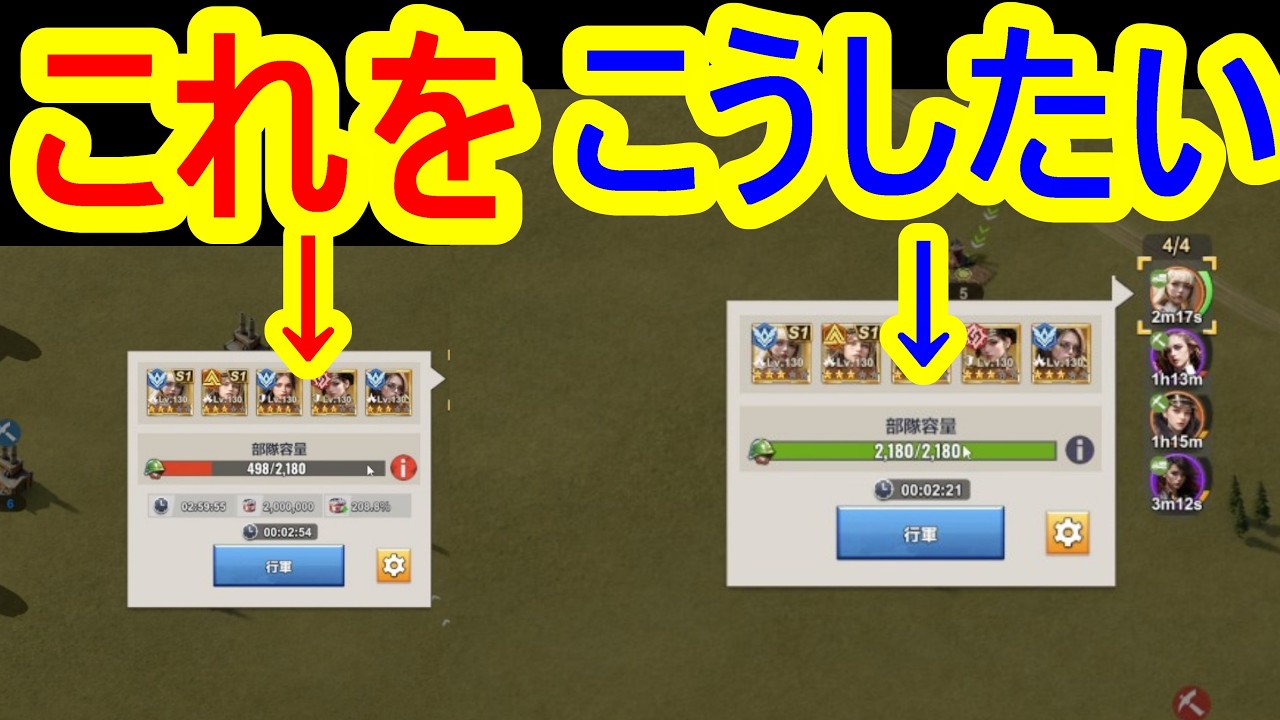
Your squads launch into combat with missing troops in Last Z: Survival Shooter because your active resource-gathering marches have locked up your reserve units. All formations draw from the same central barracks pool. When you send squads to collect resources using the default auto-fill button, the game assigns your highest-tier units to those resource nodes. To keep your primary combat squads fully staffed, manually match your gathering march sizes to the tile capacity and dedicate low-tier units to field labor.
Why Your March Capacity Drops Unexpectedly
When you initiate an attack on an enemy base, zombie boss, or event target, the deployment screen may show a troop count far below your squad’s maximum cap. This happens because gathering queues quietly deplete your base's available soldiers.
When you deploy to a resource plot—such as food, timber, iron, or an alliance coin mine—the quick-deploy interface defaults to sending the largest possible march size using your strongest available units. If you have multiple queues gathering simultaneously:
- Thousands of your highest-level frontline soldiers leave your base.
- Your primary combat squad cannot access those units while they are on the map.
- The combat squad deploys under capacity without an explicit warning dialog.
Unless replacement soldiers have finished training in your camps, your combat squad enters battle at a severe numerical disadvantage.
Matching Node Capacity to Troop Load
Sending a full squad of elite soldiers to a resource tile is inefficient. Every resource node contains a fixed amount of material, and every unit has a specific resource load stat that dictates how much it can carry.
- Payload caps: A resource tile holding 500,000 resources requires only enough troops to reach a 500,000 carrying capacity. Sending a squad with 1,500,000 capacity wastes the remaining troops, leaving two-thirds of the unit count idle in the field.
- Harvest speed mechanics: Additional troop counts beyond the node's capacity do not speed up your harvesting rate. Gathering speed depends on research technology, hero talents, and economic buffs, not raw soldier numbers.
Restricting troop numbers to the exact capacity of the node leaves the rest of your army inside your base, ready for combat.
How to Manually Adjust Gathering Marches
To keep auto-deploy from consuming your primary combat force, calibrate your march before confirming dispatch:
- Check the tile total: Select the target resource node and note the available resource amount.
- Open the march window: Tap the node to deploy and locate the load capacity bar at the bottom of the interface.
- Lower the troop slider: Move the troop count slider to the left until the load capacity closely matches the resource total on the node.
- Deselect high-tier units: Ensure the troop selection boxes pull from lower-tier units rather than your elite combat forces.
- Dispatch the squad: Confirm the march once the payload meets the resource target without surplus troops.
Separating Combat Squads from Gathering Labor
The most sustainable way to prevent missing march numbers is to enforce clear roles across your troop tiers.
| Troop Role | Unit Tier | Primary Deployment Target | Strategic Value |
|---|---|---|---|
| Assault Squads | Highest available tier | First Squad, rally leads, base defense | Delivers full combat power and maximum squad limits without downtime. |
| Gathering Labor | Lower tiers (T1–T4) | Resource nodes, wild mines, alliance pits | Provides adequate carry capacity at low production and recovery costs. |
Low-tier units carry large payloads while requiring fewer resources and less time to train. Dedicating lower tiers to gathering tasks keeps your high-tier units inside the shelter. If an opponent attacks your gathering tile, repairing low-tier units also incurs minimal hospital costs and avoids weakening your main offensive formation.
Quick Checks Before Urgent Battles
Before participating in competitive operations or state combat events, use these routine checks to ensure full squad capacity:
- Recall active gathering marches: Immediately recall gathering queues from the field so that all units return to the central barracks pool before scheduled fights.
- Avoid auto-fill presets during wartime: Do not use single-tap auto-fill for gathering when server hostility is elevated, as it prioritizes your best frontline units.
- Check the hospital: Review your hospital facility to confirm no wounded soldiers are awaiting treatment. Injured units reduce available squad capacity until healed.
- Isolate hero roles: Place utility and gathering heroes in your lower-priority queues (Squad 3 or 4), keeping your primary combat heroes in Squad 1 and 2 with dedicated claims on elite troops.
Free Last Z: Survival Shooter Codes
Current active codes and how to redeem them.

Michael Smith
Michael covers live-service games, events, reward systems, and efficient daily routines, turning frequent updates into clear actions for players.
COMMUNITY
Player Comments
79 players commented on this guide.
This saved me time in the early game.
The tips are practical and easy to follow.
Can you add more details about strategy in a future update?
This guide answered the exact question I had.