
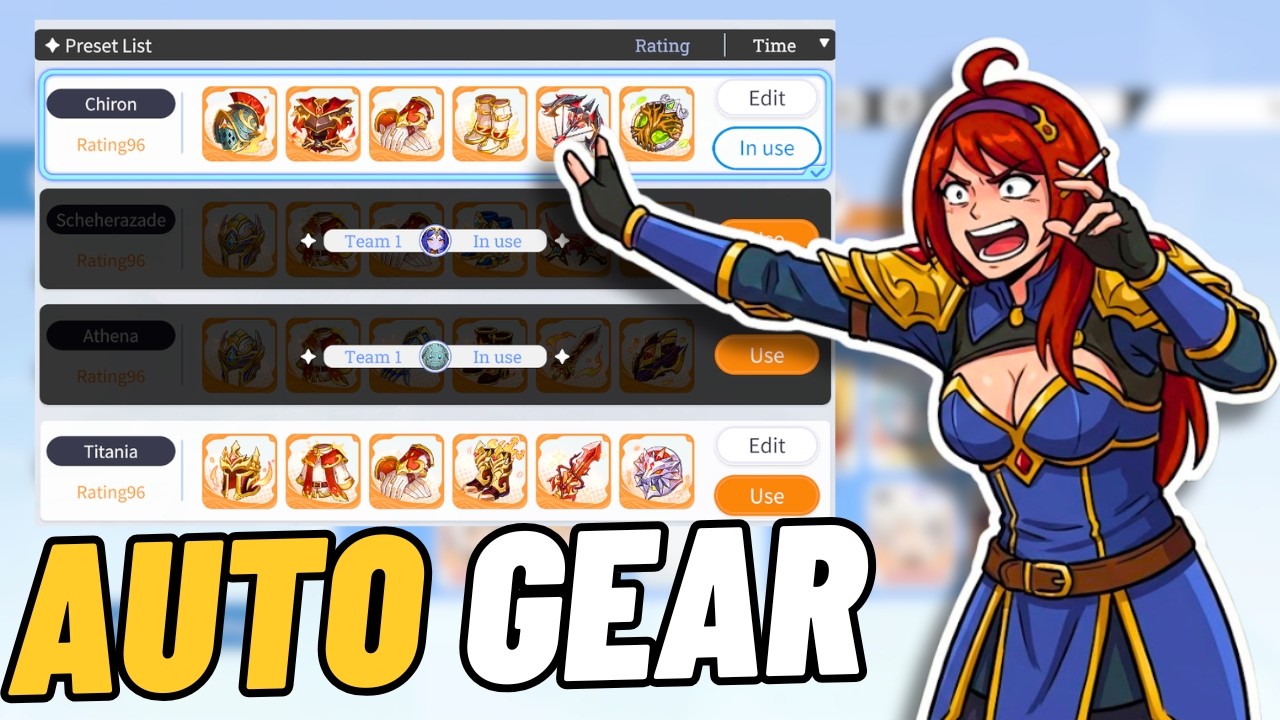

The newly implemented Auto Loadout system in Dragon Traveler fundamentally changes how you manage hero equipment by allowing you to save specific gear configurations for different game modes. By utilizing this feature, you no longer need to manually strip and re-equip your best items when switching between Campaign, Elemental Tower, and Guild Expedition. This guide details the setup process to ensure your most powerful gear is always correctly distributed across your roster without repetitive administrative effort.
Understanding the Auto Loadout System
The Auto Loadout feature serves as a permanent solution to the tedious gear-swapping cycle that previously hampered progression in Dragon Traveler. By allowing players to save specific equipment presets, the game now handles the distribution of your best gear automatically based on the activity you are currently tackling. This eliminates the risk of accidentally leaving your strongest items on an idle unit or forgetting to equip them before a critical battle.
This system is particularly beneficial for players who frequently rotate their roster to counter specific elemental advantages or team-wide synergies. Instead of spending minutes navigating individual hero menus, you can now toggle between saved loadouts with a single interaction. This ensures your progression remains efficient, allowing you to focus on strategy and team composition rather than inventory management.
Configuring Your First Gear Loadout
To begin using the system, you must first navigate to the character menu and define your desired equipment sets. Once you have manually equipped a hero with the items you want for a specific mode, look for the "Save Loadout" option within the gear interface. You can assign these presets to specific categories, such as Campaign, Elemental Tower, or Guild Expedition, which helps the game prioritize which sets to apply when those modes are launched.
It is recommended to name your loadouts clearly based on the content they are intended for. For example, creating a "Tower Speed" loadout and an "Expedition Boss" loadout will prevent confusion when you are in a rush to complete daily tasks. Once saved, the game will remember these configurations, so you only need to perform this setup once for each of your primary team units.
Optimizing Gear Distribution Across Modes
When you start an activity, the Auto Loadout system checks the presets you have saved and pulls the necessary gear from other characters if they are currently equipped. This is the "secret" to the system's efficiency: it treats your entire inventory as a shared pool rather than locking items to specific heroes. You no longer need to worry about "losing" an item to a different character, as the system intelligently reallocates gear to whoever needs it for the currently selected task.
However, keep in mind that this system prioritizes the loadout settings you have defined. If you have two different characters configured to use the same "Best in Slot" item, the game will typically defer to the most recently saved loadout or the one associated with the active game mode. Regularly updating your saved loadouts after acquiring higher-tier equipment is essential to ensure the system is always pulling your absolute best stats for your priority teams.
Managing Limitations and Trade-offs
While the Auto Loadout system is a major quality-of-life upgrade, players should be aware of its limitations regarding overlapping needs. If you attempt to use the same gear set for two different game modes that occur simultaneously or in close succession, the system will swap the gear to the hero required for the active mode. This means that if you are actively farming one mode, your secondary team might temporarily lack their optimal gear until you switch tasks.
Additionally, always double-check your loadouts after significant equipment upgrades. Because the system is automated, it will continue to pull the gear you initially saved until you manually overwrite the preset. Failing to update your saved loadout means you might be underperforming in high-difficulty content despite having better gear sitting in your inventory. Taking a moment to refresh your saved presets after every major equipment acquisition will keep your efficiency at its peak.
Why This Matters for All Player Types
Whether you are a free-to-play player maximizing every scrap of progress or a whale managing a massive roster of SSR+ units, this update saves a significant amount of time. The primary advantage is the reduction of "menu friction," which historically caused many players to avoid certain modes simply because the gear-swapping process was too cumbersome. By automating this, you reduce the barrier to entry for endgame content and event participation.
Furthermore, this system creates a more consistent experience across your account. You will find that your secondary and tertiary teams perform more reliably because they will automatically adopt the best available gear from your pool rather than relying on outdated, static equipment. This shift allows you to experiment with more team compositions without the fear of breaking your primary team's build, ultimately leading to a more dynamic and enjoyable experience in Dragon Traveler.

James Brown
James focuses on Android gaming on PC, emulator setup, controls, performance tuning, and practical troubleshooting for longer play sessions.
COMMUNITY
Player Comments
83 players commented on this guide.
The explanation is clear, especially for beginners.
This guide answered the exact question I had.
Good guide for HOT players. The strategy part was useful.
This helped me understand strategy much better.