
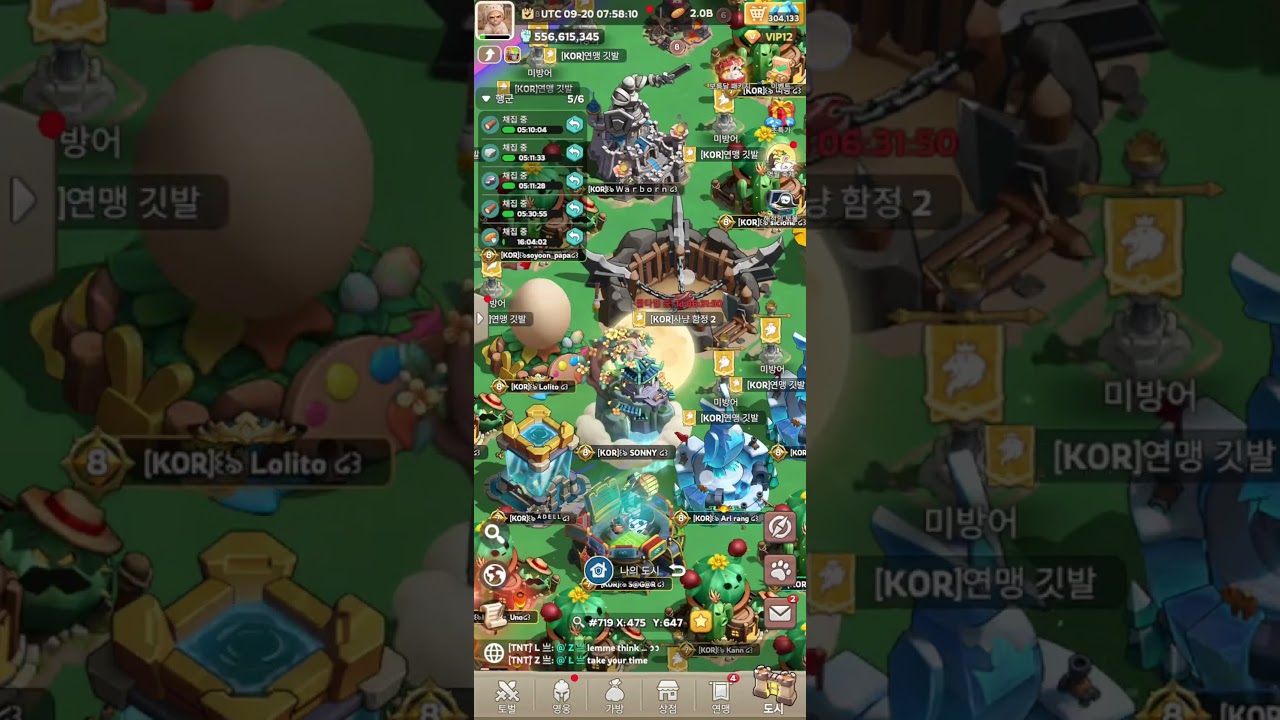
To preview and equip a new city skin in Lordrush, open the base decoration menu through your central fortress or lord avatar profile, select the cosmetic to view it live on your settlement, and confirm the selection. Equipping or switching a city skin is instantaneous and reversible; it does not pause resource gathering, building construction, tech research, or troop training queues.
How to Preview and Equip City Skins
You can access all owned and featured fortress skins directly from the main settlement view. To test a skin on your live map before committing to it, follow these steps:
- Tap your central fortress building on the settlement map or select your lord avatar in the upper-left corner of the screen.
- Open the decoration or wardrobe catalog to display the list of available city cosmetics.
- Select the desired city skin from the roster to project an interactive 3D model over your current base layout.
- Rotate the settlement camera to check how the structure integrates with your existing walls, defense towers, and production yards under different map angles.
- Confirm the selection to equip the skin immediately across both your local base view and the public wilderness map.
If you want to restore your base's original look or swap to another owned skin, return to the wardrobe menu at any time and re-equip your preferred appearance. Reverting a skin incurs no resource costs or cooldown timers.
What to Check in a Live Skin Preview
Shop banners and icon art rely on pre-rendered studio lighting that does not show how a skin looks in an active game environment. Previewing a skin on your live map lets you inspect several critical details before spending event tokens or premium currency:
- Structural Fit and Proportions: Check that the replacement keep fits naturally within your surrounding wall layout and does not visually clip into neighboring barracks or gathering structures.
- Dynamic Animations: Look for continuous motion elements such as fluttering faction flags, flowing water, or mechanical gear movements on the main towers.
- Particle Effects: Observe environmental visual effects like drifting snow, glowing magical runes, or rising chimney smoke to ensure they match your aesthetic preferences.
- Wilderness Map Silhouette: Zoom out to verify how the fortress reads on the regional kingdom map. High-tier skins often feature tall spires or distinct color glows that stand out clearly to allies and rival scouts.
Balancing Cosmetic Unlocks Against Account Progression
Acquiring limited-edition city skins often requires competing in leaderboard challenges, completing milestone events, or spending significant amounts of diamonds. Before committing progression items to a cosmetic unlock, weigh the visual benefits against your current account needs.
| Priority Factor | City Skin Acquisition | Core Account Progression |
|---|---|---|
| Primary Focus | Visual distinction, base customization, and alliance prestige | Power rating, combat efficiency, and resource generation |
| Resource Costs | Diamonds, event milestone tokens, and festival items | Research speed-ups, building blueprints, and VIP points |
| Gameplay Impact | Distinct settlement appearance with no change to march mechanics | Higher troop tiers, increased rally resilience, and march capacity |
| Target Player Stage | Late-game bases with completed core defenses and stable economies | Early-to-mid progression players still establishing battle formations |
If you are still unlocking foundational research tiers, upgrading walls, or expanding troop barracks, hold onto your diamonds and speed-ups for account progression. Focus on cosmetic unlocks only when your fortress infrastructure is stable and core upgrades no longer require your immediate event resources.
Performance and Map Visibility Considerations
Elaborate city skins featuring heavy ambient lighting and complex particle effects demand more processing power from your mobile device. If you play on an older device, reduce your graphical settings during massive multiplayer rallies to prevent frame drops caused by intensive visual effects.
Additionally, consider the diplomatic impact of your base silhouette. A brightly illuminated, highly decorated fortress immediately signals an active, high-investment account. While this makes it easy for alliance members to find your base for rally defense, it also attracts the attention of enemy scouts during competitive kingdom events. If you need to keep a low profile during hostile server matchups, consider temporarily equipping a standard skin until the conflict ends.

Free Lordrush Codes
Current active codes and how to redeem them.

Michael Smith
Michael covers live-service games, events, reward systems, and efficient daily routines, turning frequent updates into clear actions for players.
COMMUNITY
Player Comments
78 players commented on this guide.
Can you add more details about strategy in a future update?
I tried this today and it worked better than my old setup.
Good guide for Lordrush players. The strategy part was useful.
This guide answered the exact question I had.