
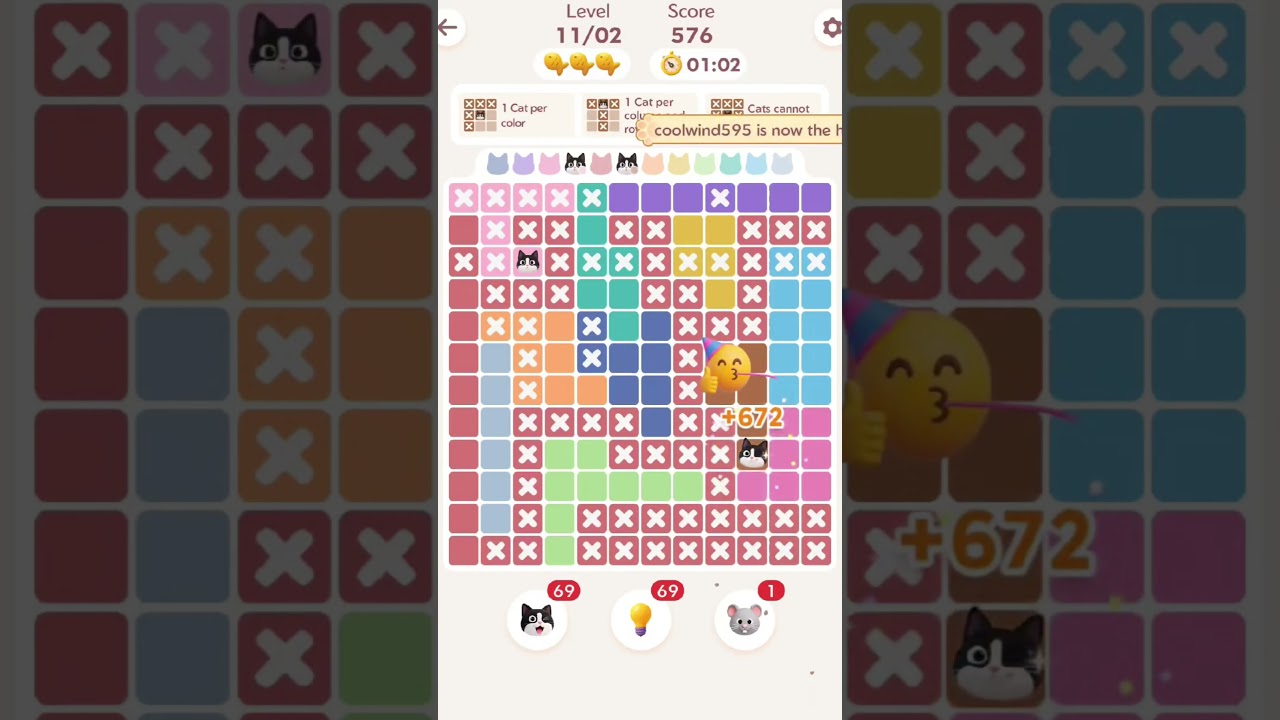
To solve puzzles in Meowdoku!! without mistakes, scan the grid for the most constrained color territories first, place your confirmed cats, and immediately mark X symbols across all eliminated tiles. Every cat you place must simultaneously satisfy row, column, territory, and adjacency rules. Applying a disciplined cross-out routine after every placement prevents mistakes and reveals forced single-cell moves across the board.
Core Rules and Spatial Constraints
Every Meowdoku!! board requires you to place cats according to four overlapping spatial rules. Placing a single cat triggers immediate eliminations across both linear axes and regional boundaries.
| Rule | Requirement | Immediate Elimination Effect |
|---|---|---|
| Row Limit | Exactly 1 cat per row | Fills all other squares in the horizontal row with X marks |
| Column Limit | Exactly 1 cat per column | Fills all other squares in the vertical column with X marks |
| Territory Limit | Exactly 1 cat per color zone | Fills all remaining tiles in that colored shape with X marks |
| Adjacency Buffer | No touching (orthogonal or diagonal) | Fills all 8 surrounding neighbor tiles with X marks |
The adjacency buffer is the most frequent source of failed attempts. Even if a placement satisfies row, column, and color rules, touching another cat diagonally causes an immediate error.
Identifying Opening Moves in Constrained Zones
Start every board by locating color territories with the smallest total area. Shapes containing only two or three cells drastically restrict valid options compared to larger territories.
Focus your initial scan on two high-value setups:
- Corner and edge territories: Shapes squeezed against board borders have fewer legal configurations and quickly limit neighboring space.
- Single-line territories: When an entire color territory is confined to a single row or column, that line's single cat must occupy one of those specific cells. You can immediately place X marks in every other tile along that row or column outside the territory, even before knowing which cell holds the cat.
The Cross-Out Routine for Placed Cats
Leaving empty, unverified squares after finding a cat causes oversight errors. The moment you confirm a cat's location, apply this four-part clearing sequence:
- Mark an X across every remaining empty cell in that horizontal row.
- Mark an X across every remaining empty cell in that vertical column.
- Mark an X across all other empty tiles within the same color territory.
- Mark an X across all eight surrounding orthogonal and diagonal neighbor squares.
The eight-square buffer often extends into adjacent color territories. Neutralizing those neighboring tiles frequently reduces an adjacent multi-cell shape down to a single remaining open cell, triggering a chain of forced placements.
Breaking Mid-Game Deadlocks with Intersection Scans
When no single-cell openings remain and open territories still have two or three candidates, switch your focus from color shapes to line scans:
- Locate rows or columns that contain only two remaining open squares.
- Test whether placing a cat in the first candidate would eliminate all remaining legal squares in an intersecting color territory.
- Check whether a candidate touches an already confirmed or implied cat position diagonally.
- Mark an X on any candidate that causes a downstream contradiction.
- Place the cat in the remaining open square of that line and resume your standard clearing sequence.
Endgame Verification to Prevent Mistakes
As the board fills with X marks, the remaining open cells appear isolated, which can tempt players to place the final cats quickly. However, late-game errors typically happen when players satisfy row and column limits while overlooking diagonal contact between the final two territories.
Before confirming your last cats, cross-check each candidate against its immediate diagonal neighbors. Complete a quick final check: confirm each row has one cat, each column has one cat, each color territory contains one cat, and no two cats touch at their edges or corners.

Free Meowdoku! Codes
Current active codes and how to redeem them.

James Brown
James focuses on Android gaming on PC, emulator setup, controls, performance tuning, and practical troubleshooting for longer play sessions.
COMMUNITY
Player Comments
70 players commented on this guide.
Good guide for Meowdoku! players. The strategy part was useful.
I tried this today and it worked better than my old setup.
The explanation is clear, especially for beginners.
The tips are practical and easy to follow.