
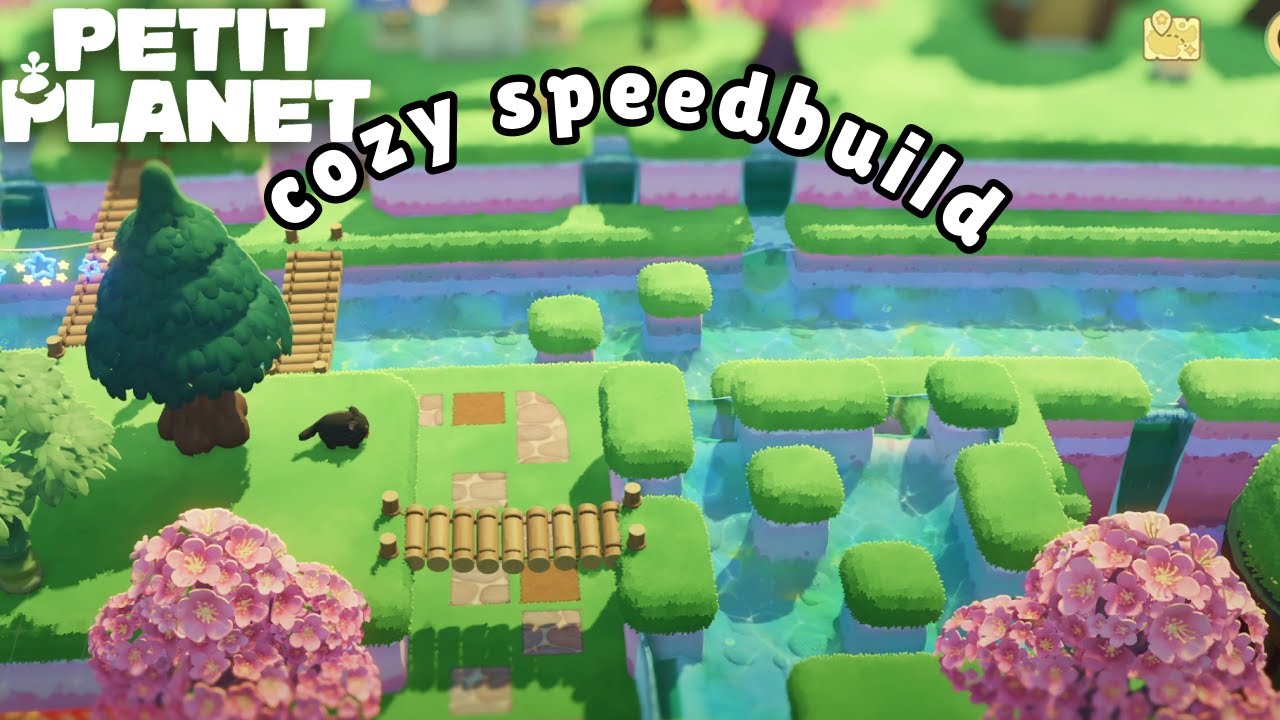
Creating immersive, naturalistic landscapes in Petit Planet requires more than just placing assets; it demands an understanding of how water physics and structural placement interact with your island's terrain. To create convincing waterways, you must balance vertical elevation changes with strategic pathing. Whether you are aiming for a serene forest stream or a grand cascading waterfall, the secret lies in how you layer your terraforming tools and integrate bridge architecture to guide the player's journey.
Understanding the Mechanics of Water Elevation
The foundation of any successful water feature in Petit Planet is the elevation gradient. Water in the game does not flow naturally across flat, uniform terrain; it requires a distinct drop in height to trigger the waterfall animation and directional flow.
To create a functional waterfall, you must establish a clear "source" and "basin":
- The Upper Plateau: Use your terraforming brush to raise an area of land by at least two levels. This provides the necessary height for the water to spill over.
- The Cliff Edge: Instead of sharp, 90-degree corners, use the smoothing tool on the edge of your plateau. A rounded cliff face allows the water texture to drape over the terrain more naturally, preventing the "blocky" look that often happens with novice builds.
- The Basin: Carve out a lower area to receive the water. Without a basin, the water will appear to simply vanish into the ground, which breaks immersion. By creating a pond at the base, you provide a destination for the visual flow, making the scene feel grounded in the game’s physics.
Strategic Bridge Placement for Gameplay Flow
Bridges in Petit Planet are not just decorative; they are the primary tools for controlling player movement and visual focus. A well-placed bridge can turn an empty expanse of water into a scenic focal point.
- The Narrowing Technique: Always look for the narrowest points in your river to place bridges. Wide, sprawling bridges can often look out of place if the river is too vast. If you have a wide river, create an "island" or a bend in the stream to force the water into a tighter channel, which naturally justifies the bridge’s presence.
- Pathing Alignment: Always align your bridge with the paths leading into it. A bridge that sits at an awkward angle to the surrounding terrain will disrupt the "flow" of the map. Ensure your pathing tools connect directly to the bridge endpoints to create a seamless transition that encourages exploration.
- The Vista Effect: Place bridges at higher elevations overlooking a waterfall. Because the game engine renders lighting and reflections differently at varying heights, these "lookout" bridges provide the best opportunities for high-quality screenshots and cinematic exploration.
Integrating Flora for a Realistic Ecosystem
A water feature in Petit Planet often looks "stiff" until you integrate the surrounding environment. The transition between water and land is the most critical area for visual detail.
- Layering Foliage: Use a mix of tall, thin grasses and water-loving reeds along the riverbanks. By placing larger trees further back from the water’s edge and smaller shrubs directly against the bank, you create a sense of depth that makes your island feel much larger than it actually is.
- Rock Placement: Erosion is a key visual cue for realism. Place clusters of stones and rocks at the base of your waterfall to simulate the impact of falling water. This small detail helps hide the transition point where the water meets the ground, making the waterfall feel like a permanent, natural feature of the environment rather than a placed asset.
- Avoiding Surface Clutter: While it is tempting to decorate the water itself, keep the water surface relatively clear. Excessive items on the water can cause clipping issues with the character's pathing and make the water texture appear muddy or unstable.
Common Pitfalls: Scale, Proportion, and Collision
One of the most frequent mistakes in Petit Planet is ignoring scale. If your bridge is significantly wider than the river, or if the river is too narrow for the bridge’s supports, the build will feel disjointed.
The Rule of 20%: Your river width should ideally be consistent with the length of your bridge asset. A good rule of thumb is that the water span should not exceed the bridge length by more than 20%. Any wider, and the bridge will appear to be "floating" rather than resting on the banks.
Testing Collision Boxes: Always test your bridge crossings in-game. Petit Planet has specific collision heights; if your terrain is slightly too high or low, your character may jitter or "clip" into the bridge structure. If you notice movement issues, use the flatten tool to ensure the ground level at both ends of the bridge is perfectly uniform before finalizing your decoration.
Achieving Visual Cohesion
To make your build look professional, establish a "design language" for your water features.
- Material Consistency: If you use a specific stone type for a bridge, try to use that same material for the surrounding retaining walls or the base of your waterfall. This creates a recurring visual motif that ties disparate parts of your island together.
- Shadow and Lighting: Bridges cast shadows that can make a shallow, flat-looking stream appear deep and mysterious. Place your water features in areas that catch the late-afternoon sun to highlight the shimmering, reflective properties of the water surface.
- Camera Rotation: Finally, always check your build from the "player's eye" perspective. Rotate your camera 360 degrees around the bridge and waterfall. A feature that looks great from one angle might reveal a gap in the terraforming from another. Regular adjustments from these lower angles are the hallmark of an expert Petit Planet builder.
By combining these techniques—intentional elevation, strategic structural placement, and careful layering of flora—you can transform your Petit Planet island into a vibrant, living space that feels both natural and expertly crafted. Focus on the transition zones, keep your paths logical, and your water features will become the centerpiece of your world.

Free Petit Planet Codes
Current active codes and how to redeem them.

Sarah Williams
Sarah specializes in RPG and collection games, explaining team building, character growth, and beginner-friendly ways to avoid expensive early mistakes.
COMMUNITY
Player Comments
50 players commented on this guide.
Good guide for Petit Planet players. The strategy part was useful.
This saved me time in the early game.
I tried this today and it worked better than my old setup.
I wish I had read this before upgrading the wrong thing.