
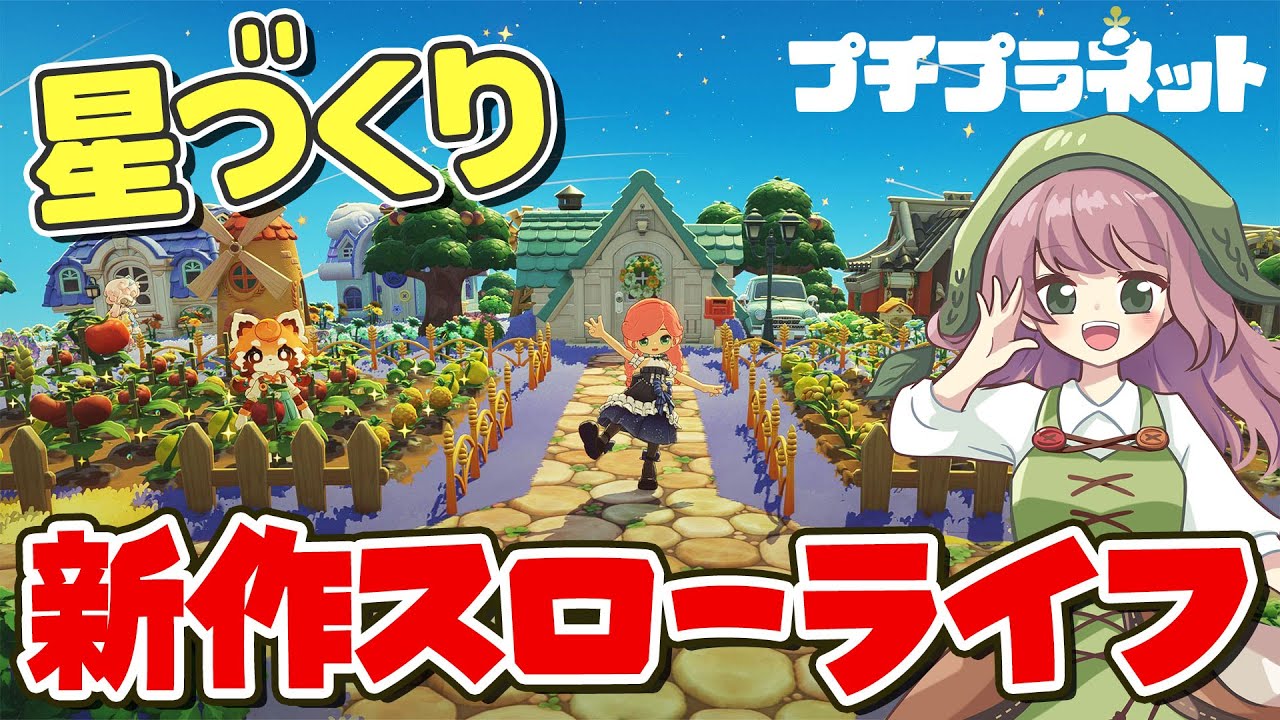
In Petit Planet, your star is more than just a home base; it is a canvas for your creativity and a hub for your gameplay progression. Whether you are aiming for a minimalist cosmic retreat or a lush, rustic sanctuary, mastering the art of customization requires an understanding of both spatial logic and thematic consistency. This guide explores the essential techniques for transforming your blank slate into a functional, cozy, and visually stunning world.
Defining Your Unique Aesthetic Theme
The foundation of a successful Petit Planet star is a singular, cohesive visual theme. Without a plan, it is easy to fall into the trap of "collection clutter," where your star becomes a disorganized graveyard of high-value items that simply do not match.
Before committing resources, define your direction. Are you building a futuristic tech-hub, a whimsical woodland cottage, or a serene zen garden? A clear theme dictates your inventory management, helping you filter out items that don’t fit your vibe.
- Color Palette Consistency: Choose a primary, secondary, and accent color. Ensure that your furniture and terrain decorations lean into these tones to maintain visual harmony.
- Thematic Zoning: Divide your star into "districts." Even on a small planet, you can create a "work zone" for crafting and a "leisure zone" for relaxation. By keeping these zones distinct, you prevent the visual noise that occurs when functional items clash with decorative ones.
- Inventory Curation: Resist the urge to place every item you unlock. If an item doesn’t serve your theme, keep it in storage. In Petit Planet, negative space is just as important as the furniture itself.
Strategic Furniture Placement for Spatial Flow
Spatial flow refers to the ease with which you and potential visitors move through your star. If your layout is too dense, you create "dead zones" that feel claustrophobic and difficult to navigate.
To optimize your environment:
- The "Path of Least Resistance": Ensure there is always a clear, unobstructed path from your arrival point to your most-used stations, such as crafting benches or storage units.
- Activity Clusters: Instead of scattering items uniformly across the map, group them into functional clusters. A chair next to a lamp and a small rug creates an "intimate seating area," which feels more intentional than a lone chair sitting in the middle of an open field.
- Visual Weight Balancing: Place larger items—like monuments or major buildings—first. Once these anchors are set, use smaller decorative items to "frame" them. This creates a sense of scale and prevents your layout from feeling lopsided.
Sculpting and Managing Terrain Features
The terrain in Petit Planet is a dynamic tool. Unlike static backgrounds in other games, your star’s topography directly influences your design opportunities.
Use sculpting tools to break the monotony of a flat surface. Introducing subtle elevation changes—such as a raised platform for your house or a sunken garden for your flora—adds depth and visual interest. When modifying the terrain, follow these best practices:
- Utilize Elevation for Depth: High-elevation areas draw the eye. Use these spots for your most prized aesthetic pieces.
- Incorporate Natural Boundaries: Use water features, rocks, or hedge rows to naturally delineate your themed zones. This avoids the need for artificial, jarring barriers and makes your star feel organic.
- The "Footprint" Rule: Always account for the footprint of your structures before terraforming. Large buildings often require flat, stable ground. Plan your foundational layout before committing to complex landscaping, as significant terrain changes can make it difficult to place large items later.
Balancing Functionality with Visual Appeal
The biggest challenge for players in Petit Planet is the "Utility vs. Beauty" conflict. You need functional items—like crafting stations and resource collectors—to progress, but these items are often bulky and utilitarian in design.
The secret to a high-ranking star is thematic integration. Don't hide your tools; incorporate them into your aesthetic:
- The Workshop Aesthetic: If your star is rustic, surround your crafting station with crates, tools, and workbenches to make it look like an active, lived-in workshop rather than a misplaced game object.
- Disguise through Decoration: Use tall shrubbery, decorative screens, or architectural elements to mask the more "industrial" looking items. If you must have a storage unit, placing it behind a partition or inside a dedicated shed structure keeps your aesthetic clean.
- Prioritize "Cozy" Metrics: In Petit Planet, "coziness" often correlates with specific item types. Identify which items provide the highest comfort bonuses and ensure these are placed in your most frequently visited areas. A star that is beautiful but lacks functionality will eventually feel like a chore to manage.
Common Mistakes to Avoid
As you refine your star, avoid these common pitfalls that often hinder progress:
- Over-Crowding: It is tempting to fill every pixel with items. However, Petit Planet rewards thoughtful composition. If your star feels cluttered, remove 20% of your items. You will be surprised at how much more impactful the remaining pieces become.
- Neglecting Verticality: Players often focus only on the ground. Use items that add height—like tall trees, pillars, or hanging decorations—to draw the player's eye upward and make the planet feel grander.
- Ignoring Lighting: Lighting is the quickest way to change the "mood" of your star. Use soft, warm lighting for residential areas and brighter, cooler lights for work zones. A well-lit star feels more welcoming and is significantly easier to navigate during night cycles.
Conclusion: Developing Your Signature Style
Mastering Petit Planet is an iterative process. Your first design won't be your final one, and that is part of the game's charm. By focusing on a cohesive theme, managing your spatial flow through activity clusters, and intelligently integrating functional items, you can create a star that is both a personal sanctuary and a masterclass in design.
Remember to revisit your layout as you unlock new items and features. As your collection grows, your ability to blend form and function will become your greatest asset. Start with a solid plan, keep your zones distinct, and don't be afraid to experiment with the landscape to make your Petit Planet experience truly your own.

Free Petit Planet Codes
Current active codes and how to redeem them.

James Brown
James focuses on Android gaming on PC, emulator setup, controls, performance tuning, and practical troubleshooting for longer play sessions.
COMMUNITY
Player Comments
61 players commented on this guide.
This saved me time in the early game.
Good guide for Petit Planet players. The strategy part was useful.
Can you add more details about strategy in a future update?
The explanation is clear, especially for beginners.