
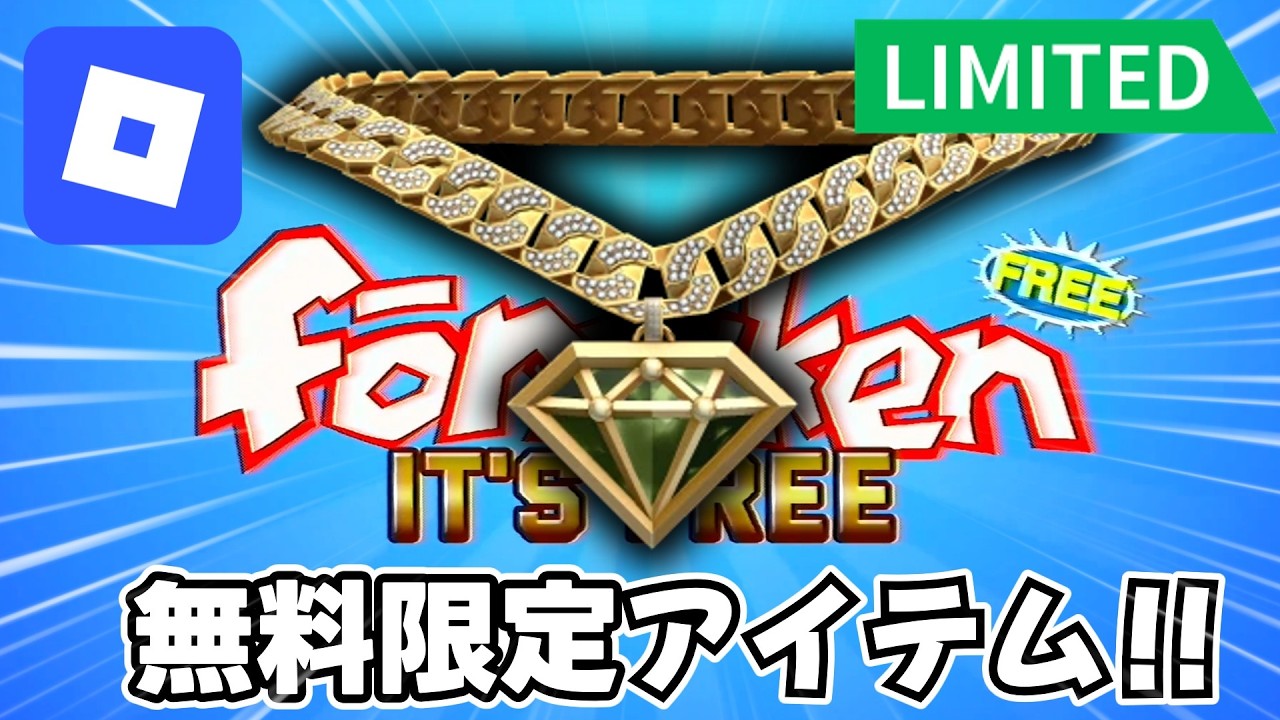
To claim the free official Diamond Chain in Roblox, locate the verified accessory listing published directly by Roblox in the Avatar Marketplace and complete the zero-Robux checkout before its one-week promotional window expires. Once claimed, the item permanently binds to your account inventory across all platforms.
How to Claim the Diamond Chain in the Marketplace
The Diamond Chain is a promotional catalog drop distributed directly by Roblox at no Robux cost. You do not need a Roblox Premium subscription, an experience badge, or a third-party link to redeem it.
Follow these steps to claim the accessory on either the desktop website or the mobile app:
- Open the Roblox app or navigate to the official Roblox website and select Marketplace.
- Open the Accessories category and choose the Neck subcategory.
- Type "Diamond Chain" into the search bar.
- Locate the listing titled Diamond Chain and verify that the creator is listed as Roblox with a verified checkmark.
- Confirm the item price displays as Free.
- Click the green Get button.
- Select Get Now in the confirmation prompt to complete the 0 Robux transaction.
When the transaction finishes, the button status updates to "Item Owned." You can immediately access the item in your inventory.
| Feature | Promotional Diamond Chain | Standard UGC Neck Accessories |
|---|---|---|
| Price | 0 Robux (Free) | Typically 50–150+ Robux |
| Availability | 1-week promotional window | Ongoing or stock-limited |
| Creator | Roblox (Official) | Community Creators |
| Inventory Status | Permanent account ownership | Permanent account ownership |
Troubleshooting Marketplace Errors and Failed Claims
High user traffic during limited-time platform giveaways can cause latency or failed transactions. If you encounter issues during redemption, apply these fixes:
- Do not repeatedly spam the purchase button: Sending rapid requests can trigger temporary client-side rate limits.
- Switch from the mobile app to a browser: If the app displays an infinite loading wheel or returns a generic "Purchase Failed" message, sign into your account using a desktop or mobile web browser (such as Chrome or Safari) to bypass local app cache delays.
- Verify your inventory: If the marketplace shows an error after you click confirmation, navigate to Inventory > Accessories > Neck to verify whether the item already registered to your account before attempting the claim again.
Identifying the Real Item and Avoiding Scams
Promotional platform drops often attract copycat listings and phishing attempts. To protect your account:
- Check the creator name: Legitimate platform giveaways are published by the official Roblox account with a verified badge, not a third-party group or individual user mimicking the asset name.
- Never use external claim sites: Official catalog items never require downloading third-party software, answering off-site surveys, or inputting your account credentials.
- Avoid game pass scams: You do not need to join custom experiences or buy developer passes to unlock the official Diamond Chain. Only acquire the item through the native Roblox Marketplace checkout window.
Equipping and Styling the Chain
The Diamond Chain attaches to your avatar's neck slot. How it displays depends on your avatar setup:
- Classic R6 Avatars: The chain rests flat against standard blocky chest geometry with minimal clipping.
- R15 and Layered Clothing: Bulky 3D layered clothing—such as thick winter coats or oversized hoodies—can cover or clip through the chain mesh. To ensure the pendant remains visible, pair it with low-collar layered shirts, open-front jackets, or classic 2D clothing. You can also adjust head and body proportions in the Avatar Customizer to refine where the links rest.
Free Roblox Codes
Current active codes and how to redeem them.

James Brown
James focuses on Android gaming on PC, emulator setup, controls, performance tuning, and practical troubleshooting for longer play sessions.
COMMUNITY
Player Comments
60 players commented on this guide.
I tried this today and it worked better than my old setup.
Nice guide. I am checking the other Roblox articles next.
This helped me understand strategy much better.
The tips are practical and easy to follow.