
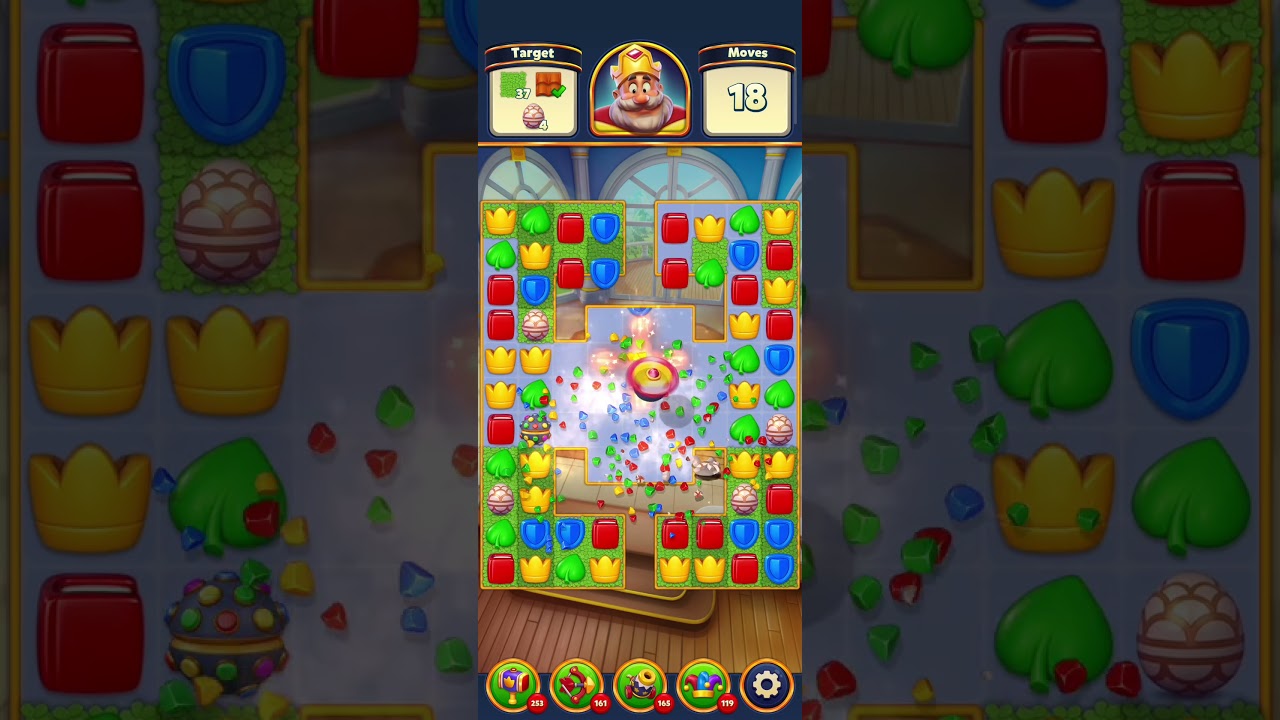
To beat Level 1349 in Royal Match without using pre-game boosters or inventory tools, execute simultaneous double swipes to clear paired sets of tiles before cascading gravity shifts the grid. This technique preserves planned tile alignments across partitioned board areas, allowing you to manufacture and combine power-ups manually to eliminate layered obstacles.
How Double Swiping Works in Royal Match
Standard moves initiate immediate board gravity that drops columns and scrambles planned alignments. Double swiping—also known as simultaneous movement—uses multi-touch inputs to resolve two independent matches in the same fraction of a second before the falling animation locks the board.
Executing simultaneous matches provides distinct tactical benefits on partitioned boards:
- Bypasses sequential tile delays to keep neighboring columns stable.
- Clears supporting tiles across board dividers without relying on random drops.
- Forms power-ups at predetermined coordinates rather than unpredictable cascade locations.
Step-by-Step Dual Swipe Execution
Executing two swipes together requires deliberate board evaluation and synchronized finger placement:
- Identify twin matches: Locate two independent match setups across the board that do not share connecting tiles.
- Prioritize power-up creation: Select pairs where at least one swipe creates a four-piece Rocket, a square Propeller, or a five-piece Light Ball.
- Align touch points: Place two fingers—typically both thumbs—directly over each designated tile set.
- Swipe simultaneously: Drag both matches into place at the exact same instant so the engine registers both actions before falling physics trigger.
- Wait for board stability: Allow all resulting cascades and secondary tile drops to finish completely before planning your next move.
Prioritizing Power-Up Combinations
Without pre-game boosters, combining on-board power-ups is the primary engine for clearing multi-hit obstacles and reaching confined corners on Level 1349.
| Power-Up Combination | Board Effect | Tactical Use on Level 1349 |
|---|---|---|
| Light Ball + Light Ball | Clears the board and removes one layer from every obstacle | Full-board reset to open space on stalled layouts |
| Light Ball + TNT | Transforms matching colored pieces into detonating TNT barrels | Broad clearing power to shatter heavy obstacle clusters |
| Light Ball + Rocket | Converts matching colored pieces into horizontal and vertical Rockets | Sweeping clearance across separated columns |
| TNT + Propeller | Carries an explosive blast directly to a priority target | Targeted removal of isolated obstacles in tight corners |
| Rocket + Propeller | Flies directly to an objective to clear a cross pattern | Puncturing narrow lanes behind barrier walls |
Handling Input Desynchronization
If your fingers touch the screen unevenly, the game registers only the first swipe as an isolated move. This desynchronization triggers column shifts that displace the second planned match, effectively wasting a turn.
When an input desynchronizes:
- Remove both hands from the screen immediately rather than panic swiping.
- Wait until all falling pieces, cascades, and incidental reactions stop.
- Re-evaluate the board from the bottom third upward, as lower-board matches trigger the largest cascades to generate new power-up opportunities organically.
Free Royal Match Codes
Current active codes and how to redeem them.

Emily Johnson
Emily writes practical mobile strategy guides with a focus on resource planning, base progression, and the early decisions that shape a long-term account.
COMMUNITY
Player Comments
159 players commented on this guide.
Good guide for Royal Match players. The strategy part was useful.
The tips are practical and easy to follow.
The explanation is clear, especially for beginners.
This guide answered the exact question I had.