
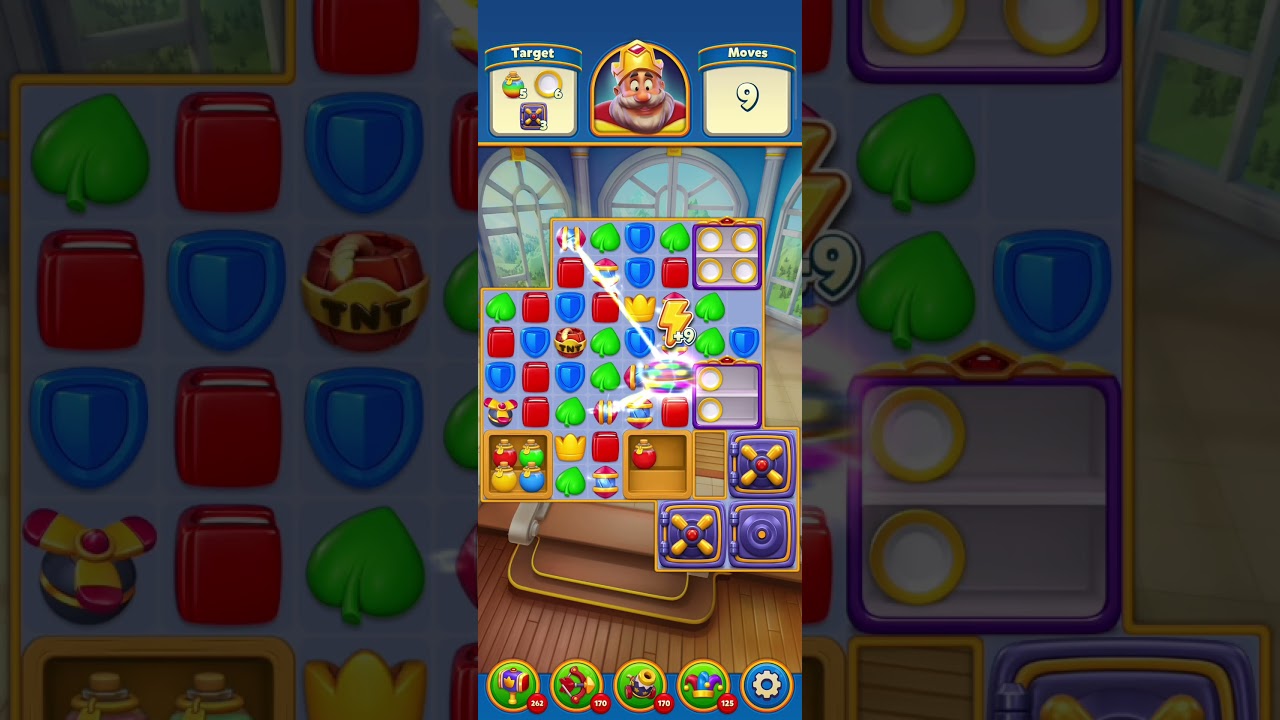
To beat Royal Match Level 1383 without spending coins or activating pre-stage boosters, you must rely on double swiping. This multi-touch technique requires executing two distinct tile matches simultaneously before the game registers gravity. Making parallel moves locks in board setups and dismantles split obstacles across the board before unintended cascades disrupt your planned combinations.
How Double Swiping Works in Royal Match
Under standard single-swipe play, Royal Match processes moves sequentially. Completing a match triggers an animation that locks the board while tiles clear and upper columns drop into empty spaces. If those falling pieces trigger secondary cascades, any other match or power-up alignment you planned elsewhere on the grid can be prematurely shifted or scrambled.
Double swiping overrides this delay by utilizing the game's multi-touch screen recognition. When two fingers execute independent tile swaps at the exact same moment, the game registers both actions into the active state simultaneously. Neither swipe is delayed by the other, and gravity does not begin dropping replacement tiles until both matches are confirmed.
| Move Technique | Cascade Risk | Setup Preservation | Input Requirement |
|---|---|---|---|
| Sequential Swiping | High; falling tiles displace lower rows | Low; fragile 4- or 5-tile alignments can break | Single-finger drag |
| Double Swiping | None during input; both resolve together | High; secures power-ups before tiles drop | Two-finger parallel drag |
Step-by-Step Simultaneous Swipe Execution
Executing double swipes requires surveying the entire grid and coordinating both hands before touching the screen.
- Locate two independent matches: Scan the board for two valid three-tile matches or power-up setups that do not share any tiles.
- Set your finger positions: Place one finger or thumb over the first swap pair and your other finger over the second pair without dragging yet.
- Swipe in unison: Flick both pairs into their matched positions at the exact same moment.
- Wait for the board to settle: Release the screen completely and allow dual tile eliminations, new tile drops, and incidental cascades to conclude before entering your next move.
Double swiping has mechanical limits. Both matches must be completely independent. If two planned swaps share a tile or sit directly adjacent in the same column, the engine registers only one action and ignores the second, consuming a move without completing both clears.
Preserving Power-Up Setups from Cascades
Dense obstacle placement on Level 1383 makes natural power-up creation essential for clearing the board within the move limit. Creating Rockets (four tiles in a line), TNT barrels (T- or L-shapes), and Light Balls (five tiles in a row) normally leaves fragile alignments exposed to chain reactions caused by clears elsewhere on the board.
If you spot a four- or five-tile alignment on the lower half of the board alongside a standard three-match near the top, swiping them sequentially risks losing the lower creation to falling tiles. Executing both swipes simultaneously guarantees that the power-up forms cleanly. Combining natural TNT and Rocket blasts clears three horizontal rows and three vertical columns simultaneously, opening the grid to generate Light Balls without relying on inventory tools.
Managing Move Economy Without Boosters
Completing Level 1383 booster-free protects your inventory of Royal Hammers, Arrows, Cannons, and Jester Hats, while saving the 900-coin fee for five extra moves. Achieving this requires disciplined board management:
- Open the board early: Dedicate initial double swipes to clearing border obstacles and unlocking blocked columns to increase tile flow.
- Maintain symmetrical clearing: Alternate or pair moves across both flanks of the board so replacement tiles fall evenly rather than stagnating on one side.
- Restart unproductive layouts: If the starting layout contains no productive matches or power-up possibilities, restart the level immediately before making your first move to avoid wasting lives or resources on an unfavorable board.
Free Royal Match Codes
Current active codes and how to redeem them.

James Brown
James focuses on Android gaming on PC, emulator setup, controls, performance tuning, and practical troubleshooting for longer play sessions.
COMMUNITY
Player Comments
108 players commented on this guide.
This helped me understand strategy much better.
This saved me time in the early game.
This guide answered the exact question I had.
Good guide for Royal Match players. The strategy part was useful.