
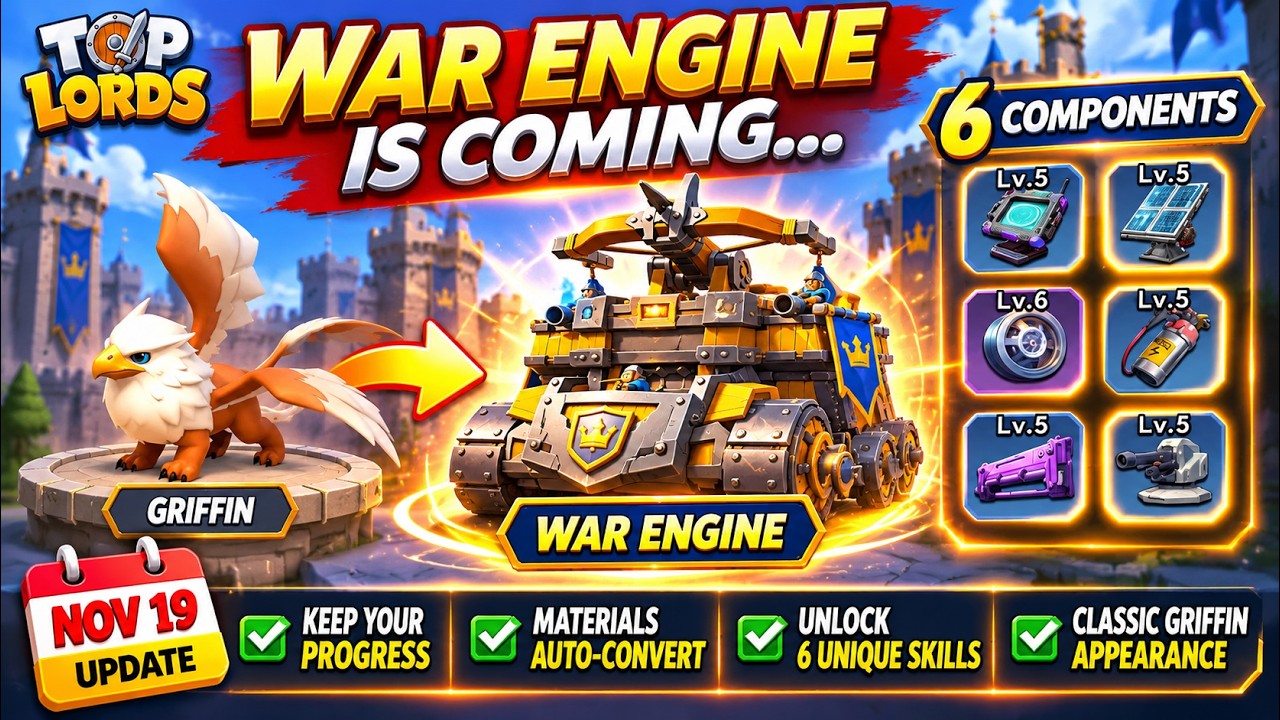
To transition smoothly into the War Engine update in Top Lords, claim all converted items from your system mailbox, level your War Engine Core to unlock every component socket, and manually equip your best parts onto your primary squad. The update permanently replaces the legacy Griffin beast system with a mechanical chassis, converting your historical progression into core levels, modular equipment, and upgrade currencies.
How Griffin Conversion Works
Player investment from the Griffin system transfers into the War Engine architecture through direct stat mapping and currency refunds. Your baseline Griffin rank determines your starting War Engine Core level, preserving base combat power without requiring a complete rebuild. Extra evolution stones, skill tomes, and related items are refunded to your mailbox as universal upgrade gears and component chests.
| Legacy Griffin Metric | War Engine Equivalent | Immediate Action Required |
|---|---|---|
| Griffin Base Level | War Engine Core Level | Confirm your base attributes transferred to Squad 1 |
| Griffin Star Rating | Modular Component Parts | Open component chests and socket parts into the chassis |
| Griffin Skill Ranks | Tactical Engine Modules | Select active artillery and passive skill modules |
| Unspent Griffin Stones | Universal Upgrade Gears | Reinvest gears into your primary War Engine Core |
Collect all mail attachments before entering combat or alliance rallies. Uncollected items remain unusable in your inventory, leaving your squads without critical component stat multipliers.
War Engine Core Sockets and Combat Mechanics
The War Engine Core sets your squad attribute caps and controls socket availability. Upgrading the central chassis unlocks four dedicated equipment slots:
- Weaponry: Increases overall troop attack values.
- Armor Plating: Grants damage mitigation to improve squad durability.
- Engine Thrusters: Increases travel speed across the kingdom map.
- Targeting Radar: Boosts critical strike chance and tactical skill triggers.
Higher component tiers require higher Core levels. Even if conversion crates grant Epic or Legendary modules, the chassis must reach the specified level threshold before mounting them.
During combat, the War Engine deploys automated artillery strikes at fixed intervals. This fire support operates independently of hero action turns, maintaining consistent damage output even when heroes are silenced or stunned. Equipping components also provides targeted squad synergies:
- Ranger Focus: Offensive radar modules boost physical backline damage, supporting ranged commanders such as Edward and Cleopatra.
- Frontline Durability: Defensive plating provides percentage-based damage reduction, reinforcing frontline defenders like Harald III.
- March Mobility: Upgraded thrusters decrease deployment times for rapid map intercepts, retreat maneuvers, and rally reinforcements.
Step-by-Step Upgrade Priority
Focusing all refunded conversion materials on your primary Squad 1 engine delivers better battle results than dividing resources across secondary marches. A single maximized engine provides higher punch in contested territory and rallies.
- Collect Mailbox Refunds: Retrieve all universal upgrade gears, component selection boxes, and skill modules from your in-game mail.
- Push Core Level Milestones: Spend universal upgrade gears on the War Engine Core until all four component slots unlock.
- Equip Primary Damage Modules: Open selection chests to mount Weaponry and Targeting Radar parts onto Squad 1.
- Assign Complementary Skills: Slot tactical skills that match your primary march type, aligning with either Ranger or Warrior hero setups.
- Upgrade Plating and Thrusters: Invest remaining materials into defensive plating and thrusters to balance march survival and travel speed.
Post-Update Pitfalls to Avoid
- Deploying With Empty Sockets: The conversion automatically sets your Core level, but modular components are not slotted automatically. You must open the War Engine interface and equip parts manually before fighting.
- Splitting Upgrade Materials: Distributing gears equally across multiple squads weakens your frontline combat power. Keep your highest-tier modules and tactical chips focused on Squad 1 until it hits socket caps.
- Ignoring Event Timing: Save subsequent gear upgrades for Alliance Duel event days that reward power growth points, maximizing reward milestones rather than spending resources immediately.
Free Top Lords Codes
Current active codes and how to redeem them.

Emily Johnson
Emily writes practical mobile strategy guides with a focus on resource planning, base progression, and the early decisions that shape a long-term account.
COMMUNITY
Player Comments
43 players commented on this guide.
This guide answered the exact question I had.
Good guide for Top Lords players. The strategy part was useful.
I wish I had read this before upgrading the wrong thing.
The explanation is clear, especially for beginners.