
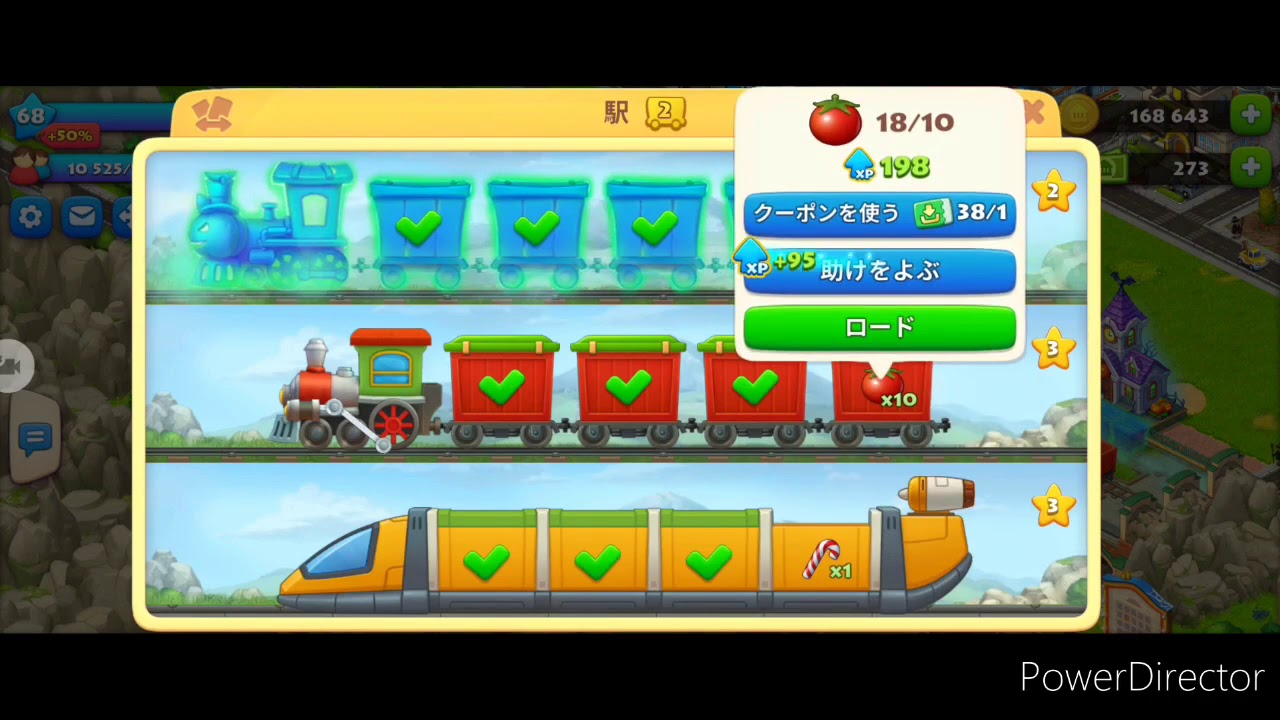
Train skins in Township are purely cosmetic customizations. Equipping a skin changes the visual appearance of your locomotive, cargo wagons, and station departure animations, but it does not alter transit timers, experience points, coin rewards, or building material drops. If you want faster delivery times, you must upgrade your train lines at the Academy of Industry rather than relying on train skins.
How to Equip and Swap Train Skins
You can equip unlocked skins at any time directly through your station menu without spending coins or interrupting active transit schedules:
- Tap the central train station in your town to open the dispatch menu.
- Select the specific train line you want to customize (Train 1, Train 2, or Train 3).
- Tap the skin customization icon on the train info card.
- Browse your unlocked skins, select your preferred look, and confirm the change.
Swapping or removing a skin is free and will not reset cargo crates or delay arriving shipments. If a train is already traveling across the map when you change its skin, the new visual model will display as soon as it pulls back into your station.
Comparing Featured Train Skins
Each skin features a distinct color scheme, engine chassis, and departure effect. You can assign different designs to each of your three transport trains to tell them apart at a glance.
| Train Skin | Aesthetic Theme | Dominant Colors | Departure Effect |
|---|---|---|---|
| Ghost Train | Supernatural / Halloween | Deep purple and glowing green | Glides away with a trail of mystical mist |
| Ultra Express | Sci-Fi / High-speed bullet | Polished white and metallic blue | High-tech glide with smooth mechanical precision |
| Red Lightning | Streamliner / Vintage racing | Bold crimson and golden yellow | Low-profile chassis rolling out with an aggressive forward surge |
These customizations also reskin the trailing flatbeds and containers, keeping your cargo wagons visually matched to the locomotive.
Cosmetic Skins vs. Academy of Industry Upgrades
A common point of confusion is whether high-speed designs like the Ultra Express or Red Lightning make shipments arrive faster. While their sleek departure animations look faster than the standard steam locomotive, train skins provide zero mechanical buffs.
To actually speed up rail shipments, invest metal ingots (bronze, silver, gold, and platinum) into your train lines at the Academy of Industry. Upgrading lines through the Academy can reduce train transit times by up to 50% and boost leveling experience. Equipping a custom skin simply gives those upgraded trains a distinct look.
Station Layout Tips
Assigning different skins across Train 1, Train 2, and Train 3 creates clear visual landmarks on your tracks. For example, setting Train 1 to Red Lightning, Train 2 to Ultra Express, and Train 3 to the Ghost Train lets you immediately identify which line has returned without opening the station dispatch card.
To keep these departure animations visible, avoid placing tall skyscrapers or massive community buildings directly behind or beside your station platform and outgoing rail lines. Clear sightlines make tracking active trains easier and prevent misclicks during timed co-op regatta tasks.

Free Township Codes
Current active codes and how to redeem them.

Sarah Williams
Sarah specializes in RPG and collection games, explaining team building, character growth, and beginner-friendly ways to avoid expensive early mistakes.
COMMUNITY
Player Comments
159 players commented on this guide.
This helped me understand strategy much better.
This guide answered the exact question I had.
This saved me time in the early game.
Good guide for Township players. The strategy part was useful.