
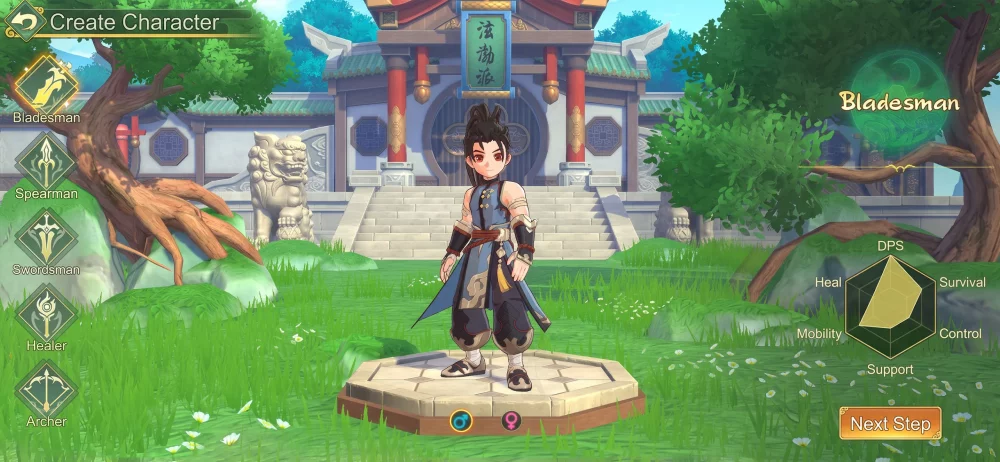
Returning players to Yulgang W will find that the game focuses heavily on recreating the classic aesthetic and UI feel of the original PC experience. To successfully transition back, focus on evaluating the fidelity of the interface, the responsiveness of the skill animations, and the classic character model transitions. By confirming these legacy elements early, you can adapt your muscle memory to the modern mobile environment without losing the tactical familiarity required for efficient questing and combat mastery.
Assessing Interface Fidelity and Navigation
The UI in Yulgang W is designed to mirror the classic version, which is a major point of consideration for long-term fans. For returning players, the most immediate task is to map your mental model of the original menu systems to the current mobile layout. The game utilizes a familiar HUD that prioritizes screen space for combat while keeping essential inventory and character stat menus accessible through traditional icon placements.
When you first log in, take time to explore the settings menu to toggle display options that affect the visual clutter. The developers have emphasized that while the resolution and graphical fidelity are updated for modern devices, the positioning of the skill bars and character status portraits remains faithful to the core Yulgang experience. Verifying these placements early prevents accidental clicks during high-intensity mob farming or PVP encounters.
Evaluating Skill Animation and Combat Feedback
One of the most significant aspects of the Yulgang W experience is the visual feedback provided by your class skills. Returning players should pay close attention to how animations for signature moves translate from the original game to this mobile iteration. The timing of these animations is critical for understanding the "weight" of your attacks and for managing the pacing of your combat rotations during auto-combat or manual play.
Test your character's primary skill chain in an early-game zone to observe the frame transitions. You will notice that the iconic visual flair of the skills has been preserved, which helps in identifying enemy telegraphs if you are familiar with the original game's boss mechanics. If an animation feels slightly delayed compared to your memory, adjust your playstyle to prioritize early engagement rather than reactive combat to compensate for the modern engine's interpolation.
Character Models and Aesthetic Consistency
The character models in Yulgang W serve as a bridge between the 20-year-old original and current gaming standards. As you progress, you will notice that the iconic visual style—specifically the distinct silhouettes and clothing silhouettes for the various classes—remains largely unchanged. This is intentional, as it allows players to immediately identify class roles in group settings or within the world map simply by looking at character gear.
When choosing or customizing your character, look for the subtle enhancements in texture and lighting that differentiate this version from its predecessors. While the gear looks "classic," the engine now handles dynamic lighting effects on armor sets, which can change how you perceive your character's progression. Use this visual clarity to judge your gear upgrades, as the aesthetic consistency makes it easier to spot when a high-tier piece of equipment has been successfully equipped compared to lower-tier base armor.
Managing Transitions to Modern Mobile Controls
The transition from keyboard-and-mouse to touch controls is the primary hurdle for returning players. Yulgang W attempts to mitigate this by implementing an auto-combat system that respects the original game's pacing. However, for manual control enthusiasts, the touch-based interface requires a shift in how you execute combos. You should prioritize setting up your skill macros in the menu to mirror your favorite classic hotkey configurations as closely as possible.
To ensure you maintain your competitive edge, follow these steps during your first hours:
- Replicate Hotkey Layouts: Use the custom skill bar configuration to place your most-used abilities in positions that correspond to your classic keyboard shortcuts.
- Test Mobility: Practice the virtual joystick movement in an open area to determine the turning radius of your character, which feels different than mouse-click movement.
- Adjust Camera Sensitivity: Use the camera settings to ensure the zoom level provides the same field of view you were accustomed to in the original version, which helps in tracking enemy spawns effectively.
Leveraging Community and Official Support Channels
Since Yulgang W is a celebration of a 20-year history, the community and developer engagement are tied directly to the "restoration" of the classic feeling. Players are encouraged to monitor official social media channels, as the developers frequently solicit feedback from long-time players regarding the accuracy of the game’s mechanics. Participating in these discussions is not just about reporting bugs; it is about ensuring the "feel" of the game continues to align with the legacy version.
If you encounter a mechanic that feels "off" or different from the original, document the specific behavior and compare it with community discussions. This feedback loop is a key part of the current development phase. By actively engaging with these channels, you help preserve the balance and identity of the game, ensuring that the modern iteration remains a worthy successor to the title that defined a generation of players.

Free Yulgang W Codes
Current active codes and how to redeem them.

Michael Smith
Michael covers live-service games, events, reward systems, and efficient daily routines, turning frequent updates into clear actions for players.
COMMUNITY
Player Comments
152 players commented on this guide.
Can you add more details about strategy in a future update?
Good guide for Yulgang W players. The strategy part was useful.
This guide answered the exact question I had.
The explanation is clear, especially for beginners.