
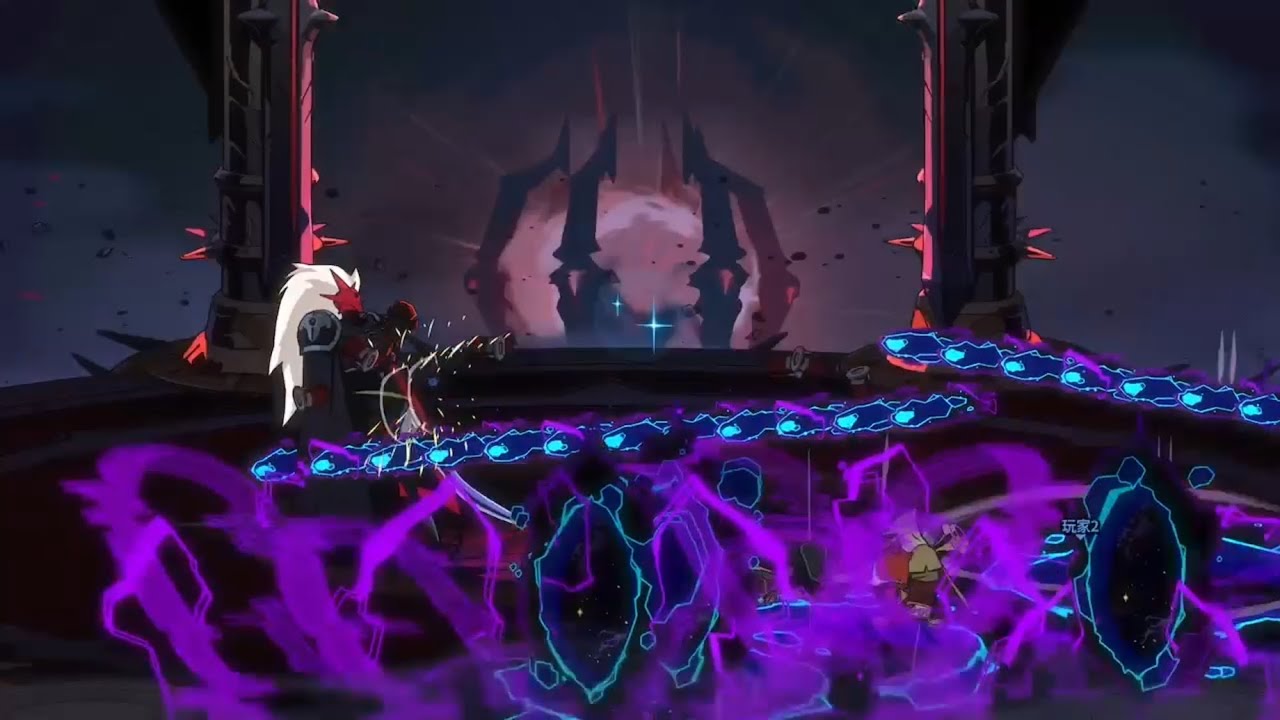
To survive dense projectile encounters in Absolum, observe enemy startup animations to predict fixed trajectory patterns, tap dash immediately after attacks to cancel recovery animations, and eliminate high-output ranged targets first.
Reading Projectile Trajectories and Startup Animations
Enemy fire in Absolum follows predictable, repeating geometric spreads rather than random trajectories. Most ranged foes launch attacks in fixed arcs or radial bursts, leaving clear gaps if you recognize the pattern early.
- Watch Startup Animations: Ranged enemies display visual cues before firing. Use these wind-up animations to determine the direction and spread of the incoming barrage before projectiles fill the arena.
- Track the Source: Focus on the enemy initiating the attack rather than tracking individual bullets. Predicting the launch angle lets you step outside the central trajectory line ahead of time.
- Position Early: Move toward the outer edges of an incoming arc during the enemy's startup animation to avoid getting trapped in the center of overlapping waves.
Using Dash-Cancels to Stay Mobile
Ground attacks and jumps lock your character into recovery animations that make you vulnerable to bullet waves. The dash mechanic allows you to cancel these recovery states, preserving your movement speed and evasion windows.
- Initiate an action: Perform a basic attack, skill, or jump landing.
- Input a dash: Tap the dash key right as your attack hits or your feet touch the ground, cutting off the remaining recovery animation.
- Weave between gaps: Use short, single dashes rather than long, stationary attack sequences when projectiles fill the screen.
Dash-canceling lets you maintain a continuous movement loop. This allows you to stay close enough to strike enemies while remaining ready to dodge incoming fire.
Arena Boundaries and Target Priority
Staying in the center of the arena during heavy bullet-hell phases forces you to monitor attacks from 360 degrees. Managing your position relative to the room edges simplifies what you need to track.
Wall and Boundary Positioning
- Hug Room Edges: Moving along the arena perimeter reduces incoming attack vectors to a half-circle, making it easier to spot safe lanes in projectile waves.
- Bait Enemy Direction: Standing near a wall encourages enemies to fire toward that boundary, keeping the center of the room open for counter-attacks.
- Kite in Circles: Guide enemies into firing along predictable paths by moving around the arena outer ring, grouping projectile waves together.
Identifying and Eliminating Priority Targets
High-density rooms feature anchor enemies that maintain persistent projectile patterns. Leaving these ranged attackers alive creates unmanageable screens where safe lanes disappear.
- Target Priority: Focus high-output ranged units before clearing weaker melee foes.
- Gap Creation: If an anchor enemy cannot be killed quickly, circle them using dash-cancels to force them to turn. This spreads their firing pattern and creates wider gaps to step through.
- Disciplined Aggression: Disengage and resume kiting whenever a pattern becomes too dense, returning to attack only after the primary firing cycle ends.
Free Absolum Codes
Current active codes and how to redeem them.

Sarah Williams
Sarah specializes in RPG and collection games, explaining team building, character growth, and beginner-friendly ways to avoid expensive early mistakes.
COMMUNITY
Player Comments
51 players commented on this guide.
Good guide for Absolum players. The strategy part was useful.
This helped me understand strategy much better.
This saved me time in the early game.
The tips are practical and easy to follow.