


Download ANANTA Official Windows PC Client
Official Windows PC client provided by LDPlayer.
About the Official ANANTA PC Client
Developer: Exptional Global
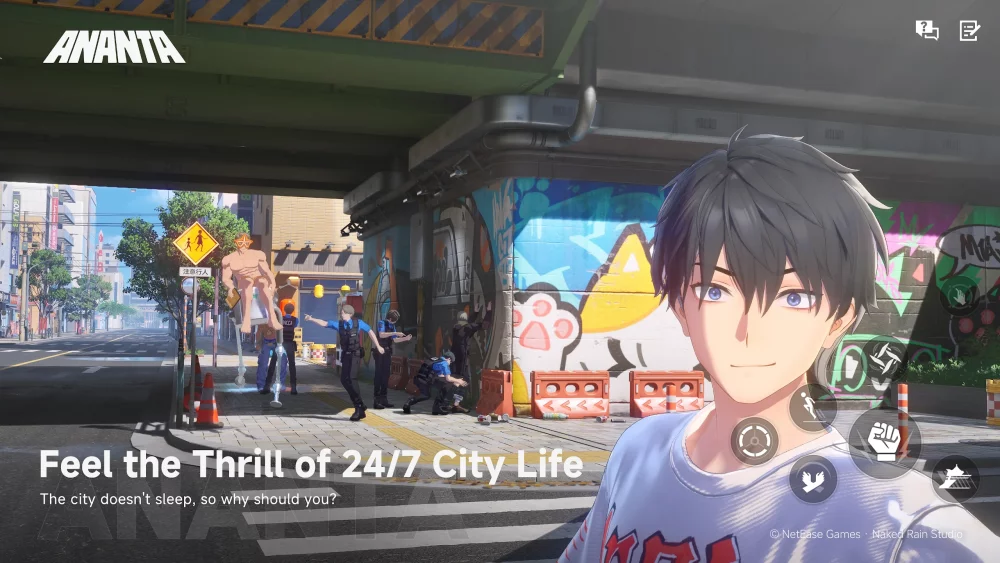
The central loop is built around choosing what to do next. Pursue the threats in the shadows, take in the nightlife, or follow the shifting dramas and activities that make the city feel busy around the clock. One day might bring soap-opera-worthy developments; another could lead to a 3AM street race. Martial arts battles put you in the middle of street fights where each strike is treated as a chance to make a splash, while exploration lets you set your own destination and travel by car, bike, boat, or by swinging freely between buildings. The promise that you can go wherever you can see encourages detours as much as direct travel. And when Nova City is no longer the focus, a trip back to Chongxiao offers a second urban setting to explore, with its own hidden secrets. The supplied description also points to activity that can be streamed anytime, tying the city’s constant motion to your growing public profile.
On PC, a larger display can make it easier to take in the layout of a city as you choose routes, spot a destination, and decide whether to continue by road, water, or through the air between buildings. It also gives more room to follow the action during martial arts encounters, where seeing the movement and spacing of a fight can help you respond to changing situations. Keyboard-and-mouse input can make repeated navigation and character-control actions more direct, whether you are steering through the city, adjusting direction while swinging between buildings, or moving between activities. The description does not specify a detailed control scheme, so the value is practical rather than a claim about particular bindings: PC gives you familiar input options for travel and action, while the larger screen helps keep the surrounding city and the immediate encounter in view.
ANANTA’s breadth comes from the contrast between its activities and the roles you can inhabit. Building a team and forging connections provide a social thread; exploring two cities supplies a continuing reason to travel; martial arts combat brings physical action; and the changing schedule of nightlife, street racing, and other city drama gives your time in Nova City a less predictable rhythm. Rather than presenting the adventure as a single mission path, the store description emphasizes freedom to set a destination and decide whether to pursue danger, discover a hidden corner, or simply take in the city. ANANTA on PC is therefore framed as a character-driven urban adventure where reputation, relationships, exploration, and action all contribute to the experience. Its global release is listed for January 15, 2027.
Screenshots
How to Download and Install the Official ANANTA PC Client
- Download and install the official Windows client distributed by LDPlayer.
- Open the app and sign in with your Google Play account.
- Search for ANANTA in the app store.
- Install the game and finish the first-launch download.
- Use the same game login if account sync is available.
Why Play ANANTA on PC?
Menus, maps, resources, and combat details are easier to read on a desktop display.
Keyboard and mouse input makes repeated actions and long sessions more comfortable.
Desktop play avoids phone battery drain during longer farming sessions.
Keep guides, codes, and notes open alongside the game on PC.
Controls and Performance
These three settings solve most common issues when playing on PC.
Map navigation, skill use, and repeated resource actions first.
Lower resolution or graphics quality if crowded scenes lose frames.
Link your account before switching devices so progress can be restored safely.
ANANTA Official PC Client FAQ
Can I play ANANTA on PC?
Yes. Download the official Windows PC client distributed by LDPlayer and play with a larger screen, keyboard, and mouse controls.
Is ANANTA better on PC than mobile?
Playing on PC can make longer sessions, detailed menus, and resource management more comfortable, while mobile is still convenient for quick check-ins.
Will my ANANTA progress sync on PC?
Progress depends on the sign-in options supported by the game. Use the same linked Google, Facebook, Apple, or game account on both devices.
Why does ANANTA lag on PC?
Lag can be caused by limited RAM, demanding graphics settings, outdated client files, or background apps. Lower the graphics settings and keep the PC client up to date.
DOWNLOAD STARTED
Your download is starting
Check your browser Downloads if it does not appear.
Official PC client for Windows, distributed by LDPlayer.
Download again