


Download Aniimo Official Windows PC Client
Official Windows PC client provided by LDPlayer.
About the Official Aniimo PC Client
Developer: PAWPRINT INTERACTIVE ENTERTAINMENT PTE. LTD
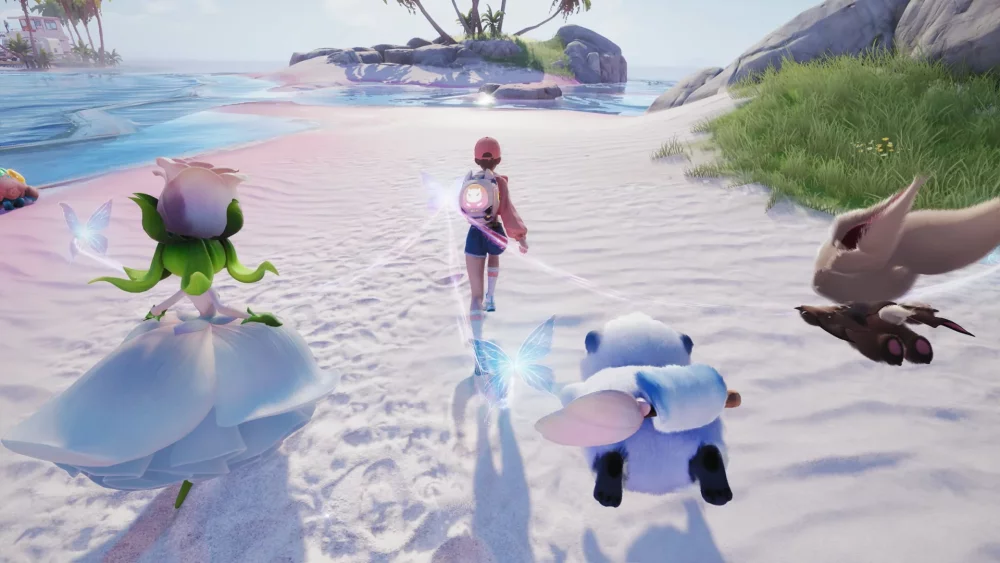
Aniimo’s defining mechanic is Twining. When you Twine with a collected Aniimo, you essentially become that creature and experience Idyll from its perspective, using its skills to solve puzzles, win battles, and overcome obstacles. This makes collecting directly relevant to exploration and problem-solving: the value of an Aniimo is not limited to ownership, since its abilities can determine how you approach a challenge. The open world supports varied movement and discovery, including gliding, diving, and burrowing, and the journey can involve challenging, racing, and searching for answers as you travel through Idyll. On PC, keyboard-and-mouse controls can make it easier to move precisely through these environments, switch between actions while navigating, and respond quickly when exploration turns into a battle or another real-time challenge. Beyond solo exploration, you can travel to a metropolis floating in the sky to meet other Pathfinders, share stories, and take part in competitive battles. The PVEVP mode Egg Heist adds a more structured multiplayer objective: form a three-player team, search the Lost Isles in real time, and fight through the uncertainty of competing encounters. The PC format is also well suited to comparing your collected Aniimo, selecting the creature whose skills fit a puzzle or battle, and managing repeated capture and exploration decisions with clear access to the game’s information. Each Pathfinder also owns a personal RV parked at a campsite in Idyll, creating a social and management layer alongside the open-world journey. You can meet and interact with other players there, then return to Homeland with your RV to plant crops, build decorations, and arrange your space with Aniimo. Whether you are pursuing a rare encounter, evolving a collection, Twining to use a creature’s abilities, joining Egg Heist, or developing a shared-feeling home base, the game connects exploration, creature progression, real-time competition, and social customization into one Pathfinder adventure.
Screenshots
How to Download and Install the Official Aniimo PC Client
- Download and install the official Windows client distributed by LDPlayer.
- Open the app and sign in with your Google Play account.
- Search for Aniimo in the app store.
- Install the game and finish the first-launch download.
- Use the same game login if account sync is available.
Why Play Aniimo on PC?
Menus, maps, resources, and combat details are easier to read on a desktop display.
Keyboard and mouse input makes repeated actions and long sessions more comfortable.
Desktop play avoids phone battery drain during longer farming sessions.
Keep guides, codes, and notes open alongside the game on PC.
Controls and Performance
These three settings solve most common issues when playing on PC.
Map navigation, skill use, and repeated resource actions first.
Lower resolution or graphics quality if crowded scenes lose frames.
Link your account before switching devices so progress can be restored safely.
Aniimo Official PC Client FAQ
Can I play Aniimo on PC?
Yes. Download the official Windows PC client distributed by LDPlayer and play with a larger screen, keyboard, and mouse controls.
Is Aniimo better on PC than mobile?
Playing on PC can make longer sessions, detailed menus, and resource management more comfortable, while mobile is still convenient for quick check-ins.
Will my Aniimo progress sync on PC?
Progress depends on the sign-in options supported by the game. Use the same linked Google, Facebook, Apple, or game account on both devices.
Why does Aniimo lag on PC?
Lag can be caused by limited RAM, demanding graphics settings, outdated client files, or background apps. Lower the graphics settings and keep the PC client up to date.
DOWNLOAD STARTED
Your download is starting
Check your browser Downloads if it does not appear.
Official PC client for Windows, distributed by LDPlayer.
Download again