
Play Clash of Critters on Windows PC
Download the official Clash of Critters Windows PC client and learn how to install and play the game on PC, with controls, system requirements, and practical tips.

Download Clash of Critters Official Windows PC Client
Official Windows PC client provided by LDPlayer.
About the Official Clash of Critters PC Client
Developer: Farlight Games
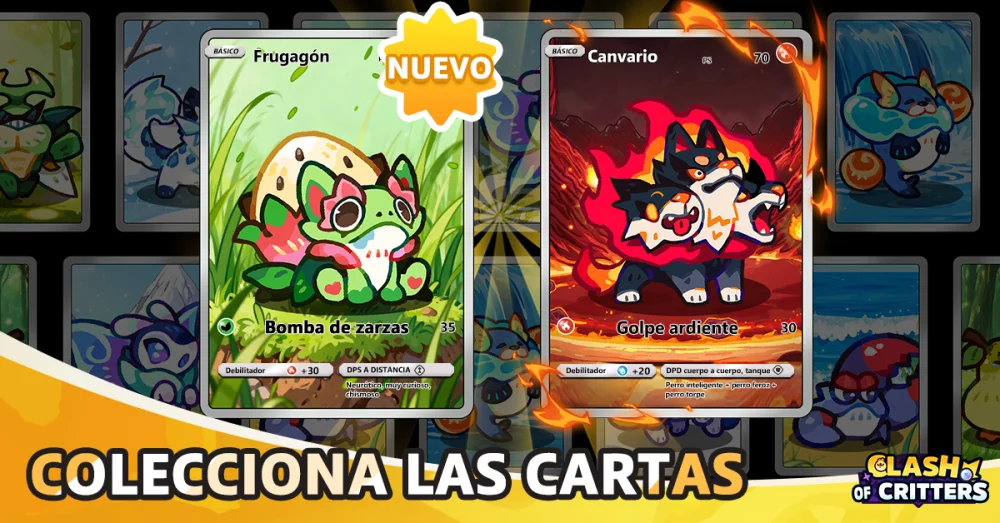
Evolution is the main route to making your pets stronger. Raising a Tatari toward a formidable Tier 4 evolution gives collection progress a practical purpose, while rare Glitter forms offer an additional target for players who want to go beyond simply finding each species. That power feeds directly into the strategy-based battles, where you mix and match formations to discover effective combinations and overcome Zobo waves. The important decision is not just which pets you own, but how you arrange and combine them when a battle begins. On PC, a larger display can make it easier to review your available Tataris, compare their current development and forms, and think through a formation before committing to a fight. Keyboard-and-mouse input can also make repeated collection and management actions more comfortable, especially when moving between pets, checking evolution options, and setting up the next battle. The larger screen is useful again when reading the battle situation and keeping track of the formation you have chosen while dealing with successive Zobo waves.
Outside combat, Clash of Critters gives the collection a personal setting through Tatari Paradise. You can craft a cozy home and interact with your pets, turning the space into more than a storage area for your growing roster. The home-building side provides a management layer alongside evolution and battles: you decide how to shape the place where your Tataris live, then observe how they respond to different surroundings and interactions. The store description specifically points to experimenting with pets in the environment, such as dropping Frostnip in the pool to see what happens. That kind of interaction makes curiosity part of the loop, encouraging you to try different Tataris in different situations rather than treating them as interchangeable entries in a catalog. With a mouse, selecting pets, placing crafted elements, and interacting with objects in your Tatari home should feel precise, while the extra screen space helps you see the space and the pets within it at once. The result is a game loop that connects three complementary activities: collect distinctive Tataris, evolve them toward Tier 4 and rare Glitter forms, then use thoughtful formations against Zobo waves while continuing to build and explore your own Tatari Paradise.
Screenshots
How to Download and Install the Official Clash of Critters PC Client
- Download and install the official Windows client distributed by LDPlayer.
- Open the app and sign in with your Google Play account.
- Search for Clash of Critters in the app store.
- Install the game and finish the first-launch download.
- Use the same game login if account sync is available.
Why Play Clash of Critters on PC?
Menus, maps, resources, and combat details are easier to read on a desktop display.
Keyboard and mouse input makes repeated actions and long sessions more comfortable.
Desktop play avoids phone battery drain during longer farming sessions.
Keep guides, codes, and notes open alongside the game on PC.
Controls and Performance
These three settings solve most common issues when playing on PC.
Map navigation, skill use, and repeated resource actions first.
Lower resolution or graphics quality if crowded scenes lose frames.
Link your account before switching devices so progress can be restored safely.
Clash of Critters Official PC Client FAQ
Can I play Clash of Critters on PC?
Yes. Download the official Windows PC client distributed by LDPlayer and play with a larger screen, keyboard, and mouse controls.
Is Clash of Critters better on PC than mobile?
Playing on PC can make longer sessions, detailed menus, and resource management more comfortable, while mobile is still convenient for quick check-ins.
Will my Clash of Critters progress sync on PC?
Progress depends on the sign-in options supported by the game. Use the same linked Google, Facebook, Apple, or game account on both devices.
Why does Clash of Critters lag on PC?
Lag can be caused by limited RAM, demanding graphics settings, outdated client files, or background apps. Lower the graphics settings and keep the PC client up to date.
DOWNLOAD STARTED
Your download is starting
Check your browser Downloads if it does not appear.
Official PC client for Windows, distributed by LDPlayer.
Download again