
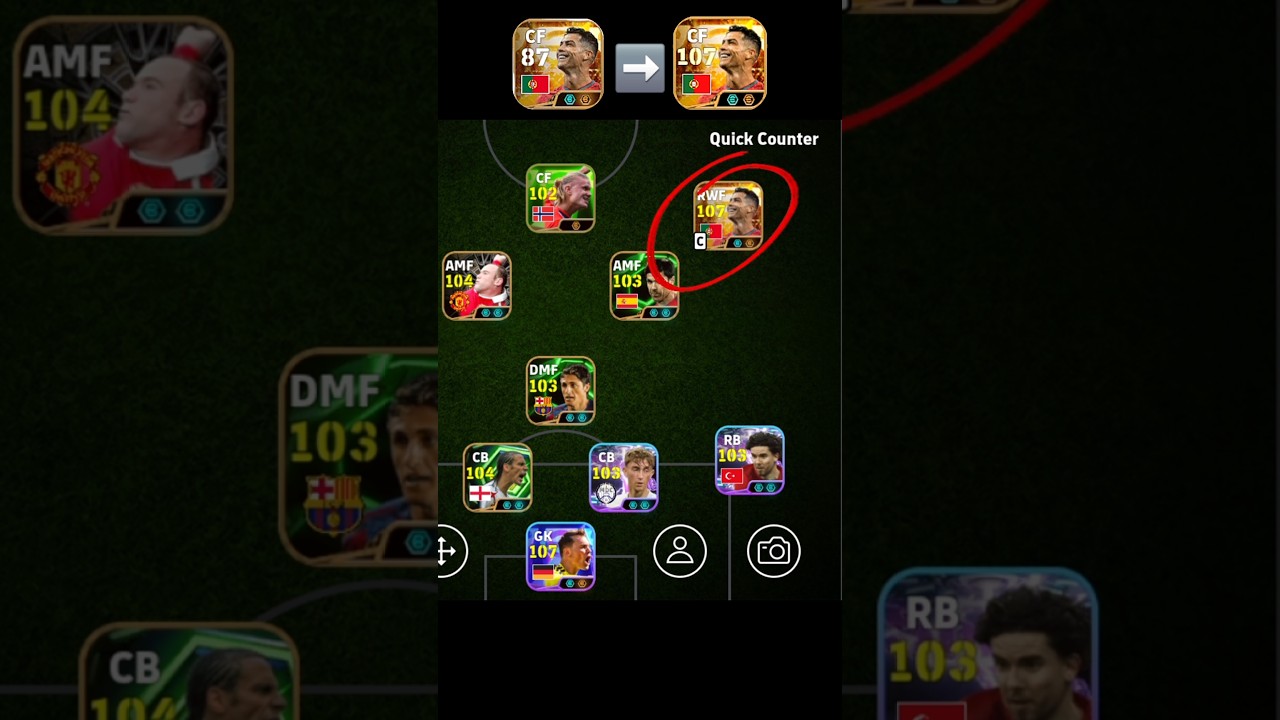
To increase a player card's Overall Rating (OVR) in eFootball™, max out the card's level using Exp Training Programs, assign the resulting Progression Points via Auto-allocate, and field the player in their primary position under a manager with 85+ Team Playstyle Proficiency.
Level Up Cards with Exp Training Programs
Every standard, Highlight, and Epic card begins at Level 1 and must be leveled up to earn Progression Points. Only special Player of the Week (POTW) cards arrive pre-maxed with locked attributes.
- Go to My Team and open the Players menu.
- Select your target card and tap Level Training.
- Apply Exp Training Programs in denominations of 100, 1,000, 4,000, or 10,000 Exp. You can earn these programs from Tour Events, AI Challenge Events, Match Pass milestones, and campaign objectives.
- Alternatively, use Legacy Transfer to consume surplus or expired players to transfer accumulated experience into your card.
- Confirm the training once the level bar hits maximum to collect your full pool of Progression Points.
Allocate Progression Points for Maximum Base OVR
After maxing the card's level, you must manually commit the earned points to raise the player's core attributes.
- Select the card and navigate to Player Progression, then choose Player Stats.
- Tap Auto-allocate to let the game distribute points according to Konami's positional rating formula. This formula targets attributes carrying the heaviest weight for that registered position—such as Offensive Awareness and Finishing for Center Forwards, or Tackling and Defensive Awareness for Center Backs.
- If you prefer specific tactical attributes (such as prioritizing Speed over Passing on wingers), adjust the points manually. Note that manual builds tuned for specific playstyles may result in a slightly lower card face rating than an Auto-allocate build.
- Confirm the allocation. If you want to change the build later, use the GP Progression Reset feature in the player menu.
Deploy High-Proficiency Managers for On-Pitch Stat Boosts
A player's displayed rating increases further once placed into an active squad led by a skilled tactician.
- Playstyle Proficiency: Managers rated 85 to 88 in your active tactic (such as Quick Counter, Possession Game, or Long Ball Counter) grant a +2 to +3 boost to nearly all player attributes during matches.
- Rating Spikes: These manager boosts explain why a card with a base rating of 96 or 97 displays as 99, 100, or higher in your starting lineup.
- Secondary Manager Bonuses: Certain premium or Epic managers grant additional targeted boosts to specific stats, like Acceleration or Tight Possession, for players who fulfill designated league or nationality conditions.
Maintain Full Position Proficiency
Fielding a player outside their natural position lowers effective attributes and reduces their overall rating in your lineup.
- Check Positional Affinity: Inspect the green grid on the player details screen. Dark, solid green indicates full proficiency (100% attribute effectiveness). Faded green indicates partial proficiency, which lowers offensive and defensive awareness by roughly 10% to 20%. Uncolored zones offer zero familiarity.
- Apply Position Training Programs: Use Position Training consumable items on eligible cards to randomly unlock full familiarity in secondary positions. Turning a secondary position solid green restores full attributes and eliminates positional rating drops.
Summary of Rating Mechanics
| Method | Role in Overall Rating | Key Action |
|---|---|---|
| Level Training | Generates the card's Progression Points | Apply 10,000 and 4,000 Exp Programs to reach the level ceiling. |
| Player Progression | Establishes the base card rating | Select Auto-allocate for the highest mathematical OVR. |
| Manager Proficiency | Adds +2 to +3 to on-pitch attributes | Use a manager with 85+ proficiency in your active playstyle. |
| Position Familiarity | Prevents out-of-position rating penalties | Field players in solid green zones or use Position Training items. |
| Booster Tokens | Pushes specific attributes past normal caps | Apply Random or Select Booster Tokens to compatible Epic or Show Time cards. |

Free eFootball™ Codes
Current active codes and how to redeem them.

Emily Johnson
Emily writes practical mobile strategy guides with a focus on resource planning, base progression, and the early decisions that shape a long-term account.
COMMUNITY
Player Comments
154 players commented on this guide.
I tried this today and it worked better than my old setup.
Can you add more details about strategy in a future update?
This guide answered the exact question I had.
I wish I had read this before upgrading the wrong thing.