

Emergency Vehicle Siren System Official PC Client
Download the official Windows client, with setup steps, controls, system requirements, and play tips.

Download the Official Emergency Vehicle Siren System PC Client
Official Windows client, distributed by LDPlayer.
About the Official Emergency Vehicle Siren System PC Client
Developer: Valeriya Proshina
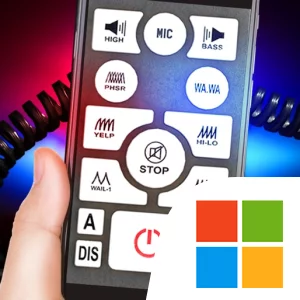
The main gameplay loop is straightforward but flexible. Choose a remote, read its button instructions, and try its available sound and lighting options. The simulator includes a broad selection of siren sounds, including yelp, horn or “quack,” hi-lo, wail, wa.wa, and manual siren horns. That gives you room to compare familiar emergency tones rather than relying on one repeating effect. The light panel adds another layer of customization, letting you adjust the look of the signals and the animation speed. For a stronger visual effect, the camera flash can be activated in several modes; when the flash is used while the siren is running, it produces a strobe effect. The presentation is supported by real 3D models of the remotes, animated buttons, and a dedicated instruction view for each radio, so part of the experience is learning how each control layout works and then operating it as a virtual device.
Emergency Vehicle Siren System also includes features intended for playful, social use. Its horn and PA microphone mode lets you press the microphone button on a remote and speak into your device. Keeping the button held allows the words to be recorded and played back after a few seconds, while available service voice commands include police audio. You can connect the device to a home audio system or car audio system through auxiliary input or Bluetooth, making the simulator suitable for demonstrating sounds to friends or experimenting with how the sirens and voice features come through a larger speaker setup. This is not a progression game with missions, inventory, or vehicle upgrades; the variety comes from collecting and testing the included remote systems, signal types, visual settings, and manual sound controls.
On PC, a larger display makes the detailed 3D remote models, animated buttons, light-panel settings, and on-screen instructions easier to inspect at the same time. That is useful when comparing the layouts of the 12 remotes or checking which control produces a particular siren pattern without losing sight of the rest of the interface. Keyboard-and-mouse input can also make repeated button presses, sound changes, flash-mode selection, and microphone activation more manageable than using a small touch display. A mouse is especially helpful for selecting individual controls on a dense remote, while a keyboard can provide a practical way to handle repeated interactions as you test yelp, hi-lo, wail, wa.wa, and horn sounds. The PC version therefore suits players who want a clearer, more deliberate way to explore this compact siren-and-special-signals simulator, whether they are comparing emergency-vehicle sound sets, tuning the visual presentation, or setting up a playful audio demonstration.
Screenshots
How to Download and Install the Official Emergency Vehicle Siren System PC Client
- Download and install the official Windows client distributed by LDPlayer.
- Open the app and sign in with your Google Play account.
- Search for Emergency Vehicle Siren System in the app store.
- Install the game and finish the first-launch download.
- Use the same game login if account sync is available.
Why Play Emergency Vehicle Siren System on PC?
Menus, maps, resources, and combat details are easier to read on a desktop display.
Keyboard and mouse input makes repeated actions and long sessions more comfortable.
Desktop play avoids phone battery drain during longer farming sessions.
Keep guides, codes, and notes open alongside the game on PC.
Controls and Performance
These three settings solve most common issues when playing on PC.
Map navigation, skill use, and repeated resource actions first.
Lower resolution or graphics quality if crowded scenes lose frames.
Link your account before switching devices so progress can be restored safely.
Emergency Vehicle Siren System Official PC Client FAQ
Can I play Emergency Vehicle Siren System on PC?
Yes. Download the official Windows PC client distributed by LDPlayer and play with a larger screen, keyboard, and mouse controls.
Is Emergency Vehicle Siren System better on PC than mobile?
Playing on PC can make longer sessions, detailed menus, and resource management more comfortable, while mobile is still convenient for quick check-ins.
Will my Emergency Vehicle Siren System progress sync on PC?
Progress depends on the sign-in options supported by the game. Use the same linked Google, Facebook, Apple, or game account on both devices.
Why does Emergency Vehicle Siren System lag on PC?
Lag can be caused by limited RAM, demanding graphics settings, outdated client files, or background apps. Lower the graphics settings and keep the PC client up to date.
DOWNLOAD STARTED
Your download is starting
Check your browser Downloads if it does not appear.
Official PC client for Windows, distributed by LDPlayer.
Download again
COMMUNITY
Player Comments
342 players shared their experience playing on PC.
The bigger screen helps a lot when checking menus and resources.
Playing Emergency Vehicle Siren System on PC feels smoother than my phone, especially during longer sessions.
The setup was simple and Emergency Vehicle Siren System ran fine after installation.