
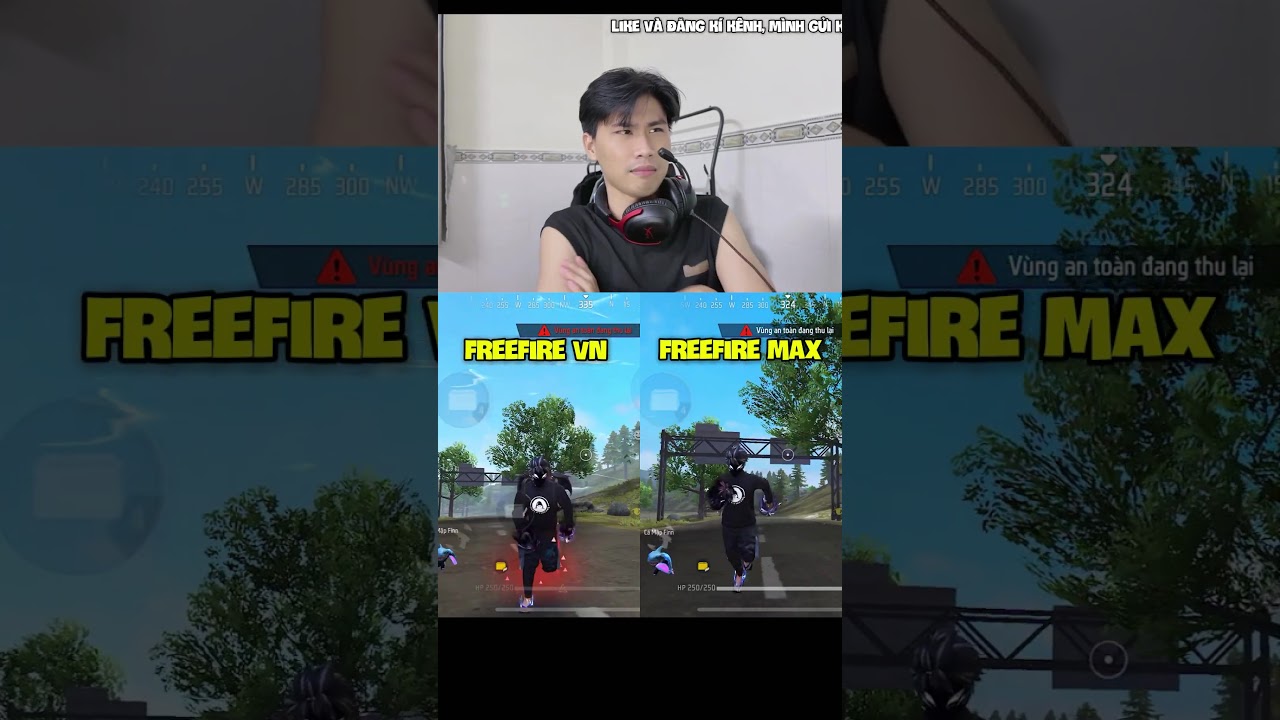
In Free Fire, your choice between Classic and New Run Style affects character posture, weapon positioning, and camera motion while sprinting. Neither setting alters your actual sprint speed, acceleration, or hitbox size. Choose Classic if you prioritize rigid crosshair centering for close-range drag headshots, or choose New if you prefer smoother camera movement and clearer peripheral sightlines on the right side of your screen.
How to Change Run Style in Settings
You can switch your sprinting animation directly in the client settings at any time:
- Tap the Gear icon in the upper-right corner of the main lobby to open Settings.
- Select the Controls tab from the left-hand menu.
- Scroll down to the movement section to find Run Style.
- Select either Classic or New. The setting applies immediately without restarting the game.
- To save your configuration across devices or reinstalls, open the Basic tab in Settings and tap Upload under Settings Sync.
Classic vs. New Run Style Comparison
| Feature | Classic Run Style | New Run Style |
|---|---|---|
| Character Posture | Upright and rigid torso | Forward lean with athletic arm sway |
| Weapon Position | Held horizontally across the chest | Tilted inward and downward |
| Camera Motion | Minimal vertical sway and screen tilt | Fluid, dynamic motion transitions |
| Screen Clearance | Weapon model covers lower-right view | Clears lower-right peripheral sightline |
| Aim Transition | Instant visual snap back to center | Smooth, gradual recovery to resting aim |
| Best Scenario | Ranked Clash Squad, shotgun and SMG duels | Battle Royale open-field rotations |
Classic Run Style: Headshot Alignment and Quick Fire
The Classic setting keeps your character upright while sprinting. Because the character's torso remains level with the horizon, your pre-aim crosshair stays naturally positioned near head height. This rigid framing makes it easier to execute upward drag headshots immediately after exiting a sprint.
When you release the sprint button to fire, the Classic animation resets to neutral instantly without visual smoothing. This sharp recovery benefits aggressive rushers using close-quarters weapons like the M1887 or MP40, allowing for tighter timing during jump shots and rapid Gloo Wall placements.
New Run Style: Peripheral Visibility and Field Rotations
The New setting introduces a modern, athletic sprint animation with a forward torso lean. Instead of keeping the weapon horizontal, the character angles the firearm downward toward the torso. This shifts the weapon model away from the right side of the screen, granting an unobstructed view of incoming threats along ridges and building corners.
The camera tracking in the New preset uses softer transitions, dampening the screen shudder that occurs when rapidly alternating between lateral directions. Mid-range and long-range players navigating large Battle Royale maps such as Bermuda, Purgatory, and NexTerra benefit from reduced visual fatigue during extended rotations.
Sprint Mobility Optimization
Regardless of the animation preset you choose, maximize your movement speed and survivability during rotations with these fundamental mechanics:
- Equip Kelly’s Dash Skill: Kelly’s passive ability increases baseline sprint speed by up to 6%, making corner peeks faster in Classic style and open-field zig-zagging more evasive in New style.
- Holster Primary Weapons: Sprinting with rifles or heavy weapons active applies an innate movement speed penalty. Tap your fists or a melee slot when traveling long distances to achieve maximum velocity.
- Carry a Pan: Keeping a Pan in your melee slot passively blocks incoming bullets from the rear while you sprint toward cover.
Free Free Fire Codes
Current active codes and how to redeem them.

Emily Johnson
Emily writes practical mobile strategy guides with a focus on resource planning, base progression, and the early decisions that shape a long-term account.
COMMUNITY
Player Comments
151 players commented on this guide.
The explanation is clear, especially for beginners.
This guide answered the exact question I had.
Can you add more details about strategy in a future update?
This saved me time in the early game.