
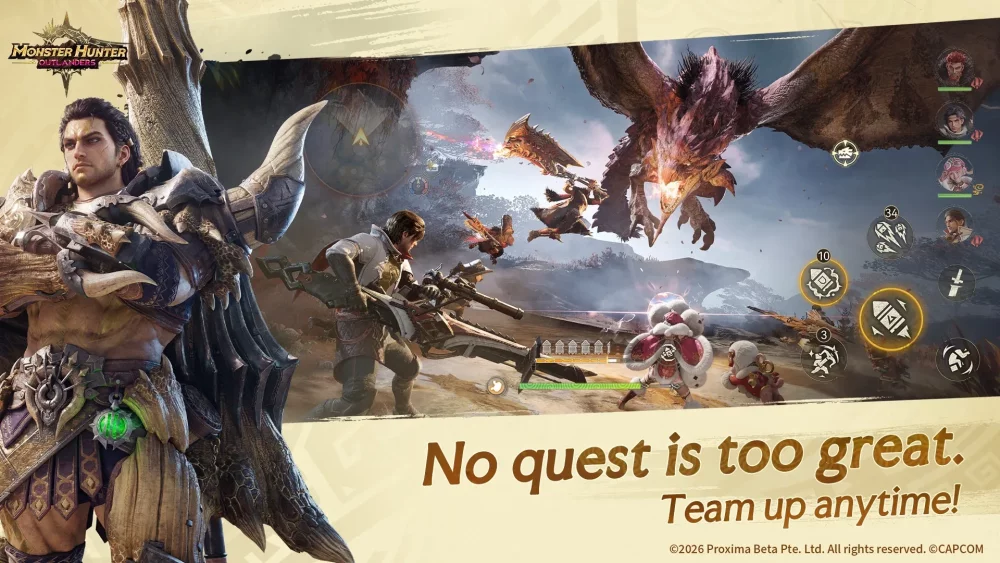
An official native PC client has been announced for Monster Hunter Outlanders, confirming the title will support cross-platform play alongside its mobile release. However, initial playtesting is restricted to the China region under localized server infrastructure. Players outside the test region cannot download the build through standard storefronts.
Your best immediate course of action is to verify your PC hardware against the client's baseline targets and monitor official Capcom pre-registration channels for international rollout dates, rather than attempting workarounds or relying on third-party mobile emulators.
Regional Testing Scope and Western Availability
The initial rollout phase for the native PC client is localized strictly to mainland test environments managed by TiMi Studio Group and Capcom.
- Access Restrictions: Western players cannot access this initial test phase through standard digital distribution platforms due to regional account verification requirements.
- Client Features in Development: The presence of a native client build establishes that the development team is building dedicated mouse-and-keyboard support, higher texture resolutions, and direct API rendering directly into the engine, rather than issuing an unoptimized port later.
- Recommended Next Step: Avoid third-party installers claiming to bypass regional locks. Secure your pre-registration through verified official portals to receive notice when international testing expands.
Native PC Client vs. Android Emulation
When playing Monster Hunter Outlanders on a desktop setup, use the native PC client rather than third-party Android virtualization software like BlueStacks or LDPlayer. Emulating mobile hardware introduces performance overhead and potential account complications.
| Feature | Official Native PC Client | Third-Party Android Emulator |
|---|---|---|
| Input Latency | Direct hardware polling | Virtualized layer delay |
| Frame Rates | Uncapped or high refresh rate support | Often locked to 30 or 60 FPS |
| Camera Controls | Raw mouse and analog stick input | Emulated touch-drag mapping |
| API Pipeline | Direct DirectX and Vulkan integration | CPU virtualization overhead |
| Account Safety | Fully authorized software | Risk of anti-cheat false positives |
Direct hardware calls prevent frame pacing stutters and dropped inputs during particle-dense monster attacks, ensuring reliable execution when dodging wide sweeps or timing invulnerability frames.
Input Configurations
The native PC client offers physical control schemes that eliminate the visual clutter and imprecise touch inputs of mobile screens.
Gamepad Controls
A standard controller provides balanced 360-degree camera tracking while executing multi-stage weapon combos. Physical triggers deliver consistent tactile feedback for charged attacks and guarding maneuvers, reducing execution errors for heavy weapons such as the Greatsword and Lance.
Keyboard and Mouse Setup
Ranged weapons benefit most from keyboard and mouse controls. Armaments like the Heavy Bowgun require fast, pinpoint reticle tracking across shifting monster weak points, including horns, wings, and tails. Direct mouse movement offers higher aiming speed than mobile swipes, while dedicated keyboard hotkeys allow quick access to healing consumables and companion commands during combat.
Cross-Progression and Platform Workflow
Monster Hunter Outlanders supports shared account progress, allowing you to alternate between PC and mobile devices without losing gear upgrades, character ranks, or materials. Structuring your sessions around each platform's strengths preserves hunting efficiency:
- Conduct progression hunts on PC: Reserve difficult encounters, such as high-difficulty story bosses and the Radiant Prismatic Dragon, for the PC client to take advantage of wider viewing angles, stable frame rates, and tactile inputs.
- Handle daily tasks on mobile: Use mobile access for low-intensity routines, including gathering routes, crafting material restocks, camp management, and Otomo companion dispatch assignments.
System Hardware Requirements
The native PC build is designed to scale across standard gaming hardware. Ensure your system meets the baseline specifications ahead of broader testing:
| Component | Minimum Baseline | Recommended Specification |
|---|---|---|
| Processor (CPU) | Intel Core i5-8400 or AMD Ryzen 5 | Intel Core i7-10700 or AMD Ryzen |
| Graphics (GPU) | Nvidia GeForce GTX 1060 or AMD Radeon RX 580 | Nvidia GeForce RTX 2060 or AMD Radeon RX 6600 |
| Memory (RAM) | 8 GB | 16 GB Dual-Channel |
| Storage | SATA SSD | High-Speed NVMe M.2 SSD |
Installing the game on solid-state storage minimizes micro-stuttering during dynamic monster spawns and speeds up transitions across large hunting areas. Update your gamepad firmware (such as standard Xbox Wireless or PlayStation DualSense controllers) so your hardware is ready once international client access begins.
Free Monster Hunter Outlanders Codes
Current active codes and how to redeem them.

Sarah Williams
Sarah specializes in RPG and collection games, explaining team building, character growth, and beginner-friendly ways to avoid expensive early mistakes.
COMMUNITY
Player Comments
27 players commented on this guide.
Nice guide. I am checking the other Monster Hunter Outlanders articles next.
The tips are practical and easy to follow.
I tried this today and it worked better than my old setup.
This helped me understand early game much better.