
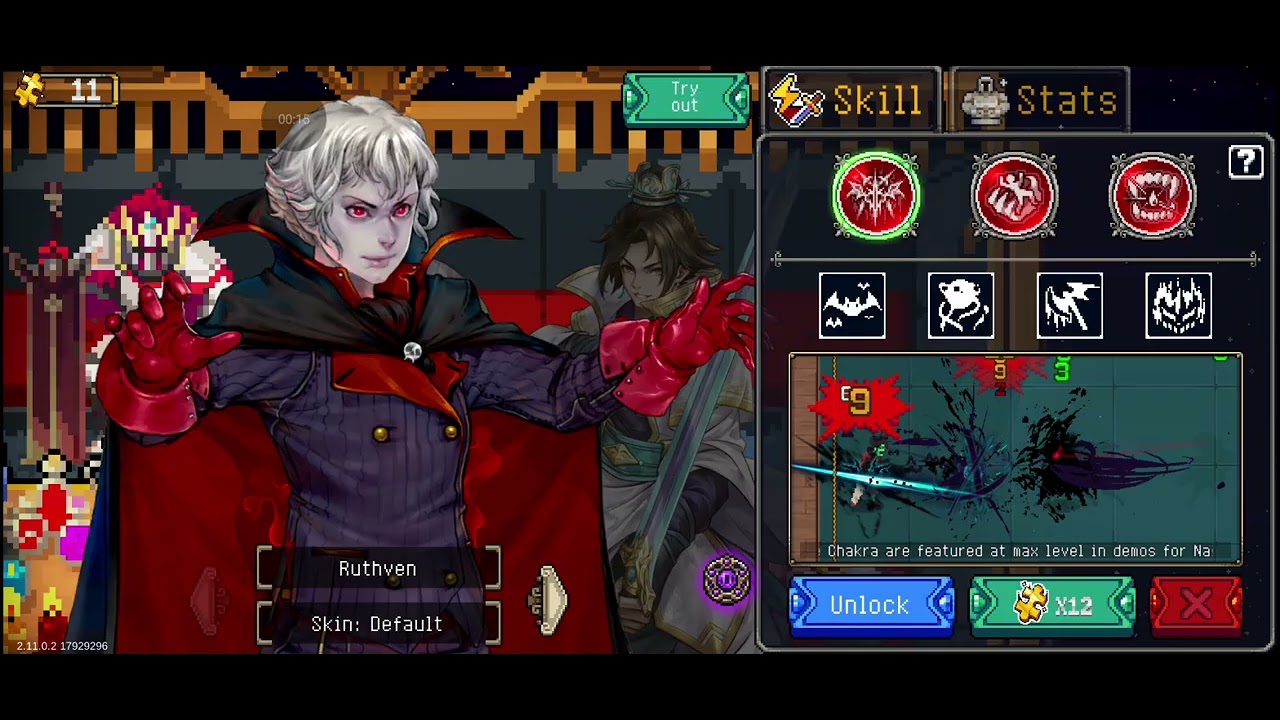
To play an unowned hero during a dungeon run in Otherworld Legends version 2.11.0.2, trigger the locked hero's inspection dialogue in the Living Room lobby while holding your movement input directly into the dungeon entrance gateway. This input overlap forces the scene transition to prioritize loading Scene 1-1 while assigning the inspected character's model and baseline moveset to your player entity.
This setup functions strictly as a temporary, in-run trial mechanism. It does not permanently unlock heroes on your account or sync progression to your cloud save.
How to Execute the Character Steal Glitch
Executing the glitch requires clean positioning between the target hero and the doorway trigger, followed by simultaneous input buffering.
- Select an agile starting character: Use an owned hero with standard movement speed, such as Quan Huying or Ginzo, to ensure precise walking inputs without accidental skill activations.
- Line up your approach: Identify the locked hero standing near the portal. Position your character so your path walks directly toward the right-hand dungeon portal archway without snagging on furniture or other lobby NPCs.
- Trigger the prompt at the threshold: Walk toward the portal. As soon as the target hero's interaction bubble appears and your character reaches the gateway boundary, tap the interaction button while holding the virtual joystick firmly to the right.
- Hold through the transition: Keep pushing the joystick right until the hero inspection screen flashes and the display fades to black.
- Release upon loading: Release all controls once the black loading screen appears to allow Scene 1-1 to generate normally.
| Phase | Player Input | Visual Indicator | Result |
|---|---|---|---|
| Setup | Move starting hero near gateway | Interaction icon appears over locked hero | Prompt enters input buffer |
| Execution | Tap interact while pushing joystick right | Inspection UI briefly flashes on screen | Scene manager registers locked hero ID |
| Loading | Release controls during fade-to-black | Black loading screen appears | Game generates Scene 1-1 |
| Spawn | Enter dungeon | Avatar spawns in the starting room | You control the locked hero |
Troubleshooting Timing Failures
If the setup fails, adjust your timing based on how the game responds:
- Spawning as your original hero: Your interaction tap was too late. The portal registered your gateway entry and locked in your active hero before the interaction prompt registered. Retest by tapping the interaction button a fraction of a second earlier, right as your character enters the portal frame.
- Freezing in the lobby with the store UI open: Your directional movement stopped too early. The inspection menu took control focus before your character crossed the portal's loading threshold. Keep the joystick held firmly to the right until the screen completely fades to black.
Glitch Limitations and Save Safety
Using this setup allows you to test attack animations, hitboxes, and baseline skill mechanics against live enemies rather than the lobby training dummy. However, it imposes strict gameplay limits:
- Base stats only: Glitched heroes spawn at Level 1 without Power of Asura stat distributions or unlocked alternate skill styles. You are restricted to the character's default primary skill.
- No mastery gains: Dungeon clears, boss victories, and collected Soul Stones achieved during a glitched run will not grant mastery levels or unlock achievements for the locked character.
- Save instability: Exiting to the lobby immediately removes the glitched character. Do not attempt manual cloud saves during a glitched run, as mismatched hero states can corrupt local save data.
- Version vulnerability: This interaction relies on UI buffering specific to version 2.11.0.2. Future patches and hotfixes that adjust lobby collision checks or menu priority will remove the setup. Permanent access to skill styles, Power of Asura allocation, and stable multiplayer still requires unlocking heroes legitimately with Universal Fragments, Hero Fragments, or direct purchases.
Free Otherworld Legends Codes
Current active codes and how to redeem them.

Michael Smith
Michael covers live-service games, events, reward systems, and efficient daily routines, turning frequent updates into clear actions for players.
COMMUNITY
Player Comments
39 players commented on this guide.
The explanation is clear, especially for beginners.
Good guide for Otherworld Legends players. The heroes part was useful.
Nice guide. I am checking the other Otherworld Legends articles next.
Can you add more details about heroes in a future update?