
Play Ragnarok Origin: Classic on Windows PC
Download the official Ragnarok Origin: Classic Windows PC client and learn how to install and play the game on PC, with controls, system requirements, and practical tips.

Download Ragnarok Origin: Classic Official Windows PC Client
Official Windows PC client provided by LDPlayer.
About the Official Ragnarok Origin: Classic PC Client
Developer: Gravity Game Vision Limited
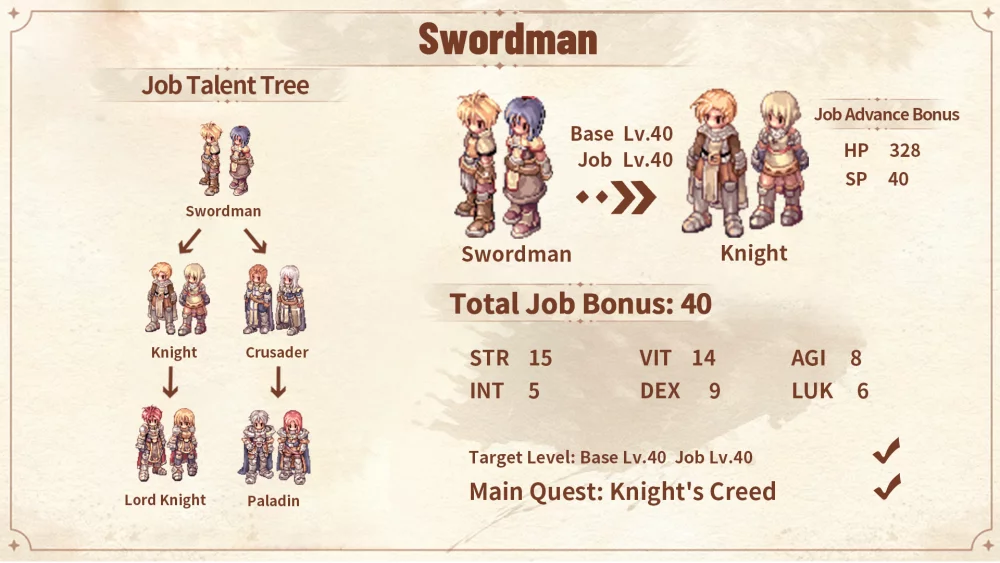
Character progression is intentionally broad, with all 14 classic Trans. 2nd jobs available together and 27 unique builds to experiment with. Stress-free job switching makes it easier to explore different approaches instead of treating an early choice as permanent, while the debut of the Doram Summoner adds a distinct option to that roster. That flexibility matters both during ordinary leveling and when preparing for competitive play. Ragnarok Origin: Classic includes fair PvP events ranging from 5v5 tactical squads to 80v80 guild wars, as well as cross-server GvG competition across the Americas. Players from New York to São Paulo can team up, compete for their cities, and rely on skill and coordination rather than entry barriers or wallet-based advantages. A larger PC display is useful when reading the flow of a crowded 5v5 match or 80v80 guild war, where keeping the wider battle in view can help you judge positioning, identify the next objective, and coordinate with teammates. Keyboard-and-mouse input also suits the game’s repeated management tasks: moving between job builds, checking dungeon rewards, reviewing MVP cards and headwear, and organizing the resources or costumes earned through active play can be handled more comfortably across multiple menus. That is equally valuable for the collection side of the game, where 203 costumes can be freely collected, mixed, and matched into changing outfits. Whether your priority is fast leveling, refining a Trans. 2nd job build, earning loot through dungeons, competing in Pan-America PvP, or building a wardrobe without paying for each item, the PC version gives those interconnected systems room to breathe while preserving the game’s central focus on adventure, fair progression, and playing together.
Screenshots
How to Download and Install the Official Ragnarok Origin: Classic PC Client
- Download and install the official Windows client distributed by LDPlayer.
- Open the app and sign in with your Google Play account.
- Search for Ragnarok Origin: Classic in the app store.
- Install the game and finish the first-launch download.
- Use the same game login if account sync is available.
Why Play Ragnarok Origin: Classic on PC?
Menus, maps, resources, and combat details are easier to read on a desktop display.
Keyboard and mouse input makes repeated actions and long sessions more comfortable.
Desktop play avoids phone battery drain during longer farming sessions.
Keep guides, codes, and notes open alongside the game on PC.
Controls and Performance
These three settings solve most common issues when playing on PC.
Map navigation, skill use, and repeated resource actions first.
Lower resolution or graphics quality if crowded scenes lose frames.
Link your account before switching devices so progress can be restored safely.
Ragnarok Origin: Classic Official PC Client FAQ
Can I play Ragnarok Origin: Classic on PC?
Yes. Download the official Windows PC client distributed by LDPlayer and play with a larger screen, keyboard, and mouse controls.
Is Ragnarok Origin: Classic better on PC than mobile?
Playing on PC can make longer sessions, detailed menus, and resource management more comfortable, while mobile is still convenient for quick check-ins.
Will my Ragnarok Origin: Classic progress sync on PC?
Progress depends on the sign-in options supported by the game. Use the same linked Google, Facebook, Apple, or game account on both devices.
Why does Ragnarok Origin: Classic lag on PC?
Lag can be caused by limited RAM, demanding graphics settings, outdated client files, or background apps. Lower the graphics settings and keep the PC client up to date.
DOWNLOAD STARTED
Your download is starting
Check your browser Downloads if it does not appear.
Official PC client for Windows, distributed by LDPlayer.
Download again