
Play RAID: Shadow Legends on Windows PC
Download the official RAID: Shadow Legends Windows PC client and learn how to install and play the game on PC, with controls, system requirements, and practical tips.

Download RAID: Shadow Legends Official Windows PC Client
Official Windows PC client provided by LDPlayer.
About the Official RAID: Shadow Legends PC Client
Developer: Plarium Global Ltd
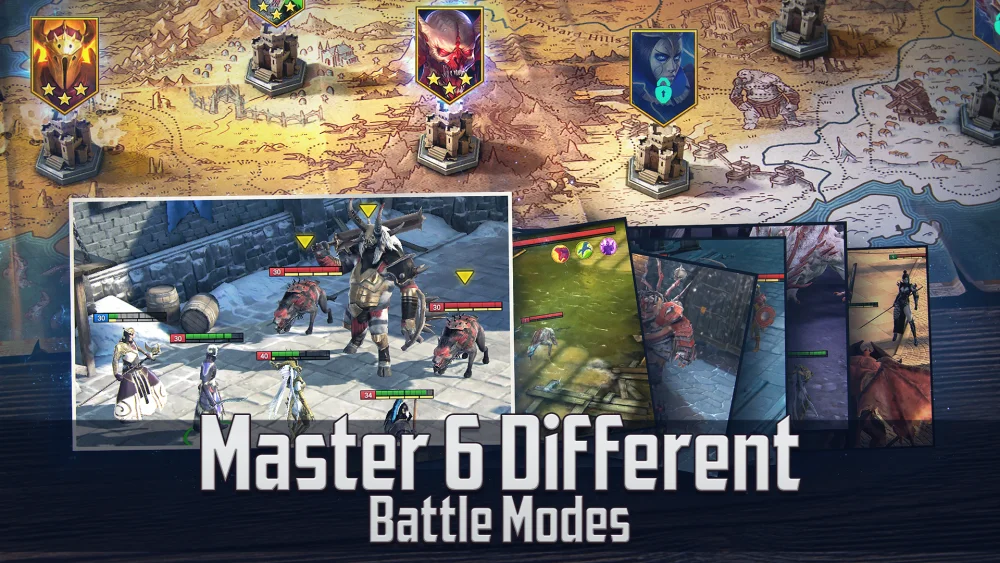
The main PvE journey is the massive campaign, which spans 12 RPG locations and presents a fully voiced story set across Teleria. Campaign battles provide a structured way to advance while also introducing the game’s broader systems, but the long-term progression is tied closely to repeatable content. In Dungeons, you can confront dangerous Bosses for loot, XP, and special drops, then return to those encounters to pursue additional rewards and strengthen your Champions further. Gear and rank progression therefore become central strategic considerations: the most useful team is not only determined by which factions or characters you have collected, but also by how you equip and develop them. On PC, a larger display makes it easier to read combat information, compare Champions and Gear, and keep track of the different abilities available during a turn. Keyboard-and-mouse input also suits repeated menu and roster actions, helping you move between campaign stages, Dungeons, and upgrade screens while managing a growing collection.
RAID: Shadow Legends also extends beyond solo progression through Clan and multiplayer systems. Joining a Clan lets you team up with other players against Clan Bosses and participate in Sieges to conquer enemy Clan fortresses, adding a cooperative and competitive layer to the individual work of building a roster. The multiplayer PvP Arenas offer both asynchronous and real-time battles, where you face other players, compete for special Gear, and climb the ranks toward becoming an Arena legend. These modes give your collection a practical purpose: a Champion setup that performs well in the campaign may need different planning for a Boss encounter, a Clan challenge, or an Arena opponent. A PC display is especially helpful when reviewing several Champions before a fight, judging how to arrange a squad, and monitoring battle details during turn-based exchanges, while precise mouse control makes selecting skills and navigating between modes straightforward. Alongside the battles, the Champion bio collection and the animated limited series, RAID: Call of the Arbiter, provide additional context for the heroes and villains of the setting. The game includes in-game purchases with random items and optional automatically renewing Raid Card subscriptions, so players should review those terms before purchasing.
Screenshots
How to Download and Install the Official RAID: Shadow Legends PC Client
- Download and install the official Windows client distributed by LDPlayer.
- Open the app and sign in with your Google Play account.
- Search for RAID: Shadow Legends in the app store.
- Install the game and finish the first-launch download.
- Use the same game login if account sync is available.
Why Play RAID: Shadow Legends on PC?
Menus, maps, resources, and combat details are easier to read on a desktop display.
Keyboard and mouse input makes repeated actions and long sessions more comfortable.
Desktop play avoids phone battery drain during longer farming sessions.
Keep guides, codes, and notes open alongside the game on PC.
Controls and Performance
These three settings solve most common issues when playing on PC.
Map navigation, skill use, and repeated resource actions first.
Lower resolution or graphics quality if crowded scenes lose frames.
Link your account before switching devices so progress can be restored safely.
RAID: Shadow Legends Official PC Client FAQ
Can I play RAID: Shadow Legends on PC?
Yes. Download the official Windows PC client distributed by LDPlayer and play with a larger screen, keyboard, and mouse controls.
Is RAID: Shadow Legends better on PC than mobile?
Playing on PC can make longer sessions, detailed menus, and resource management more comfortable, while mobile is still convenient for quick check-ins.
Will my RAID: Shadow Legends progress sync on PC?
Progress depends on the sign-in options supported by the game. Use the same linked Google, Facebook, Apple, or game account on both devices.
Why does RAID: Shadow Legends lag on PC?
Lag can be caused by limited RAM, demanding graphics settings, outdated client files, or background apps. Lower the graphics settings and keep the PC client up to date.
DOWNLOAD STARTED
Your download is starting
Check your browser Downloads if it does not appear.
Official PC client for Windows, distributed by LDPlayer.
Download again