
Play Star Sailors on Windows PC
Download the official Star Sailors Windows PC client and learn how to install and play the game on PC, with controls, system requirements, and practical tips.

Download Star Sailors Official Windows PC Client
Official Windows PC client provided by LDPlayer.
About the Official Star Sailors PC Client
Developer: Com2uS Holdings
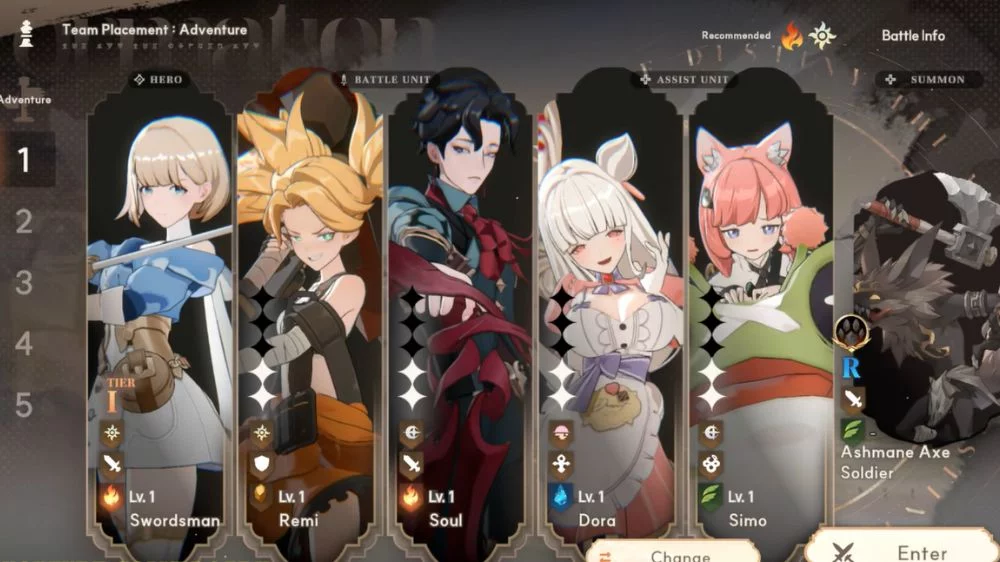
The main gameplay loop centers on building a team, entering dynamic turn-based battles, choosing skills with a plan in mind, and improving your Partners so they can handle more demanding encounters. Battles are defined by combinations rather than by a single strongest character. Skill synergies between Partners can turn a carefully assembled team into a coordinated attack, while elemental advantages give you a reason to consider the opposing side before committing to a lineup. The Classes, Monsters, and Anomalies systems add further variables to that preparation, asking you to account for how different team members and enemy situations interact. During a fight, you can use Break effects to damage enemy defenses, then look for a Burst Chance QTE to release the buffs you have accumulated in one decisive sequence. That combination of turn-by-turn planning, defense breaking, elemental decisions, and timed finishing blows gives each battle a clear rhythm: prepare the right team, create an opening, build momentum, and convert it into a potentially battle-ending explosion.
Progression is designed to support both active play and a more relaxed routine. Newly recruited Partners can be deployed immediately through the Link system, reducing the friction between recruitment and experimentation. When previously cleared content becomes repetitive, the Sweep system lets you reduce the time spent grinding and keep your attention on team building, new objectives, and the next part of the voyage. The result is a progression structure that can be approached casually while still leaving room for the deeper decisions associated with a JRPG: which Partners belong together, how their Classes complement one another, which elemental advantages matter for a particular encounter, and when to reserve accumulated buffs for a Burst Chance QTE. On a larger PC display, the visual information in battle is easier to inspect at a glance, from the current state of enemy defenses to the effects you are building toward before a finishing blow. Mouse input also makes it practical to move through recruitment, Partner conversations, and team-management screens while comparing characters and assembling a lineup. When you are preparing for a difficult fight, the additional screen space helps keep the roster, class choices, and relevant battle options visible as you make decisions. Keyboard-and-mouse control is also well suited to repeated menu actions and Sweep-based progression, letting you move through routine upgrades and cleared content efficiently before returning to the strategic choices that define the next encounter.
Screenshots
How to Download and Install the Official Star Sailors PC Client
- Download and install the official Windows client distributed by LDPlayer.
- Open the app and sign in with your Google Play account.
- Search for Star Sailors in the app store.
- Install the game and finish the first-launch download.
- Use the same game login if account sync is available.
Why Play Star Sailors on PC?
Menus, maps, resources, and combat details are easier to read on a desktop display.
Keyboard and mouse input makes repeated actions and long sessions more comfortable.
Desktop play avoids phone battery drain during longer farming sessions.
Keep guides, codes, and notes open alongside the game on PC.
Controls and Performance
These three settings solve most common issues when playing on PC.
Map navigation, skill use, and repeated resource actions first.
Lower resolution or graphics quality if crowded scenes lose frames.
Link your account before switching devices so progress can be restored safely.
Star Sailors Official PC Client FAQ
Can I play Star Sailors on PC?
Yes. Download the official Windows PC client distributed by LDPlayer and play with a larger screen, keyboard, and mouse controls.
Is Star Sailors better on PC than mobile?
Playing on PC can make longer sessions, detailed menus, and resource management more comfortable, while mobile is still convenient for quick check-ins.
Will my Star Sailors progress sync on PC?
Progress depends on the sign-in options supported by the game. Use the same linked Google, Facebook, Apple, or game account on both devices.
Why does Star Sailors lag on PC?
Lag can be caused by limited RAM, demanding graphics settings, outdated client files, or background apps. Lower the graphics settings and keep the PC client up to date.
DOWNLOAD STARTED
Your download is starting
Check your browser Downloads if it does not appear.
Official PC client for Windows, distributed by LDPlayer.
Download again