
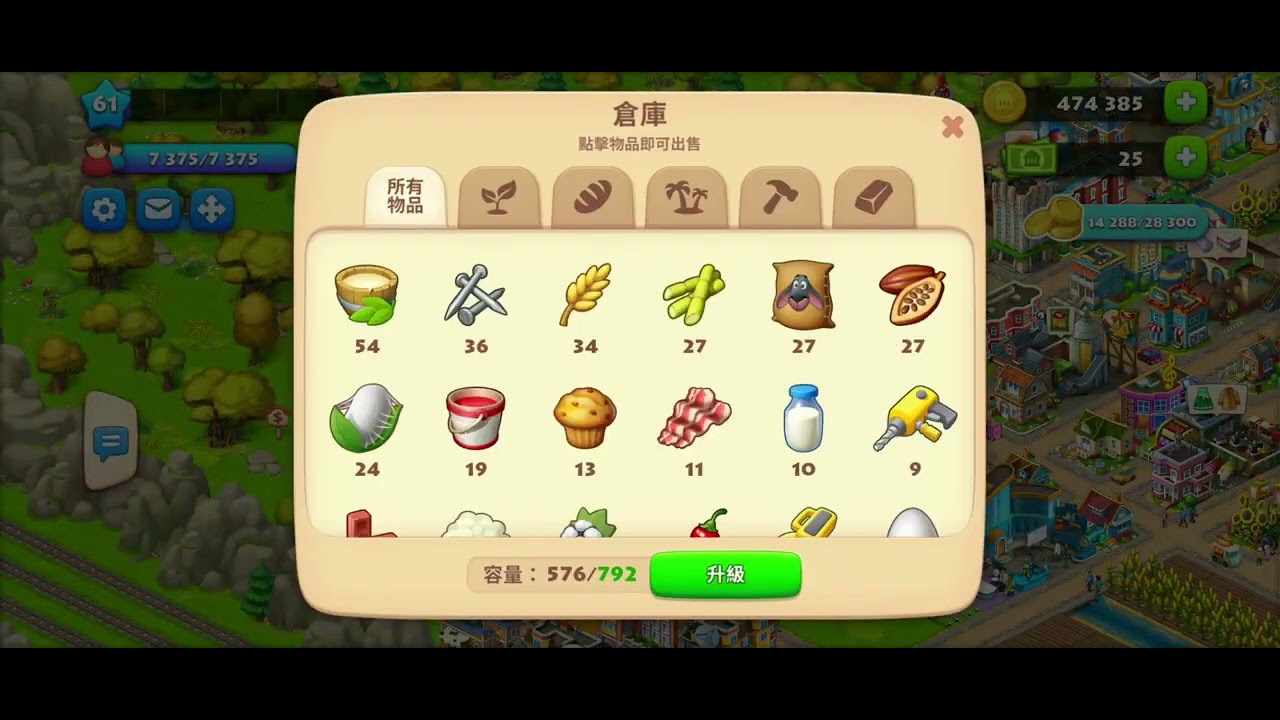
To get the most storage out of a barn upgrade in Township, activate the Spacious Barn Laboratory booster before applying your building materials. The booster applies a dynamic 20 percent bonus to your current permanent base capacity. When you upgrade your barn while the booster is active, the game instantly recalculates your total storage against the new, higher baseline, compounding your temporary capacity.
How the Spacious Barn Booster Calculates Capacity
The Spacious Barn booster in the Laboratory does not add a flat storage number. Instead, it provides a 20 percent increase based on your permanent base cap.
Permanent upgrades require three construction materials:
- Hammers
- Nails
- Red Paint
When you apply these materials to complete an upgrade, your baseline capacity increases permanently. If the Spacious Barn booster is already active, the game immediately reapplies the 20 percent bonus to the new baseline. Upgrading during an active boost provides two immediate inventory advantages:
- It consumes stockpiled Hammers, Nails, and Red Paint, instantly freeing up the inventory slots those materials previously occupied.
- It expands your temporary storage ceiling by both the base upgrade amount and the additional 20 percent calculated from that new tier.
Step-by-Step Upgrade Sequence
Coordinate your booster activations with demanding town events—such as Regatta task streaks, transport events, or the Great Freight event—to handle large inventory surges efficiently.
- Stockpile tools: Gather the exact number of Hammers, Nails, and Red Paint needed for your next upgrade threshold.
- Activate the booster: Open the Laboratory and turn on the Spacious Barn booster using gems (such as Topaz, Emeralds, or Rubies) or a booster coupon earned from events or Golden Ticket rewards.
- Apply the upgrade: Open the barn menu and finalize the upgrade immediately. Your storage will jump to reflect the new permanent baseline plus the active 20 percent bonus.
- Fill factory queues: Use the newly opened capacity to clear factory shelves and store slow-to-produce goods.
| Upgrade Method | Primary Resource Cost | Duration | Effect on Barn Storage |
|---|---|---|---|
| Permanent Upgrade | Hammers, Nails, Red Paint | Permanent | Increases base capacity |
| Spacious Barn Booster | Gems or Booster Coupons | 2 Days (Temporary) | Adds 20% on top of current base cap |
| Combined Execution | Tools + Gems or Coupon | Mixed | Raises base cap and recalculates the 20% bonus |
Preventing Gridlock When the Booster Expires
The Spacious Barn booster lasts for two days. When the timer runs out, your maximum capacity drops back to your permanent baseline.
The game does not delete surplus inventory if you exceed your base capacity when the booster ends. For example, if you hold 1,200 items when your booster drops your cap back to 1,000, your inventory will display as 1,200/1,000. However, being over capacity completely halts key town operations:
- You cannot harvest crops from your fields.
- You cannot collect completed products from factory shelves.
- You cannot buy goods or hire dealer items from the City Market.
- You cannot unload construction materials from arriving trains.
To avoid a production freeze, check the booster timer during its final hours. Reduce your stock below your permanent baseline before the countdown reaches zero by loading airplane crates, sending helicopter orders, feeding farm animals, and starting long factory queues.
Inventory Management During the Boost Window
Extra capacity should be reserved for items that take substantial time to replace. Avoid cluttering expanded storage with fast-growing crops like Wheat, Corn, or Carrots, which can be harvested within minutes as needed. Use your expanded space for:
- High-tier dairy, rubber, and fabric goods with long manufacturing times.
- Island fruits brought in by ships.
- Goods required for pending train and airplane shipments.

Free Township Codes
Current active codes and how to redeem them.

Sarah Williams
Sarah specializes in RPG and collection games, explaining team building, character growth, and beginner-friendly ways to avoid expensive early mistakes.
COMMUNITY
Player Comments
74 players commented on this guide.
This guide answered the exact question I had.
Nice guide. I am checking the other Township articles next.
This saved me time in the early game.
Can you add more details about base building in a future update?