
Play Zero City: Zombie Shelter Game on Windows PC
Download the official Zero City: Zombie Shelter Game Windows PC client and learn how to install and play the game on PC, with controls, system requirements, and practical tips.

Download Zero City: Zombie Shelter Game Official Windows PC Client
Official Windows PC client provided by LDPlayer.
About the Official Zero City: Zombie Shelter Game PC Client
Developer: MYGAMES MENA FZ LLC
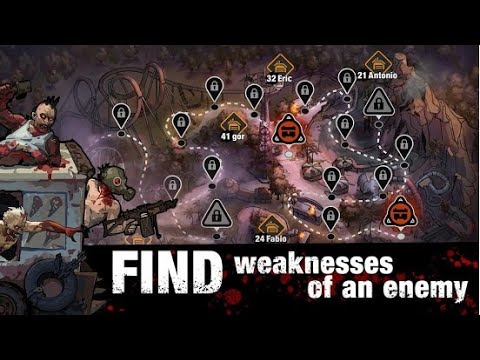
Construction is an ongoing strategic system rather than a one-time objective. You build and upgrade rooms, establish a range of defensive structures, and decide which defense combination best protects the shelter. Those choices give the base a management layer that complements the game’s battles: your workers keep construction moving while your planning determines how the refuge is prepared for danger. Beyond the shelter, you create effective weapons and equipment, then arm and dress your squad for the fights ahead. Supplies and items found in abandoned warehouses can become useful in battles against hordes of zombies and their master, so exploration and collection feed directly into your ability to survive. The story-driven campaign leads your squad through the trials of the new world and includes hundreds of battles against zombies and mutant fanatics, giving you a steady series of objectives built around assembling, improving, and deploying your fighters.
Zero City: Zombie Shelter Game also extends its survival struggle into multiplayer PVP. You can create a powerful squad for arena tournaments or attacks on other shelters, shifting the focus from surviving scripted threats to proving that your preparation is stronger than another player’s. Equipment choices, survivor development, and the composition of your fighting force all matter when you move into these open confrontations. On PC, the larger display gives you more room to read shelter layouts, inspect rooms and defensive structures, compare available equipment, and keep track of the different roles assigned to your dwellers. Keyboard-and-mouse controls are also useful when repeatedly selecting workers, assigning duties, navigating the base, and organizing a squad before a campaign battle, arena tournament, or shelter attack. That combination makes it easier to move between management and combat planning while keeping the game’s many connected systems visible: develop the people, strengthen the refuge, collect what the ruined world provides, and send a properly equipped squad into the next fight.
Screenshots
How to Download and Install the Official Zero City: Zombie Shelter Game PC Client
- Download and install the official Windows client distributed by LDPlayer.
- Open the app and sign in with your Google Play account.
- Search for Zero City: Zombie Shelter Game in the app store.
- Install the game and finish the first-launch download.
- Use the same game login if account sync is available.
Why Play Zero City: Zombie Shelter Game on PC?
Menus, maps, resources, and combat details are easier to read on a desktop display.
Keyboard and mouse input makes repeated actions and long sessions more comfortable.
Desktop play avoids phone battery drain during longer farming sessions.
Keep guides, codes, and notes open alongside the game on PC.
Controls and Performance
These three settings solve most common issues when playing on PC.
Map navigation, skill use, and repeated resource actions first.
Lower resolution or graphics quality if crowded scenes lose frames.
Link your account before switching devices so progress can be restored safely.
Zero City: Zombie Shelter Game Official PC Client FAQ
Can I play Zero City: Zombie Shelter Game on PC?
Yes. Download the official Windows PC client distributed by LDPlayer and play with a larger screen, keyboard, and mouse controls.
Is Zero City: Zombie Shelter Game better on PC than mobile?
Playing on PC can make longer sessions, detailed menus, and resource management more comfortable, while mobile is still convenient for quick check-ins.
Will my Zero City: Zombie Shelter Game progress sync on PC?
Progress depends on the sign-in options supported by the game. Use the same linked Google, Facebook, Apple, or game account on both devices.
Why does Zero City: Zombie Shelter Game lag on PC?
Lag can be caused by limited RAM, demanding graphics settings, outdated client files, or background apps. Lower the graphics settings and keep the PC client up to date.
DOWNLOAD STARTED
Your download is starting
Check your browser Downloads if it does not appear.
Official PC client for Windows, distributed by LDPlayer.
Download again