
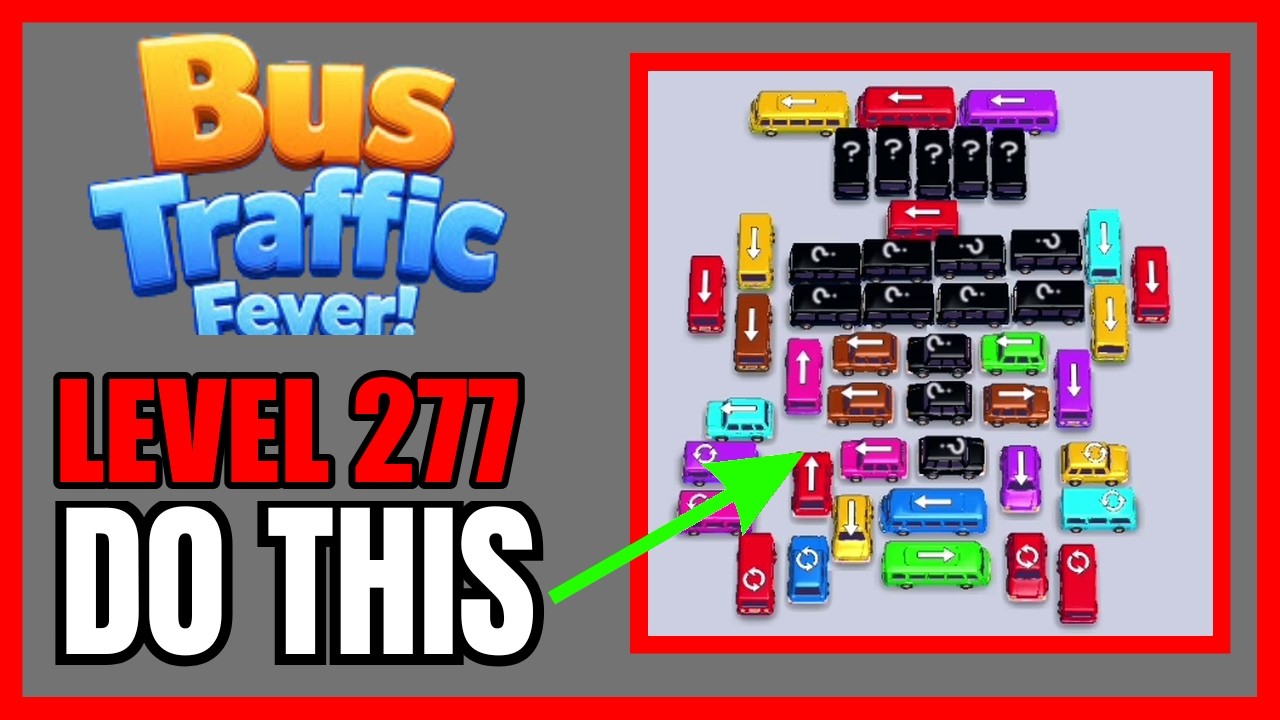
To clear Level 277 in Bus Traffic Fever! on your first attempt without hints or boosters, dispatch only vehicles that immediately board the front commuters in the passenger queue, and never fill your final open loading dock bay with an unmatched bus. Premature launches trap idle vehicles in the terminal, blocking incoming buses and causing unrecoverable gridlock.
Analyzing the Level 277 Grid and Chokepoints
Level 277 arranges buses in an interlocking grid of perpendicular lanes. Horizontal and vertical vehicles physically block each other from reaching the main exit road, trapping high-capacity buses in the center of the lot. You cannot access these central carriers until the outer buffer vehicles vacate their lanes.
A green exit arrow on a bus indicates only that its driving path is physically unobstructed, not that sending it is safe. At the top of the screen, passengers wait in a strict first-in, first-out line consisting of red, blue, green, and yellow groups. Sending an unobstructed perimeter bus to the terminal when its color does not match the front commuters leaves that vehicle stuck at the dock, consuming a vital pickup bay.
Perimeter Unblocking Order
Solve Level 277 by dismantling the exterior barrier from the outside inward, clearing space for interior vehicles while satisfying the queue in order:
- Check the front commuters: Identify the exact colors of the first three to four passengers waiting at the boarding entrance.
- Locate corresponding buses on the board: Scan the lot for buses matching those colors and determine which perimeter vehicles block their exits.
- Clear corner vehicles first: Corner buses typically cross fewer perpendicular paths than central vehicles. Removing them opens lateral exit routes with minimal risk of triggering crossroad jams.
- Dispatch blockers only with queue alignment: If an obstructing perimeter bus must move, ensure its color matches the next group in the queue before dispatching it to an empty bay.
Managing Dock Bay Capacity
Terminal failure occurs when all loading stalls fill with buses waiting for passenger colors buried deeper in the line. Because passengers cannot skip ahead, a stalled dock prevents all further movement.
Maintain slot discipline using the following rules:
| Current Dock State | Board Situation | Required Action |
|---|---|---|
| Two or more vacant bays | Matching bus obstructed by one vehicle | Dispatch the blocker only if it matches secondary queue colors |
| Exactly one vacant bay | Obstructed bus matches front passenger | Hold movement until an unblocked bus directly matches the front line |
| Single bay remaining | No direct queue match open on the board | Stop tapping; trace lane chains to free a matching bus before dispatching |
| All bays filled | Queue colors do not match any docked bus | Terminal failure; no valid moves remain |
Sequencing Passenger Line Clearances
Buses require their full seating capacity to be filled before departing the bay and freeing up dock space. Sending a four-seat bus to the dock when only two matching passengers stand at the front leaves that bus idling in place, narrowing your margin for error.
Before tapping any vehicle, verify that the active queue contains enough matching passengers to fill and launch it immediately, or that its arrival will expose the exact colors required by another unblocked bus. Clearing buses in rapid pairs—where the departure of the first bus advances the queue directly into the color of the second—keeps the terminal clear and systematically empties the lot.
Free Bus Traffic Fever! Codes
Current active codes and how to redeem them.

Emily Johnson
Emily writes practical mobile strategy guides with a focus on resource planning, base progression, and the early decisions that shape a long-term account.
COMMUNITY
Player Comments
130 players commented on this guide.
Good guide for Bus Traffic Fever! players. The strategy part was useful.
This guide answered the exact question I had.
I wish I had read this before upgrading the wrong thing.
Nice guide. I am checking the other Bus Traffic Fever! articles next.