
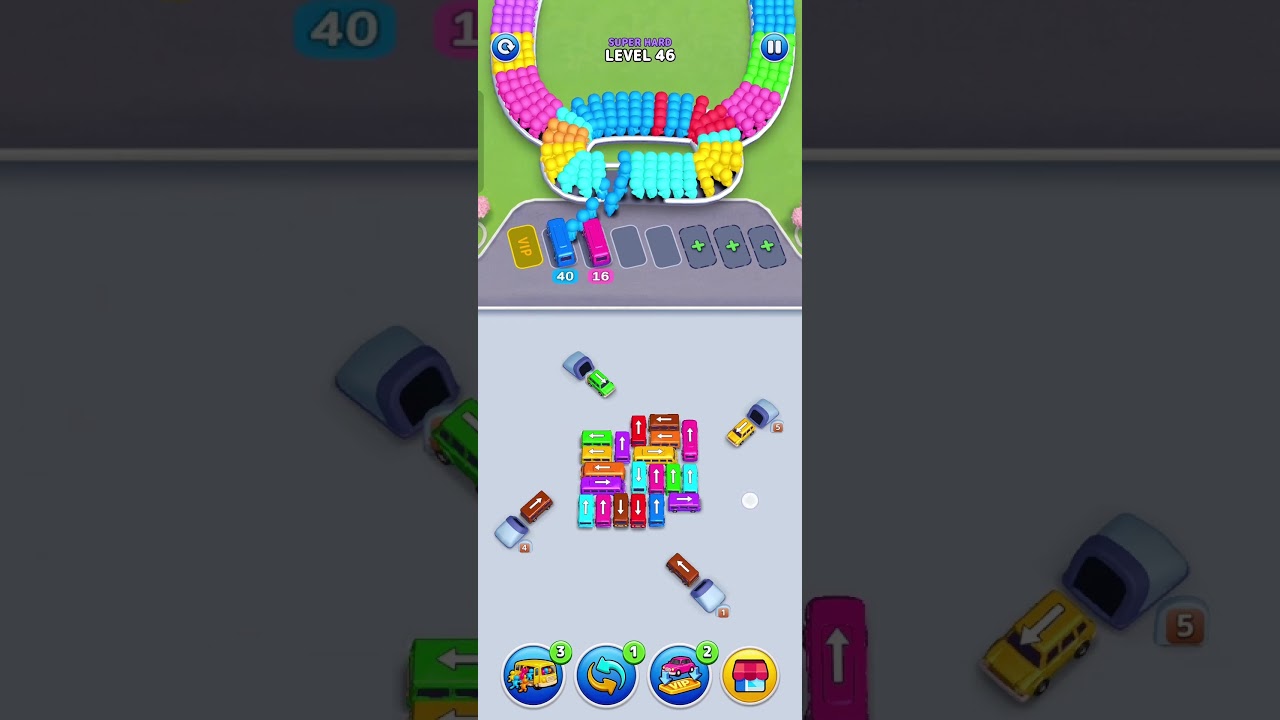
To beat Level 46 in Bus Traffic Fever!, dispatch buses only when their colors match the passengers currently waiting at the front of the queue, and always keep at least one loading dock bay empty as a buffer. Sending unmatching buses into the bays fills your limited docking space and causes an instant loss if the active line stalls.
How to Coordinate Queue Order and Dock Bays
Passengers in Bus Traffic Fever! board vehicles strictly from front to back. A bus sent to a loading dock will sit idle until passengers matching its color reach the front of the line. Because Level 46 features mixed color clusters and tightly constrained dock capacity, you must read the passenger line before tapping any vehicle on the grid.
| Passenger Queue Status | Dock Action | Board Impact |
|---|---|---|
| Leading group matches an unblocked bus | Dispatch the matching bus immediately | Clears the bay quickly and opens a lane on the grid |
| Front group has split colors | Hold the secondary bus until the first boards | Prevents two partially filled buses from clogging the bays |
| Needed color is buried behind blockers | Leave vehicles parked on the grid | Protects empty bays while you clear peripheral blockers |
Never route a bus to the dock unless its matching passenger is already at the gate or will step forward after the current boarding cycle finishes. Filling every dock bay with partially loaded buses freezes your board state completely.
Step-by-Step Clearing Sequence for Level 46
Level 46 interlocks horizontal and vertical vehicles, creating deadlocks where edge buses trap central rows. Solve the layout by working from the outside inward:
- Clear perimeter matches first: Scan the outer edges of the lot for free-rolling buses that match the front of the passenger queue. Drive these out to clear initial queue slots and create clearance lanes along the borders.
- Unlock interior keystone buses: Identify perpendicular vehicles pinning the center rows. Move these blockers into the docks only when their corresponding passenger colors arrive at the front of the line, opening paths for deeper vehicles without jamming dock bays.
- Empty the remaining lot: With the central grid opened, route the remaining buses into the loading area in sequence with the final passenger waves.
Managing the Dock Bay Buffer
Always reserve one vacant loading bay to handle transitions. If you have three dock bays, keep two actively boarding and leave the third empty. This open slot gives you the leeway to pull an intermediary bus out of the grid to free a pinned vehicle, provided a matching passenger is immediately ready to cycle through.
Avoid tapping mobile vehicles simply because they have an open path to the roadway. If a vehicle does not clear passengers upon entering the dock or expose the nose of another critical bus, leave it parked until its color appears in the queue.

Free Bus Traffic Fever! Codes
Current active codes and how to redeem them.

Sarah Williams
Sarah specializes in RPG and collection games, explaining team building, character growth, and beginner-friendly ways to avoid expensive early mistakes.
COMMUNITY
Player Comments
141 players commented on this guide.
Can you add more details about strategy in a future update?
I wish I had read this before upgrading the wrong thing.
The tips are practical and easy to follow.
Nice guide. I am checking the other Bus Traffic Fever! articles next.