
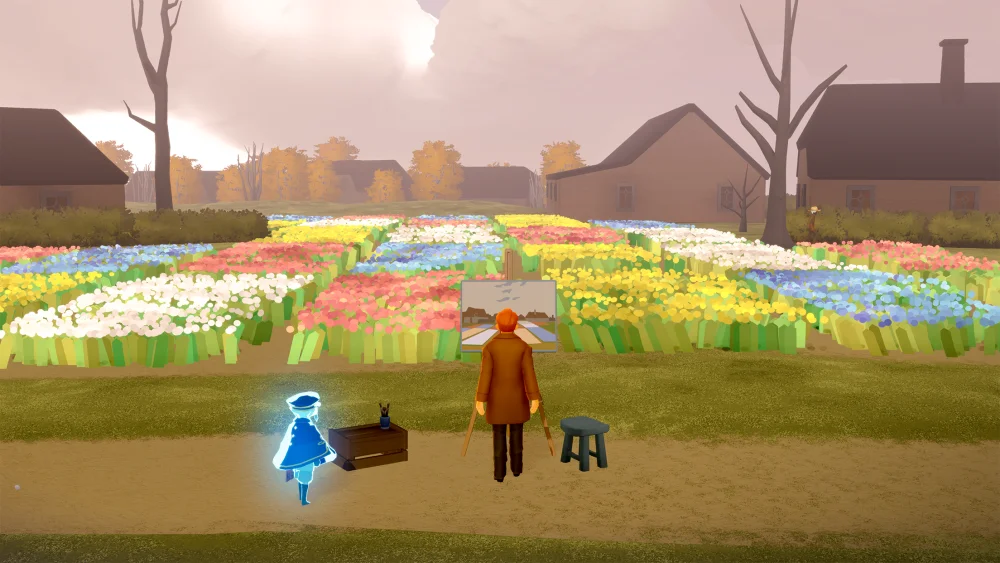
Play Sky: Children of the Light on PC if you want native 4K clarity, longer draw distances, and steady frame rates during long farming routes. Choose mobile ultra settings if you prioritize handheld convenience and touchscreen controls for short sessions, but expect heat buildup and resolution scaling over extended play.
Graphics Feature Comparison
| Visual Feature | PC (Steam Client) | Mobile (Ultra Preset) |
|---|---|---|
| Native Resolution | True 1080p, 1440p, or 4K | Dynamic resolution scaling |
| Edge Smoothing | Clean anti-aliasing (MSAA/FXAA) | Noticeable edge shimmer in motion |
| Volumetric Effects | Denser fog and self-shadowing clouds | Compressed particles and simpler mist |
| Draw Distance | Full geometry and early foliage render | Aggressive culling of distant objects |
| Thermal Stability | Consistent performance | Throttling and dimming after 20–30 min |
Resolution and Texture Fidelity
The primary visual difference lies in asset compression and resolution stability. Mobile hardware relies on dynamic resolution scaling to keep temperatures manageable. In sprawling realms like Daylight Prairie and the Valley of Triumph, this scaling softens distant structures. Fine details—such as stone engravings on realm gates, cape patterns, and seasonal cosmetic trim—lose crispness on mobile when the camera pulls back during flight transitions.
The PC port outputs native display resolutions up to 4K without aggressive reconstruction. Textures remain sharp across wide camera angles, avoiding the compression artifacts that appear when projecting mobile footage to larger external displays.
Lighting, Shaders, and Draw Distance
Both platforms handle the game's emotional aesthetic well, but desktop hardware renders more complex atmospheric shaders:
- Bloom and Glow: While both platforms highlight Winged Light and candle clusters, the PC client cleanly separates light sources from surrounding surfaces. Mobile ultra settings can introduce a broad glow haze across adjacent dark textures.
- Clouds and Fog: Flying through the clouds in Hidden Forest reveals multi-layered volumetric fog on PC, complete with soft self-shadowing. Mobile uses simpler, compressed particle layers to save processing power.
- Far-Field Rendering: PC loads terrain geometry, foliage, and interactable lights well outside the immediate player area. Mobile ultra culls background vegetation and decorative geometry, which causes visible terrain pop-in when diving at high flight speeds.
Performance and Thermal Stability
Session length heavily influences performance on mobile devices. Flagship mobile phones can run the ultra graphics preset at 60 frames per second, but sustained play sessions introduce hardware constraints:
- Thermal Throttling: After roughly 20 to 30 minutes of continuous play, mobile devices begin throttling clock speeds to shed heat. This produces stuttering during fast flight or heavy weather sequences, particularly in the Eye of Eden.
- Crowded Instances: High player density in social hubs like Aviary Village strains mobile processors, causing visible frame drops when rendering multiple cosmetics and chat props at once.
- Screen Dimming: Mobile operating systems frequently reduce display brightness automatically to manage internal heat, flattening contrast in darker zones like the Golden Wasteland.
Desktop systems avoid these thermal constraints entirely, maintaining stable frame pacing across long play sessions.
Which Platform Should You Choose?
Select the platform that matches your immediate goal:
- Choose PC if you are recording cinematics, capturing high-resolution screenshots, attending crowded live events, or executing full multi-realm candle runs that take 40 minutes or longer.
- Choose Mobile Ultra if you are doing quick daily quest turn-ins, collecting light from friend constellations, or playing musical instruments via direct touchscreen inputs. If your phone becomes noticeably warm or dims its screen during play, lower the graphics setting by one tier to maintain smooth flight handling.

Free Sky: Children of the Light Codes
Current active codes and how to redeem them.

Emily Johnson
Emily writes practical mobile strategy guides with a focus on resource planning, base progression, and the early decisions that shape a long-term account.
COMMUNITY
Player Comments
56 players commented on this guide.
This saved me time in the early game.
I tried this today and it worked better than my old setup.
Can you add more details about strategy in a future update?
This guide answered the exact question I had.