
Play Sky: Children of the Light on Windows PC
Download the official Sky: Children of the Light Windows PC client and learn how to install and play the game on PC, with controls, system requirements, and practical tips.

Download Sky: Children of the Light Official Windows PC Client
Official Windows PC client provided by LDPlayer.
About the Official Sky: Children of the Light PC Client
Developer: thatgamecompany
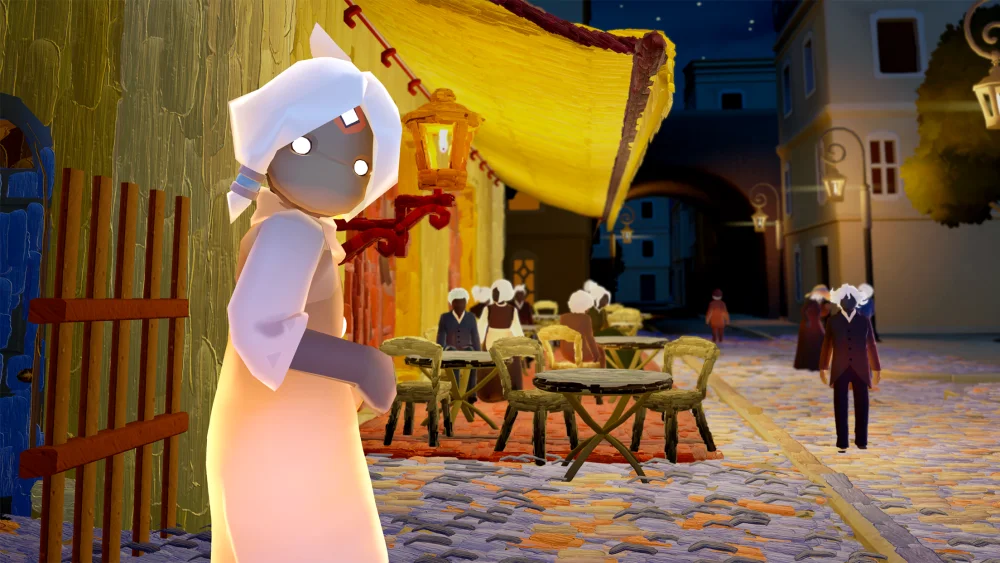
The central progression is narrative and reflective. A decades-long exchange of letters between Vincent and his brother Theo forms the emotional foundation of the experience, while Johanna, Theo’s wife, guides you toward the parts of the story that are often overlooked. As you advance, you piece together how doubt, devotion, and support influenced Van Gogh’s work, including the invisible hands that helped carry his legacy forward. Exploration is therefore tied directly to interpretation: the places you visit are not simply scenic backdrops, but playable expressions of different periods and feelings in his life. The experience also includes Sky’s signature brushstroke mechanic, allowing you to bring color and light back into the world alongside other players. This cooperative element gives the journey a social dimension without changing its introspective focus. Instead of competing for rewards or managing a traditional combat loadout, you collaborate to transform the environment, making shared action part of the game’s theme.
Playing Sky: Children of the Light on PC can make that visual and cooperative design easier to appreciate. A larger display gives the painted landscapes more room to breathe, making it simpler to follow paths through the Netherlands-inspired fields, distinguish details in the glowing night scenes, and read the visual changes as color and light return to the world. Keyboard-and-mouse controls can also make movement and camera handling more deliberate while you explore, especially when you are positioning yourself for the brushstroke mechanic or trying to coordinate an action with another player. The extra screen space is useful when comparing the surrounding details of a scene and considering where the experience is directing your attention, while precise input helps with repeated movement through an environment rather than forcing every interaction to feel imprecise. At the end, Dear Van Gogh asks you to pause, reflect on what you observed, and share what moved you. Its progression is measured less by conventional victories than by the story you assemble, the paintings you walk through, and the connections—between Vincent and Theo, between Johanna and the legacy she protected, and between players—that give the art its meaning.
Screenshots
How to Download and Install the Official Sky: Children of the Light PC Client
- Download and install the official Windows client distributed by LDPlayer.
- Open the app and sign in with your Google Play account.
- Search for Sky: Children of the Light in the app store.
- Install the game and finish the first-launch download.
- Use the same game login if account sync is available.
Why Play Sky: Children of the Light on PC?
Menus, maps, resources, and combat details are easier to read on a desktop display.
Keyboard and mouse input makes repeated actions and long sessions more comfortable.
Desktop play avoids phone battery drain during longer farming sessions.
Keep guides, codes, and notes open alongside the game on PC.
Controls and Performance
These three settings solve most common issues when playing on PC.
Map navigation, skill use, and repeated resource actions first.
Lower resolution or graphics quality if crowded scenes lose frames.
Link your account before switching devices so progress can be restored safely.
Sky: Children of the Light Official PC Client FAQ
Can I play Sky: Children of the Light on PC?
Yes. Download the official Windows PC client distributed by LDPlayer and play with a larger screen, keyboard, and mouse controls.
Is Sky: Children of the Light better on PC than mobile?
Playing on PC can make longer sessions, detailed menus, and resource management more comfortable, while mobile is still convenient for quick check-ins.
Will my Sky: Children of the Light progress sync on PC?
Progress depends on the sign-in options supported by the game. Use the same linked Google, Facebook, Apple, or game account on both devices.
Why does Sky: Children of the Light lag on PC?
Lag can be caused by limited RAM, demanding graphics settings, outdated client files, or background apps. Lower the graphics settings and keep the PC client up to date.
DOWNLOAD STARTED
Your download is starting
Check your browser Downloads if it does not appear.
Official PC client for Windows, distributed by LDPlayer.
Download again