
Play Solo Leveling:Arise on Windows PC
Download the official Solo Leveling:Arise Windows PC client and learn how to install and play the game on PC, with controls, system requirements, and practical tips.

Download Solo Leveling:Arise Official Windows PC Client
Official Windows PC client provided by LDPlayer.
About the Official Solo Leveling:Arise PC Client
Developer: Netmarble Corporation
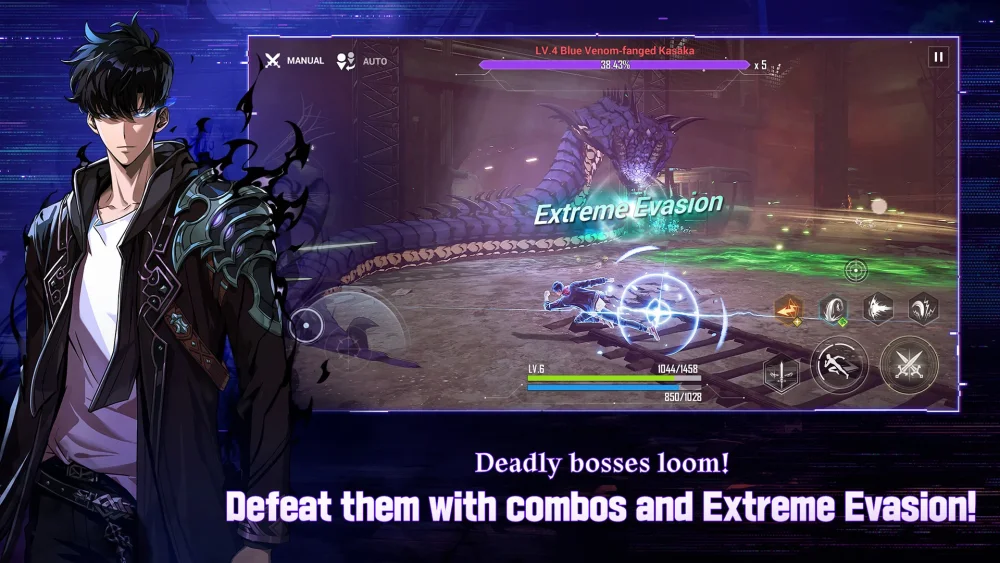
Combat is built around timing, positioning, and team decisions instead of constant attacking. You can use Extreme Evasion to avoid danger and follow it with a perfectly timed QTE skill for a killing blow, making defensive reactions an important part of your offensive strategy. Jinwoo is not alone in battle: hunters such as Choi Jong-In, Baek Yoonho, and Cha Hae-In can be combined with different abilities and tactics to form specialized teams. Choosing which hunters to bring and how their abilities work together is especially relevant when tackling the game’s varied content, including massive dungeon raids, boss replays, and Time Attack stages where every second counts. As Jinwoo advances, he can also extract the shadows of defeated monsters and recruit them as Shadow Soldiers, then command squads of these loyal allies. That army-building system adds another layer to the progression loop, linking victories against monsters to the growth of your available forces. Playing Solo Leveling:Arise on PC gives these systems more room to breathe: a larger display makes it easier to read combat information, follow enemy movement, judge the timing for Extreme Evasion, and recognize the moment to trigger a QTE skill. Keyboard-and-mouse input can also make repeated actions and menu navigation more direct when you are switching equipment, comparing skills, assembling hunter combinations, or organizing Shadow Soldier squads before a gate. With its mix of action combat, character and equipment choices, dungeon progression, boss-focused challenges, and collectible allies, the PC version is suited to players who want a more readable and controllable way to experience Jinwoo’s transformation into the Monarch of Shadows.
Screenshots
How to Download and Install the Official Solo Leveling:Arise PC Client
- Download and install the official Windows client distributed by LDPlayer.
- Open the app and sign in with your Google Play account.
- Search for Solo Leveling:Arise in the app store.
- Install the game and finish the first-launch download.
- Use the same game login if account sync is available.
Why Play Solo Leveling:Arise on PC?
Menus, maps, resources, and combat details are easier to read on a desktop display.
Keyboard and mouse input makes repeated actions and long sessions more comfortable.
Desktop play avoids phone battery drain during longer farming sessions.
Keep guides, codes, and notes open alongside the game on PC.
Controls and Performance
These three settings solve most common issues when playing on PC.
Map navigation, skill use, and repeated resource actions first.
Lower resolution or graphics quality if crowded scenes lose frames.
Link your account before switching devices so progress can be restored safely.
Solo Leveling:Arise Official PC Client FAQ
Can I play Solo Leveling:Arise on PC?
Yes. Download the official Windows PC client distributed by LDPlayer and play with a larger screen, keyboard, and mouse controls.
Is Solo Leveling:Arise better on PC than mobile?
Playing on PC can make longer sessions, detailed menus, and resource management more comfortable, while mobile is still convenient for quick check-ins.
Will my Solo Leveling:Arise progress sync on PC?
Progress depends on the sign-in options supported by the game. Use the same linked Google, Facebook, Apple, or game account on both devices.
Why does Solo Leveling:Arise lag on PC?
Lag can be caused by limited RAM, demanding graphics settings, outdated client files, or background apps. Lower the graphics settings and keep the PC client up to date.
DOWNLOAD STARTED
Your download is starting
Check your browser Downloads if it does not appear.
Official PC client for Windows, distributed by LDPlayer.
Download again