
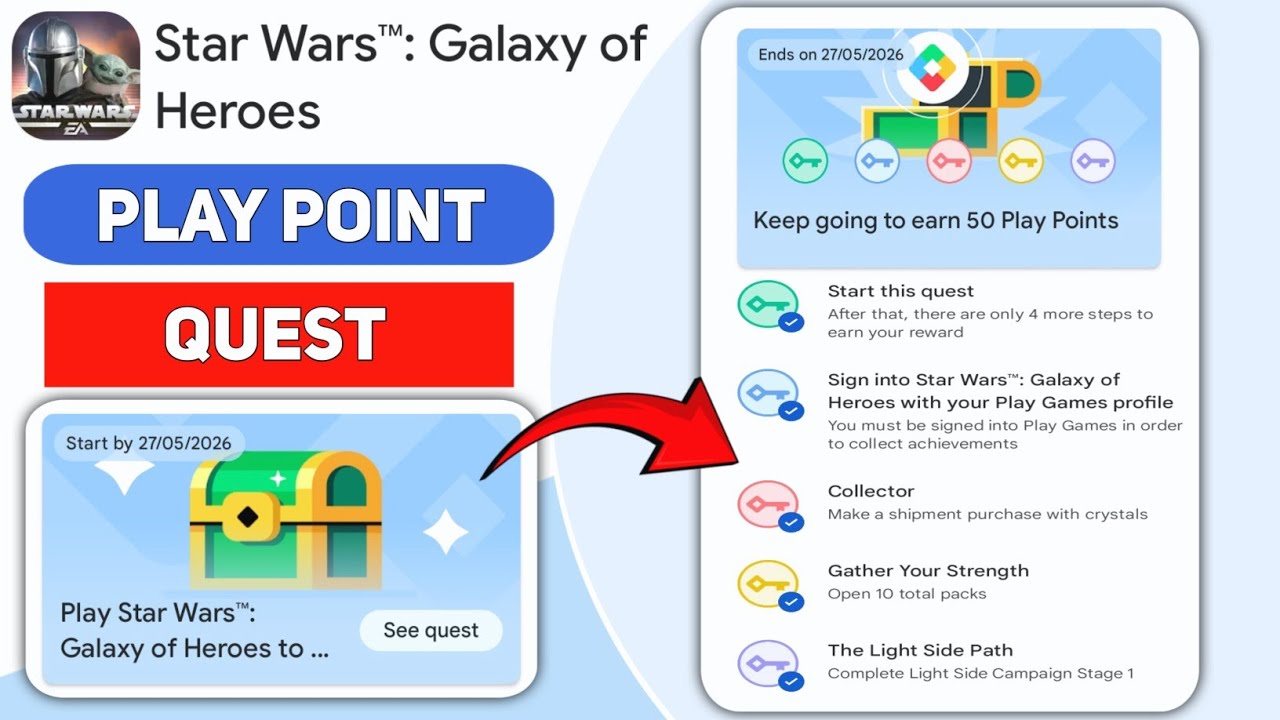
To complete Play Point Quests in Star Wars™: Galaxy of Heroes, you must link your game account to the Google Play Games PC beta client and complete designated in-game milestones while playing through that specific interface. These quests are separate from standard daily objectives and provide unique point rewards that can be redeemed for various digital benefits within the Google Play ecosystem.
Setting Up Your Account for Play Point Quests
The Play Point Quest system is an exclusive feature of the Google Play Games PC beta environment. Because these points are tracked through Google’s services rather than the game’s internal server-side logs alone, you cannot earn these rewards using an iOS device or by playing exclusively on a standard mobile Android installation.
Step-by-Step Installation:
- Verify Region: Ensure your country supports the Google Play Games PC beta, as regional restrictions apply.
- Download the Client: Visit the official Google Play Games on PC website to download the beta installer.
- Account Sync: Log in using the exact same Google account currently linked to your Star Wars™: Galaxy of Heroes profile. If you use a guest account or a different email, your progress will not track toward the quests.
- Library Verification: Launch the PC client and search for Star Wars™: Galaxy of Heroes. If the game is not showing in your library, ensure your account is logged in correctly.
Once installed, treat the PC client as your primary interface for "quest-heavy" days. While your game data is synced across all devices, the Google Play Point tracking software is specifically tied to the PC client’s execution.
Understanding Quest Tracking and Mechanics
Play Point Quests function as "external milestones." Unlike in-game achievements, which pop up immediately upon completion, these are tracked via the Google Play Games overlay.
How Tracking Works
- Active Session Requirement: Always perform the required gameplay (e.g., spending Cantina energy, winning Arena battles) while the game is running via the PC client. Actions performed on a mobile device while the PC client is closed often fail to register because the Google Play Games service is not actively monitoring the game state.
- The "Earn" Tab: Navigate to the "Earn" tab within the Google Play Games PC app. This is your authoritative dashboard. If a quest shows as "In Progress," you can track your percentage completion there.
- Sync Latency: There is often a short delay (up to 30 minutes) between completing a task in-game and the point reward appearing in your Google Play account. Do not be alarmed if the reward is not instantaneous.
Strategic Integration: Farming While Questing
As a senior player, you know that Star Wars™: Galaxy of Heroes is a game of resource management. You should never sacrifice your long-term farming goals—such as unlocking a Galactic Legend or gearing a Conquest team—just to chase a minor Play Point reward. Instead, integrate these quests into your existing daily routine.
Strategies for Passive Completion
- Energy Consumption: If a quest requires spending 500 energy, do not waste crystals refreshing nodes you don’t need. Wait until you have a farming project that requires that specific energy type (e.g., a new marquee character’s shards) and execute those battles on the PC client.
- Fleet and Arena Rotation: If you are required to win a certain number of fleet battles, perform your daily climb on the PC client. Since you are already playing those matches to maintain your ranking, the quest completion becomes a "bonus" rather than a chore.
- The "PC-First" Rule: Make it a habit to log into the PC client first thing in the morning to collect your daily free energy and handle your first few battles. This ensures you are always "connected" to the Google Play monitoring service before you start your heaviest grinding.
Troubleshooting Common Issues
If you are performing the required actions but the quest remains stuck, consider these common pitfalls:
- Parental Controls: If your Google account has parental controls enabled, the Play Points system may be restricted. You must have a standard, unrestricted account to participate in point-earning activities.
- Version Mismatch: Ensure both your Star Wars™: Galaxy of Heroes app and the Google Play Games PC client are updated to the latest version. Outdated clients often fail to sync tracking data.
- Connection Stability: Because the tracking relies on a constant handshake between the game client and the Google Play service, a poor internet connection can cause quest progress to drop. If you are grinding for a milestone, ensure a stable, wired connection if possible.
Is It Worth the Effort?
The decision to focus on Play Point Quests depends on your current stage of the game. For newer players, these points provide a helpful boost to resource acquisition. For veteran players, the rewards may feel negligible compared to the time spent managing a second platform.
Decision Matrix:
- If you already play on PC: Participation is a "no-brainer." Just keep the Google Play overlay open to track progress.
- If you are a mobile-only player: Do not switch to PC just for the points unless you have the hardware to handle the game comfortably. The performance difference between a high-end phone and the PC beta can sometimes affect your ability to play effectively during high-stakes modes like Grand Arena Championships.
By treating these quests as a secondary benefit to your daily grind rather than the primary focus, you maintain efficiency while maximizing your account's total value over time. Always check the "Earn" tab at the start of each month to see if the requirements align with your farming roadmap before committing extra time.
Free Star Wars™: Galaxy of Heroes Codes
Current active codes and how to redeem them.

Sarah Williams
Sarah specializes in RPG and collection games, explaining team building, character growth, and beginner-friendly ways to avoid expensive early mistakes.
COMMUNITY
Player Comments
66 players commented on this guide.
The tips are practical and easy to follow.
Nice guide. I am checking the other Star Wars™: Galaxy of Heroes articles next.
This saved me time in the early game.
The explanation is clear, especially for beginners.