
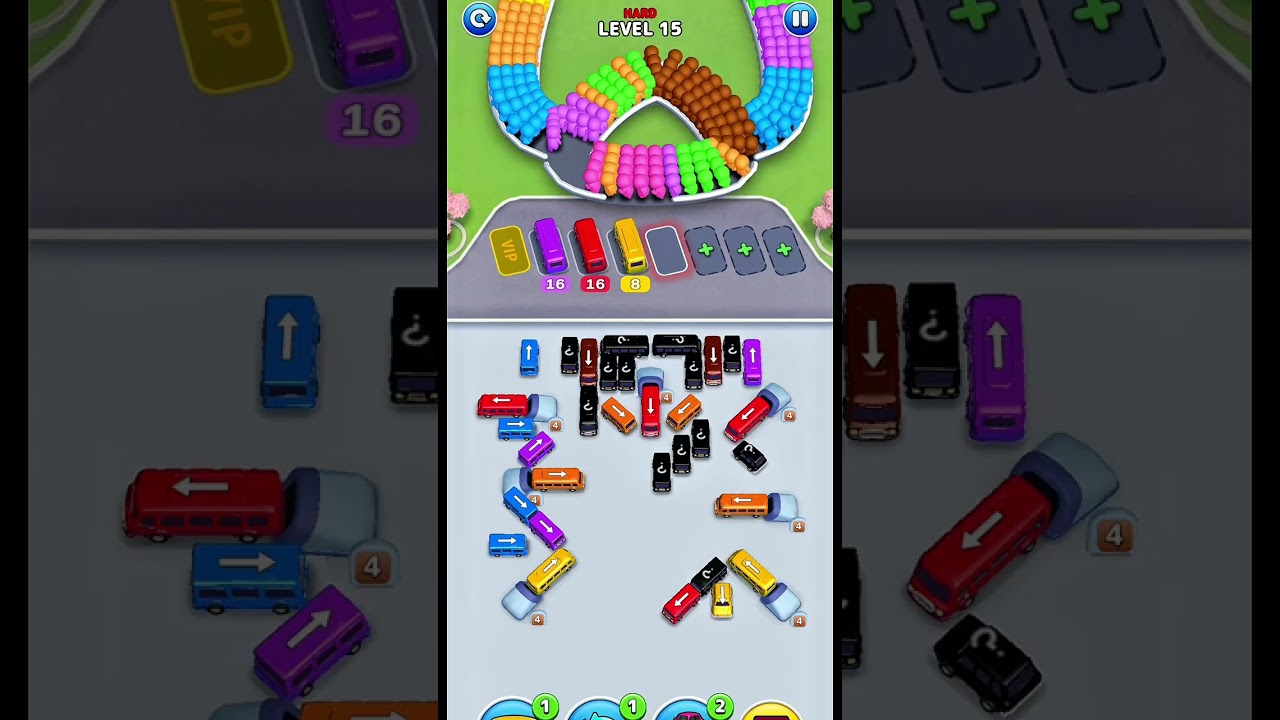
To beat the Hard difficulty puzzle on Level 15 in Bus Traffic Fever!, prioritize passenger queue matching over opening random paths. The board features tightly packed parking rows and a strict boarding bay limit. Sending an idle or unmatchable vehicle into the dock causes immediate gridlock. Focus on unblocked perimeter buses that directly match the leading passenger group, keep at least one dock slot open for vehicle cycling, and untangle interior vehicles through deliberate two-step chains.
Step-by-Step Opening Sequence
The opening moves dictate whether you can sustain vehicle flow or quickly fail the level. Outer perimeter buses facing unobstructed exit lanes must only be dispatched if their color corresponds with the front of the passenger queue.
- Check the front two color groups in the passenger queue before touching any vehicle.
- Locate an unblocked bus on the perimeter whose color matches the immediate front group.
- Tap that bus to route it into the boarding dock.
- Let the vehicle fill to capacity and depart to keep the dock clear.
- Recheck the updated passenger queue and verify if the vacated perimeter spot opened a lane for an adjacent vehicle.
Boarding Dock Management Rules
A run ends in failure when all dock slots are occupied by buses waiting for passengers who are trapped behind different colors in the queue. Passengers board strictly in first-in, first-out order. If a passenger at the front cannot board any docked bus, the entire line halts.
| Grid Scenario | Action | Dock Risk | Primary Objective |
|---|---|---|---|
| Queue front matches an open perimeter bus | Dispatch bus immediately | Low | Complete an instant departure and keep bays cycling |
| Front passenger blocked by another color | Leave matching bus in the lot | Medium | Avoid stranding a half-empty bus in a dock bay |
| Dock capacity reduced to one open slot | Route only buses that leave immediately | Critical | Maintain a free slot to prevent irreversible lockouts |
| Deep blocker holds a critical color bus | Move blocker only with two slots free | High | Sacrifice an open bay temporarily to unblock inner lanes |
Unlocking Interior Multi-Bus Chains
Once perimeter options are exhausted, you must clear interior gridlocks. Many center buses face vertical lanes but are blocked horizontally by other vehicles. Moving a blocker into the dock is only safe if it either boards immediate passengers or directly enables a trapped bus behind it to board the next passenger group.
Before moving an interior vehicle, trace its directional dependencies:
- Identify the blocker and the blocked: Locate which vehicle's exit lane becomes clear the moment the front vehicle moves.
- Match the passenger sequence: Confirm that moving the first vehicle aligns with the front passenger group, and the vehicle behind it matches the passengers queued immediately behind them.
- Execute the combo: Dispatch the forward vehicle to board and exit, then route the newly freed transport behind it into the vacated bay.
Common Failure Points to Avoid
- Dispatching partial-capacity buses: If a bus holds four passengers but only two matching passengers appear at the front of the queue, sending it to the dock leaves it stranded until the remaining passengers appear. Only dispatch partial-capacity matches when you have surplus open dock bays.
- Over-focusing on a single corner: Spending multiple moves to dig out a deeply trapped vehicle often wastes dock space. Scan both flanks of the parking lot to check if an opposite perimeter bus already matches the current passenger group.
- Filling the final dock slot prematurely: Never fill your last available bay with a vehicle that cannot depart immediately. Losing that final buffer prevents vehicle rotation and ends the puzzle.

Free Bus Traffic Fever! Codes
Current active codes and how to redeem them.

Michael Smith
Michael covers live-service games, events, reward systems, and efficient daily routines, turning frequent updates into clear actions for players.
COMMUNITY
Player Comments
77 players commented on this guide.
The explanation is clear, especially for beginners.
I wish I had read this before upgrading the wrong thing.
Good guide for Bus Traffic Fever! players. The strategy part was useful.
This guide answered the exact question I had.